Inbound Call Center Services: How to Scale Support in 2026

Inbound call centre services

Customer expectations have changed dramatically in the last few years. Today’s customers expect fast responses, consistent support across channels, and personalized service every time they interact with a brand. For growing businesses, meeting these expectations internally can quickly become expensive and operationally overwhelming.

According to Microsoft’s Global State of Customer Service research, organizations that invest in omnichannel support, automation, and AI-driven service tools consistently improve customer satisfaction, loyalty, and resolution speed. Microsoft Global State of Customer Service Report. This highlights how critical scalable and well-structured support systems have become for modern businesses.

That is why more companies now choose to outsource inbound call center services to improve responsiveness, reduce operational costs, and scale customer support without increasing internal overhead.

If your business needs scalable inbound call center support, contact the experts at wowcustomersupport today and discover how professional inbound call handling can improve customer experience, response efficiency, and business growth.

What Are Inbound Call Center Services?

Inbound call center services refer to customer support systems where agents handle incoming calls from customers. These services focus on:

  • Customer Inquiries
  • Order Support
  • Technical Assistance
  • Complaint Handling
  • Billing Questions
  • Product Support

Unlike outbound operations, inbound support is reactive and customer-driven.

Businesses use inbound call centers to ensure customers always have access to fast and reliable support.

Inbound vs Outbound Call Centers

Inbound Call Centers

Inbound centers handle:

  • Customer Inquiries
  • Support Requests
  • Order Tracking
  • Issue Resolution

They are focused on service quality and customer satisfaction.

Outbound Call Centers

Outbound centers focus on:

  • Sales Calls
  • Lead Generation
  • Surveys
  • Marketing Outreach

Both models serve different business goals, but inbound is essential for retention and long-term customer loyalty.

Types of Call Center Services

  • Customer Support Services: Handle general customer queries and issue resolution.
  • Technical Support Services: Assist with product or service troubleshooting.
  • Order and Billing Support: Manage payments, refunds, and order tracking.
  • Multichannel Contact Support: This includes managing many channels at a time, like phone, email, chat, and social media. Modern inbound systems are increasingly omnichannel.

Scalable Support Model for Growing Businesses

A scalable inbound support system ensures businesses can handle increasing customer demand without compromising service quality.

Key components include the following:

  • Flexible staffing models
  • Cloud-based call routing
  • Automated ticketing systems
  • CRM integration
  • Performance tracking dashboards

Scalability is especially important for ecommerce, SaaS, and service-based companies experiencing rapid growth.

Enterprise examples demonstrate the impact of structured support systems. Amazon uses advanced inbound support frameworks, including centralized routing, AI-assisted workflows, and omnichannel customer service systems, to manage millions of customer interactions efficiently. This shows how structured inbound operations directly support large-scale business growth.

ROI of Inbound Customer Service Outsourcing

Cost Efficiency

Outsourcing call services reduces:

  • Hiring costs
  • Training expenses
  • Infrastructure investment

Faster Response Times

Dedicated teams improve:

  • First response time
  • Resolution speed
  • Customer satisfaction

Higher Retention Rates

Better support leads to:

  • Repeat purchases
  • Reduced churn
  • Stronger brand loyalty

Operational Flexibility

Businesses can scale support up or down based on demand.

AI and Automation for Faster Scaling

Modern inbound call center services use AI to improve efficiency.

AI-Powered Features

  • Automated call routing
  • Chatbots for first-level support
  • Sentiment analysis
  • Real-time transcription
  • Predictive support workflows

Automation Benefits

  • Reduced agent workload
  • Faster resolution times
  • Improved accuracy
  • 24/7 availability

AI does not replace agents but enhances productivity.

Industry-Specific Use Cases

Inbound call center models adapt based on industry requirements. In the following industries, companies use inbound call center services for various operations, as mentioned.

  • Ecommerce: Order tracking, returns handling, and payment support
  • Healthcare: Appointment scheduling, patient queries, and insurance verification
  • SaaS: Technical troubleshooting, onboarding support, and subscription management
  • Finance: Transaction support, account queries, and fraud assistance

Risk-Free Scaling with Compliance and Quality Control

Scaling support requires strong operational governance.

Quality Monitoring

Includes:

  • Call Audits
  • Performance Scoring
  • Customer Feedback Tracking

Compliance Management

Ensures adherence to:

  • Data Privacy Laws
  • Industry Regulations
  • Security Protocols

Workforce Training

Agents require continuous training for:

  • Product Knowledge
  • Communication Skills
  • Escalation Handling

Best Practices for Inbound Call Center Operations

  • Define Clear KPIs and track them: Some important KPIs are first call resolution, average handling time, customer satisfaction score, and response time
  • Implement CRM Integration: CRM systems ensure unified customer data, faster issue resolution, and personalized support.
  • Use Omnichannel Support: Customers expect seamless communication across channels.
  • Continuously Optimize Workflows: Regularly review call patterns, ticket volume, and agent performance for improvements.

When selecting a provider, evaluate:

  • Experience and Expertise: Look for proven industry experience.
  • Technology Stack: Ensure the use of modern technologies with cloud systems, AI tools, and CRM integration.
  • Scalability: The provider must handle business growth.
  • Reporting Transparency: Clear dashboards and performance reporting are essential.

Pricing Models Explained

  • Per-Agent Pricing: Fixed monthly cost per support agent.
  • Per-Call Pricing: Charges based on call volume.
  • Hybrid Models: A combination of fixed and usage-based pricing.

Generally, the cost variation depends on:

  • complexity of support
  • industry requirements
  • service level agreements

Conclusion

Inbound call center services are no longer just a support function. They are a strategic growth driver that directly impacts customer retention, brand reputation, and operational efficiency.

By leveraging inbound customer service outsourcing, businesses can scale faster, reduce costs, and improve customer satisfaction without increasing internal workload.

Whether you are a startup or an enterprise, structured inbound support systems ensure your customers always receive fast, consistent, and high-quality service.

If your business needs scalable call center services, get expert help from the professionals at Wow Customer Support. Book a consultation and discuss customized call center solutions designed to improve customer support efficiency, response times, and long-term operational scalability.

FAQs About Inbound Call Center Services

1. What industries benefit most from inbound call center services?

Industries such as ecommerce, healthcare, SaaS, finance, and logistics benefit the most because they handle high volumes of customer inquiries that require fast and accurate resolution.

2. Can inbound call centers support seasonal spikes in customer demand?

Yes. Most inbound call center providers offer scalable staffing models that allow businesses to increase or reduce support capacity during peak seasons without long-term hiring commitments.

3. Do inbound call centers operate 24/7?

Many providers offer 24/7 support depending on the service agreement. This ensures customers in different time zones can always access assistance when needed.

4. What tools are commonly used in inbound call centers?

Inbound centers typically use CRM systems, ticketing platforms, call routing software, AI chat systems, and analytics dashboards to manage customer interactions efficiently.

5. How do inbound call centers maintain service quality?

Quality is maintained through call monitoring, agent training programs, performance KPIs, and regular feedback analysis to ensure consistent customer experience standards.
Live Chat Best Practices: 10+ Ways to Improve Customer Support

A customer stuck at checkout or confused about a return policy will not wait long for an answer. If live chat is slow, robotic, or disconnected from the rest of the support system, the customer either abandons the purchase or ends up more frustrated than when they started. Simply having a chat widget on the website does not solve this. The businesses that see real gains from live chat are the ones that treat it as a discipline, not a feature.

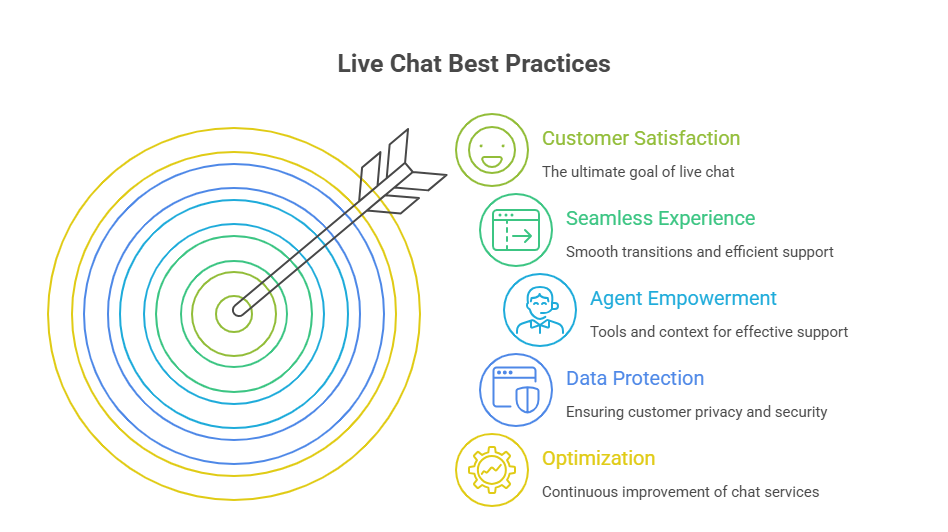
This article breaks down what separates functional live chat from live chat that actually improves satisfaction, retention, and revenue. The practices below fall into four connected areas: how chat is set up and staffed, how agents are trained and supported, how chat is used to support sales without becoming pushy, and how teams measure and refine performance over time. Getting all four right is what turns live chat into a dependable part of the customer experience rather than a box checked on a features list.

Why Live Chat Best Practices Matter

Customers who get fast, accurate help through chat tend to rate their overall experience higher, and that satisfaction carries into how they perceive the brand elsewhere. Response speed matters because chat is inherently a real-time channel; a delayed reply defeats the purpose of offering it. Businesses that handle chat well also see it reflected in retention, since customers who feel supported are less likely to churn after a bad experience.

Chat also has a direct line to revenue. Agents who can answer product questions or handle objections in the moment influence purchase decisions that would otherwise stall. On the internal side, well-run chat operations improve agent productivity by cutting down repetitive lookups, and that efficiency lowers the cost per resolved conversation compared to phone or email support.

Deploy 24/7 live chat services for your business.

Book a Call

10 Live Chat Best Practices

The practices below cover the operational, technical, and human factors that determine whether live chat performs well or simply exists as a checkbox feature.

1. Place Live Chat Where Customers Need It Most

Chat should not be a single floating icon that appears everywhere and nowhere in particular. It works best when placed with intent. Product and pricing pages benefit from chat because these are moments of comparison and hesitation, where a quick answer can prevent a customer from leaving to research elsewhere. Checkout pages and other high-intent moments deserve chat access too, since friction at this stage directly threatens a sale.

Support and help center pages need chat as a fallback when self-service articles do not fully answer the question. Proactive chat triggers, such as a message appearing after a visitor spends extended time on a page without acting, can also open a conversation before the customer decides to leave. The goal is coverage where hesitation is likely, not chat for the sake of having it everywhere.

2. Set Clear Response Expectations

Uncertainty is often more frustrating to customers than a wait itself. Publishing business hours prevents customers from expecting a live response when no agent is available. Showing estimated wait times, even roughly, helps customers decide whether to stay in the queue or try another channel. Internally, teams should define response-time targets for first reply and for resolution, since these targets shape staffing and routing decisions.

When live chat support is offline, a clear after-hours message with alternative contact options, such as email or a callback request, keeps the interaction from feeling like a dead end. Setting these expectations upfront, rather than leaving customers guessing, aligns what the business promises with what it can realistically deliver, which is the foundation of a dependable service-level standard.

3. Respond Quickly With Personalized Support

First response time is one of the most visible measures of chat quality, and customers notice when it slips. Speed alone is not enough, though. Using the customer's name and referencing relevant context, such as an order in progress or a page they were viewing, signals that the conversation is not starting from zero. Access to purchase and prior interaction history lets agents avoid asking customers to repeat information they have already provided elsewhere.

Urgent conversations, such as a payment failure or a shipping issue tied to a deadline, should be prioritized over routine questions. None of this works if responses sound scripted. Personalized, human phrasing, even when using templated starting points, makes the difference between a transaction and a genuinely helpful exchange.

4. Collect the Right Information Upfront

A short intake form before the chat begins can route the conversation to the right agent and reduce back-and-forth. Useful fields typically include the customer's name, relevant order or account details, and a general issue category so the conversation starts with context rather than a blank slate. Capturing basic customer context, such as which page they were on, adds further clarity without requiring the customer to explain it manually.

The risk is overcorrecting. Long forms with too many required fields discourage customers from starting the chat at all, especially on mobile devices. The right approach asks for only what is necessary to resolve the issue efficiently, leaving deeper details to be gathered conversationally once an agent is engaged.

5. Train Agents and Maintain a Consistent Brand Voice

Agents need solid product knowledge to answer questions accurately without escalating routine issues. Beyond knowledge, chat etiquette matters: clear phrasing, appropriate pacing, and knowing when to ask a clarifying question instead of guessing. Tone and empathy are harder to standardize but can be taught through examples of what strong responses to frustrated customers look like.

Role-playing difficult scenarios, such as an angry customer disputing a charge, prepares agents for situations that scripts alone cannot cover. Canned responses are useful for efficiency, but they need to be edited with personalization rather than pasted verbatim, since customers can tell when they are reading a generic template. Ongoing coaching, not a one-time onboarding session, is what keeps brand voice consistent as the team grows.
Live Chat Best Practices

6. Make Transfers, Escalations, and AI Handoffs Seamless

Every live chat system eventually needs to move a conversation from one agent to another, or from a bot to a human. Clear escalation triggers, such as a customer explicitly asking for a person or a bot failing to resolve an issue after a set number of exchanges, prevent conversations from stalling. Skill-based routing ensures the right specialist, rather than the next available agent, picks up complex issues like billing disputes or technical troubleshooting.

AI-to-human handoffs deserve particular attention, since a poorly executed transition is one of the fastest ways to frustrate a customer. The full conversation history and any context the bot gathered should transfer automatically. When this works correctly, the customer never has to repeat their issue from the beginning, which is often the single biggest complaint about escalated support interactions.

7. Give Agents the Context and Tools They Need

Agents cannot deliver personalized, efficient support without the right systems behind them. CRM integration surfaces customer history and account status directly inside the chat window. A connected knowledge base lets agents pull accurate answers quickly instead of relying on memory or asking a colleague. Order management system access is essential for ecommerce support specifically, since a large share of chat volume involves order status, shipping, or returns.

Unified customer profiles that combine chat, email, and phone interactions prevent agents from working with a partial picture. Cross-channel conversation history matters just as much, since customers frequently switch channels mid-issue and expect the new agent to already understand what happened before.

8. Use Live Chat for Sales Without Being Intrusive

Chat can support revenue when it identifies genuine buying signals, such as a visitor comparing product pages or lingering on a pricing tier, and offers help at that moment. Product recommendations delivered through chat feel more natural than a pop-up because they respond to something the customer is actively doing.

Agents trained to handle objections, such as price concerns or comparison questions, can resolve hesitation that would otherwise end in an abandoned cart. Proactive chat triggered by cart abandonment behavior can recover sales that would be lost entirely without intervention. The line to watch is intrusiveness. Chat that interrupts browsing too aggressively or pushes products before a customer has shown interest tends to damage trust rather than build it.

9. Protect Customer Data and Make Chat Accessible

Chat often involves sensitive information, from account details to payment references, which makes security a non-negotiable requirement. Authentication and access controls should limit who can view account-specific data within a conversation. Encryption protects personally identifiable information both in transit and at rest, and any payment-related exchange should route through a secure, compliant process rather than being typed directly into open chat.

Accessibility deserves equal attention. A mobile-friendly chat interface is essential given how much support traffic now originates from phones, and keyboard navigation support ensures the widget works for customers using assistive technology. Multilingual support extends accessibility further, allowing chat to serve a broader customer base without forcing everyone into a single language experience.

10. Measure, Learn, and Continuously Optimize

Live chat performance is not something to set up once and leave alone. Monitoring customer sentiment during conversations can flag frustration before it turns into a formal complaint or a lost customer. Post-chat CSAT surveys and open feedback give a direct read on how customers experienced the interaction, while periodic reviews of actual conversation transcripts reveal patterns that aggregate metrics miss.

A/B testing widget placement, greeting copy, and proactive trigger timing helps teams find what actually converts rather than relying on assumptions. For businesses using AI in live chat, tracking bot performance separately from human agent performance clarifies where automation helps and where it creates friction. All of this feeds into staffing optimization, ensuring coverage matches actual demand patterns instead of guesswork.

Frequently Asked Questions

1. What are the most important live chat best practices?

Fast, accurate first responses combined with proper context are the foundation. Beyond that, clear escalation paths, agent training, and ongoing measurement determine whether chat performance holds up as volume grows.

2. What is a good live chat response time?

There is no single universal benchmark, since expectations vary by industry and customer type, but chat is generally expected to be faster than email. Businesses should set an internal target for first response and track it consistently rather than relying on a generic industry figure.

3. How can businesses improve live chat customer service?

Improvement usually comes from a combination of better agent training, tighter integration between chat and other customer systems, clearer escalation processes, and regular review of past conversations to identify recurring gaps.

4. Should live chat use AI or human agents?

Most effective setups use both. AI handles routine, repetitive questions and initial triage, while human agents manage complex, sensitive, or emotionally charged conversations. The handoff between the two needs to be seamless for this combination to work well.

5. How many chats can one agent handle?

This depends on the complexity of the issues being handled and the tools available to the agent. Simple, well-supported queries allow for higher concurrency than technical or emotionally sensitive conversations, so a single fixed number rarely applies across use cases.

6. What KPIs should live chat teams track?

Common metrics include first response time, resolution time, CSAT, chat volume by channel entry point, and agent-level performance. Teams using AI should also separate bot resolution rates from human-assisted outcomes.

7. How can live chat increase conversions?

Chat increases conversions primarily by resolving hesitation at the moment it occurs, whether that is a product question, a pricing concern, or an objection at checkout. Proactive engagement based on browsing behavior can also recover visitors who would otherwise leave without acting.

8. What should agents never say in live chat?

Agents should avoid dismissive or vague responses such as telling a customer to simply check the website again, and should avoid making commitments, like guaranteed refund timelines, that the business cannot reliably keep. Clear, honest communication holds up better than reassurance that turns out to be inaccurate.

Conclusion

Live chat service works best when speed, personalization, context, and human judgment operate together rather than in isolation. A fast reply without the right account context still frustrates customers, and a well-trained agent without proper tools still struggles to resolve issues efficiently. Treating chat as a full system, supported by clear processes and consistent measurement, produces better outcomes than optimizing the widget alone.

Businesses that want to strengthen this system without building it entirely in-house often turn to experienced outsourcing partners. When the underlying data is reliable, live chat agents can resolve issues faster and with fewer errors, which is often the difference customers actually notice.

How to Reduce Call Abandonment Rates: 10 Proven Strategies to Improve Customer Experience

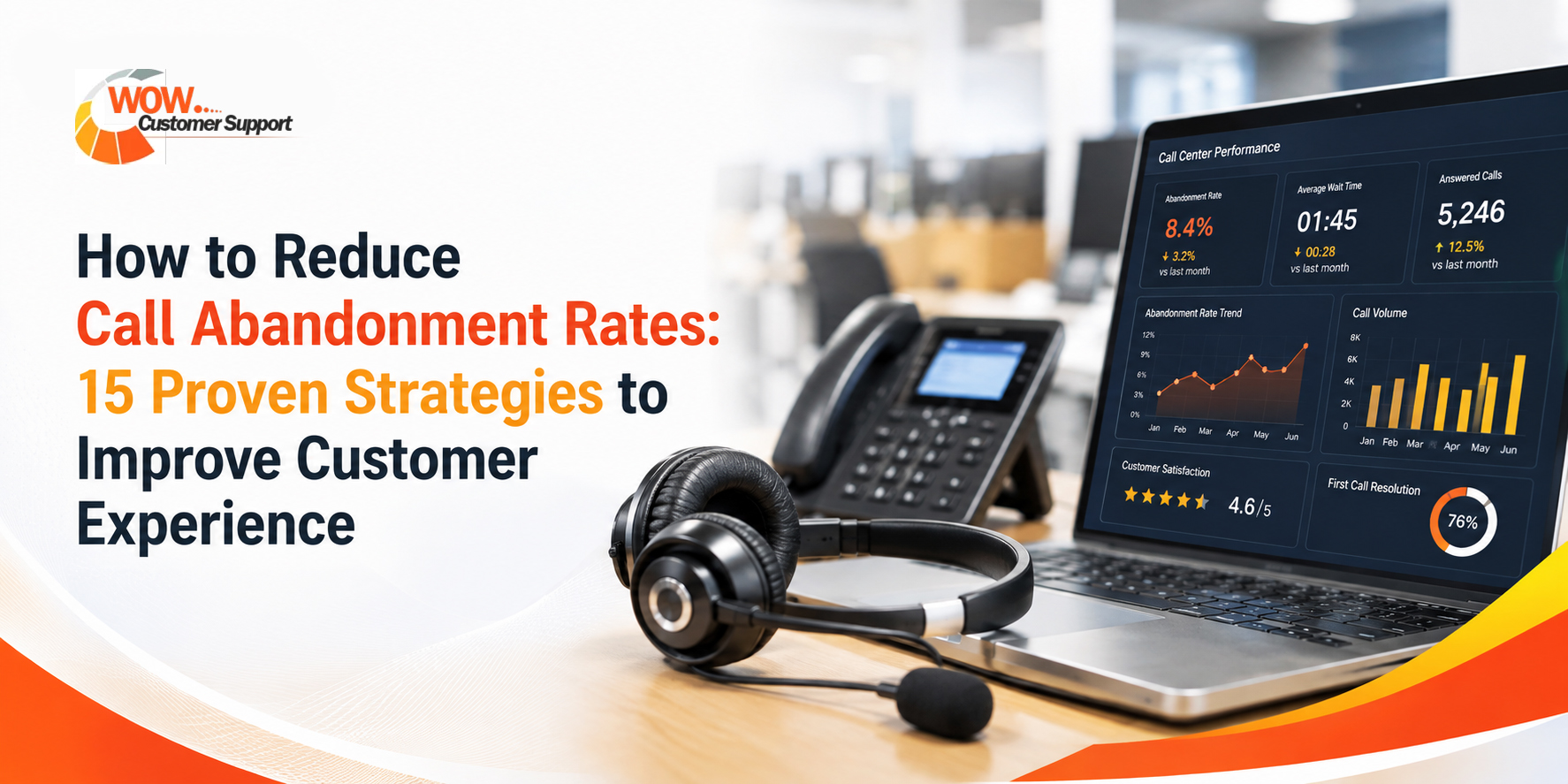
How to Reduce Call Abandonment Rates

A caller dials in, waits, and hangs up before anyone answers. That single moment is a lost sale, a delayed support resolution, or a customer who quietly switches to a competitor. Call abandonment is one of the clearest signals a contact center has that something in the queue experience isn't working.

The rate itself matters less than what it reveals. A high abandonment rate points to staffing gaps, clunky IVR menus, or wait times customers were never prepared for. Left unaddressed, it shows up downstream in lower CSAT scores, higher repeat-call volume, and rising service costs as frustrated customers call back again and again for the same issue.

This article covers what counts as a reasonable abandonment rate across industries, the most common reasons customers give up on a call, ten practical ways to bring the rate down, and how to think about the cost of doing nothing.

What is a Good Call Abandonment Rate?

There isn't a single number every contact center should chase. Abandonment rate is a downstream effect of service level and average speed to answer, not a metric you can manage directly. A center running 5% abandonment at a strong service level is in good shape. A center running the same 5% while callers wait far longer than the published service level is masking a deeper staffing or forecasting problem.

That said, benchmark ranges are useful for orienting a team. Most contact center research puts the overall cross-industry average somewhere between 5% and 8%, with high-performing operations pushing below 3%. Centers that rely heavily on IVR menus or handle seasonal spikes, such as telecom and utilities, often run higher, sometimes into the teens during peak periods. Centers using AI-assisted forecasting and callback options increasingly report rates under 2%.

Reduce your call abandonment rate with expert customer support

Book a call with us

The more useful exercise for most operations leaders is pairing abandonment rate with service level and average speed to answer. If abandonment is climbing but service level is holding steady, the problem is likely IVR design or self-service gaps rather than staffing. If both are slipping together, the root cause is almost always a forecasting or scheduling shortfall.

Why Customers Abandon Calls

Most abandonment traces back to a small set of causes, and they tend to compound each other.

Long wait times are the most direct driver. Research consistently shows the bulk of hang-ups happen inside the first 60 seconds of hold time, with the majority of remaining abandoners gone within five minutes. Once a caller passes their personal patience threshold, no amount of hold music changes the outcome.

Poor IVR design adds friction before a caller even reaches the queue. Menus with too many layers, unclear options, or paths that force callers to repeat themselves push people to give up out of irritation rather than wait time alone.

No callback option removes the one thing that keeps an impatient caller in line: control over their own time. Without it, staying on hold is the only way to keep a place in the queue, and many callers simply won't.

Lack of self-service means every routine question, like a balance check or order status update, has to go through a live agent. That inflates queue volume for issues that never needed a human in the first place.

Unclear wait expectations compound all of the above. A caller who knows they're fifth in line and expects a four-minute wait behaves very differently from one staring into silence with no sense of how long the call will take.

10 Proven Ways to Reduce Call Abandonment

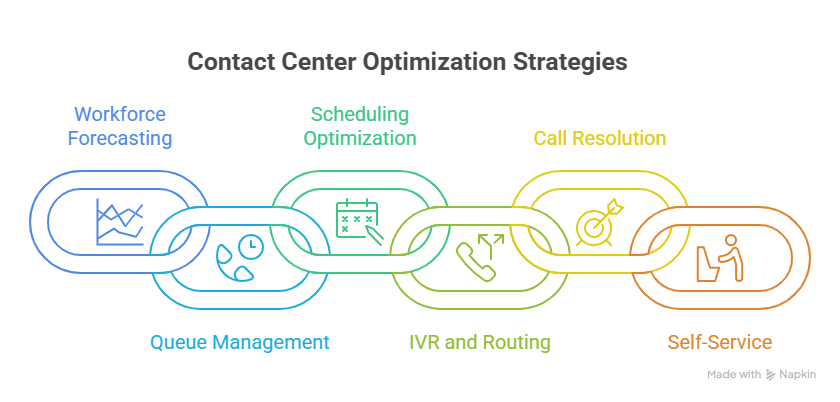
None of these strategies work in isolation. The centers that see the biggest improvement in abandonment rate typically combine two or three, usually starting with forecasting accuracy and a callback option, since those two address both the staffing gap and the customer experience problem at once.

Improve workforce forecasting

Using historical volume patterns, seasonality, and marketing calendars to predict call volume, rather than relying on flat averages, closes the staffing gaps that cause abandonment to spike during predictable peaks. This is usually the foundation everything else builds on, since even the best IVR or callback system can't compensate for a queue that's short-staffed at the wrong hour.

Offer virtual queue callbacks

Letting callers keep their place in line and receive a callback instead of waiting on hold addresses the friction point directly. Vendor-reported studies put the reduction in abandonment from callback adoption in the 30% to 38% range, and roughly three in four callers say they prefer a callback to waiting on hold. For most centers, this is the single highest-leverage change on this list.

Optimize scheduling

Aligning agent shifts to actual intraday call patterns, rather than even eight-hour blocks, closes the gap between forecasted demand and the agents actually available at the specific hours abandonment tends to spike. Forecasting tells you what volume to expect; scheduling determines whether the right people are on the phones when that volume arrives.

Simplify IVR menus

Cutting unnecessary layers, using plain language, and routing callers to the right queue in fewer steps reduces the chances a frustrated caller hangs up before ever reaching a live queue. Every extra menu layer is another opportunity for a caller to give up.

Use skills-based routing

Matching callers to the agent best equipped to resolve their specific issue on the first attempt shortens handle time and reduces the repeat calls that add unnecessary volume to the queue. A caller routed to the wrong specialist the first time often ends up calling back, which compounds the very abandonment problem the team is trying to fix.

Reduce transfers

Giving frontline agents broader training or better routing logic so fewer calls need to bounce between departments matters because each transfer effectively resets the caller's wait and increases the odds of frustration-driven abandonment later in the call.

Improve first call resolution (FCR)

Equipping agents with better tools, knowledge bases, and authority to resolve issues without escalation raises FCR, and industry leaders target rates of 70% to 80%. Higher first call resolution correlates directly with lower repeat-call volume, which in turn keeps queues shorter and abandonment lower.

Deploy AI-powered forecasting

Applying machine learning models to refine volume predictions in near real time, adjusting for anomalies traditional forecasting misses, pushes accuracy further than historical averages alone can reach. Contact centers using AI-assisted forecasting and routing increasingly report abandonment rates under 2%.

Expand self-service options

Moving routine, low-complexity questions to IVR self-service, chatbots, or account portals reduces the volume of calls that reach a live queue in the first place. This eases pressure during peak periods without adding headcount, since a portion of demand never enters the queue at all.

Communicate wait times clearly

Telling callers their queue position or estimated wait time as soon as they enter the queue reduces the anxiety that drives early hang-ups. Callers who know what to expect are considerably more willing to stay on the line than those left waiting in silence.

Improving IVR design and adding a callback option tend to produce the fastest visible results, since both directly address the moment a caller decides whether to stay or go. Forecasting and scheduling improvements take longer to show up in the numbers but address the structural staffing gap that causes abandonment to recur.

Contact center Optimization strategies

The Business Cost of High Call Abandonment

Every abandoned call carries a cost that extends well past the missed interaction itself.

  • Lost revenue: It is the most immediate impact, particularly for sales and order-related lines. Estimates for the cost of a single missed call range from roughly $200 to $1,200 depending on industry, and small to mid-sized businesses are estimated to lose well over $100,000 a year in aggregate to missed calls.
  • Reduced CSAT: It follows almost automatically. A customer who hangs up after a long wait, only to call back later, starts their next interaction already frustrated, which drags down satisfaction scores even if the eventual resolution is fine.
  • Lower NPS: Wait-time frustration is one of the more common reasons customers cite when asked why they wouldn't recommend a brand, even when the product or service itself met expectations.
  • Customer churn: It becomes a real risk when abandonment is chronic rather than occasional. Customers who repeatedly can't reach support start looking for alternatives, particularly in categories where switching costs are low.

Frequently Asked Questions

1. What is a good abandonment rate?

Most benchmarks put a healthy range between 3% and 8%, with top-performing centers under 3%. The right target depends on your industry and, more importantly, on the service level behind the number.

2. How long will customers wait?

Patience varies, but most research shows the steepest drop-off happens within the first 60 seconds, with the large majority of remaining abandoners gone by the five-minute mark.

3. Does callback software help?

Yes. Offering a virtual queue callback consistently reduces abandonment, with vendor studies reporting reductions in the 30% to 38% range, largely because it removes the need to stay on hold to keep a place in line.

4. How do AI tools reduce abandonment?

AI-assisted forecasting improves the accuracy of staffing predictions, which closes the gap between expected and actual call volume. AI-powered routing and self-service can also resolve simple issues without ever reaching a live queue.

5. Which KPI should I improve first?

Start with service level and average speed to answer rather than abandonment rate itself. Abandonment is a lagging indicator; fixing the upstream metrics that drive it produces more durable results than chasing the abandonment number directly.

Conclusion

Reducing call abandonment comes down to closing two gaps: the gap between predicted and actual call volume, and the gap between what customers expect while waiting and what they actually experience. Forecasting, scheduling, and AI-assisted routing address the first. IVR simplification, callback options, and clear wait-time communication address the second.

None of these fixes are one-time projects. Call patterns shift with seasonality, marketing campaigns, and customer expectations, which means abandonment rate needs regular monitoring rather than an annual review. Centers that treat it as a continuous optimization loop, rather than a number to fix once and forget, tend to hold their gains over time.

Omnichannel Call Centers: Complete Guide to Unified Customer Support, AI, Benefits & Best Practices

Omnichannel Call Centers

Customer support has moved past the point where phone, email, and chat can operate as separate systems. A shopper who starts a return over chat and then calls to confirm a refund expects the agent on the phone to already know what happened in chat.

When that continuity breaks, resolution slows down and customer trust erodes. This is the operational problem an omnichannel call center is built to solve. This guide covers what omnichannel call centers are, how they function, the benefits they deliver, and how to evaluate and implement one.

What Is an Omnichannel Call Center?

An omnichannel call center is a customer support model that unifies voice, chat, email, SMS, and social media into a single system, with one customer profile and one conversation history behind every channel. Unlike traditional call centers built around phone queues, an omnichannel setup treats every channel as an entry point into the same ongoing conversation.

The core components are a unified customer data platform, cross-channel routing logic, an integrated agent desktop, and a CRM layer that keeps every interaction, regardless of channel, attached to the same customer record.

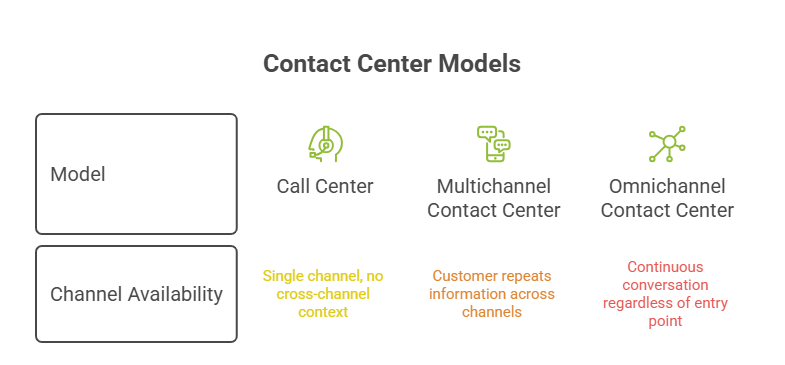
Omnichannel Call Center vs Contact Center vs Multichannel

These terms are often used interchangeably, which creates confusion during vendor evaluation.

Model

Channel Availability

Data Continuity

Customer Experience

Call Center Voice only N/A Single channel, no cross-channel context
Multichannel Contact Center Multiple channels offered Siloed per channel Customer repeats information across channels
Omnichannel Contact Center Multiple channels offered Unified across channels Continuous conversation regardless of entry point

Omnichannel Call Centers
The common misconception is that offering several channels automatically makes a center omnichannel. Without unified data behind those channels, it is still multichannel, and the customer experience reflects that gap.

How an Omnichannel Call Center Works

The system is built around a few connected functions:

  • Unified customer profile: Every interaction, past and present, is tied to a single record so agents see full context regardless of which channel a customer used.
  • Channel integration: Voice, chat, email, SMS, and social platforms feed into the same interaction layer instead of separate queues.
  • Intelligent routing: Conversations are directed based on customer history, agent skill set, and urgency rather than simple first-available logic.
  • CRM synchronization: Interaction data updates the CRM in real time, so sales, support, and operations teams work from the same information.
  • AI-powered assistance: Machine learning models support agents with suggested responses, summaries, and next-best-action prompts during live interactions.

Benefits of Omnichannel Call Centers

Organizations invest in omnichannel support not only to improve service quality but also to create more efficient, scalable, and customer-centric operations.

  • Improved customer experience: Maintaining continuity across multiple channels minimizes repetition and creates a smoother customer journey.
  • Faster resolution: Agents can access complete interaction histories, allowing them to solve problems more quickly and accurately.
  • Higher first-contact resolution: Fewer transfers, escalations, and callbacks are needed to resolve customer issues.
  • Increased agent productivity: A unified platform reduces the need to switch between tools and lowers administrative workloads.
  • Better personalization: Consolidated customer profiles enable agents to deliver more relevant and tailored support experiences.
  • Higher customer retention: Consistent and convenient support interactions strengthen customer loyalty and reduce churn.
  • Cost savings: Self-service tools and AI-assisted workflows help lower the cost of handling customer interactions over time.

Omnichannel Call Center Use Cases by Industry

Retail and ecommerce: Order status, returns, and exchange requests often move across chat, email, and phone within a single customer journey. Unified profiles let agents pick up mid-journey without asking the customer to repeat order details, which matters most during peak volume periods like holiday returns.

Telecom: Billing disputes, plan changes, and technical support frequently span self-service portals, chat, and voice. Omnichannel routing reduces the back-and-forth common in telecom support, where customers are often already frustrated before contacting the center.

How AI Is Transforming Omnichannel Call Centers

Speech analytics now processes voice interactions in real time, surfacing compliance issues or escalation risk before a call ends. Sentiment analysis extends this across text channels, flagging frustration signals in chat or email that a human reviewer might miss in high volume.

Automated summaries reduce after-call work by generating interaction notes automatically, and agent-assist tools suggest responses or relevant knowledge base articles mid-conversation, shortening resolution time without removing agent judgment from the interaction.

Best Practices for Implementing an Omnichannel Call Center

Define customer journeys across all channels before selecting technology, so the system is built around real behavior rather than assumptions. Centralize customer data into a single source of truth before adding new channels.

Integrate CRM and other business systems early rather than treating integration as a later phase. Train agents on cross-channel context, not just individual channel tools. Monitor KPIs from day one to catch routing or integration issues quickly. Continuously optimize based on interaction data rather than treating implementation as a one-time project.

Common Challenges and How to Overcome Them

  • Data silos: Legacy systems often store channel data separately; a unified customer data platform is typically required before true omnichannel routing is possible.
  • Legacy systems: Older infrastructure may lack API support; middleware or phased replacement is often necessary.
  • Agent adoption: New unified desktops change daily workflows; structured training reduces resistance.
  • Integration complexity: Connecting CRM, WMS, and support tools takes planning; prioritize high-impact integrations first.
  • Security and compliance: Unified data increases the surface area for risk; access controls and encryption need to scale with integration.
  • Scaling operations: Systems that work at low volume can break under peak load; load testing before major sales periods is essential.

KPIs to Measure Omnichannel Call Center Success

  • First Contact Resolution (FCR): Measures the percentage of customer issues resolved during the first interaction without requiring follow-up communication.
  • Average Handle Time (AHT): Tracks the average amount of time agents spend handling customer interactions across all channels.
  • Customer Satisfaction (CSAT): Evaluates how satisfied customers are with a specific interaction based on their direct feedback.
  • Net Promoter Score (NPS): Measures the likelihood that customers will recommend the company to others, providing insight into long-term loyalty.
  • Customer Effort Score (CES): Assesses how much effort customers must expend to resolve an issue or complete a task.
  • Agent Utilization: Calculates the proportion of an agent's working time spent on productive customer interactions and related activities.
  • SLA Compliance: Measures how consistently the organization meets its predefined response and resolution time targets.

How to Choose the Right Omnichannel Call Center Solution

Evaluate vendors against a short list of essentials: native support for all required channels, real integration capabilities with existing CRM and operational systems (not just API availability on paper), built-in AI features such as sentiment analysis and agent assist, and proven scalability under peak load.

Pricing models vary between per-agent and usage-based structures, so cost should be assessed against expected volume growth, not just current headcount. During vendor evaluation, request references from companies of similar scale and industry, since implementation complexity often depends more on existing systems than on the platform itself.

Conclusion

An omnichannel call center is defined less by the number of channels offered and more by whether those channels share one continuous view of the customer. That continuity is what drives faster resolution, higher first-contact resolution rates, and stronger retention. Choosing and implementing the right solution comes down to data unification, realistic integration planning, and KPIs tracked from the start rather than added later.

Frequently Asked Questions

1. What is an omnichannel call center?

An omnichannel call center unifies voice, chat, email, SMS, and social media into one system with a shared customer profile, so agents have full context regardless of which channel a customer uses.

2. Is omnichannel better than multichannel?

Omnichannel typically delivers a better customer experience because interaction data is unified. Multichannel offers similar channel variety but without shared context, which often means customers repeat information.

3. How does AI improve omnichannel support?

AI supports agents through real-time sentiment and speech analytics, automated call summaries, and next-best-action suggestions, reducing resolution time and administrative work.

4. What channels should an omnichannel call center support?

Most implementations cover voice, live chat, email, SMS, and at least one social channel, chosen based on where the customer base is actually active.

5. How long does implementation take?

Timelines vary by existing infrastructure, but most mid-market implementations take several months, from data unification through agent training and phased channel rollout.

6. What are the biggest challenges in migration?

Data silos from legacy systems and integration complexity with existing CRM or operational tools are the most common obstacles during migration.

7. What KPIs matter most?

First Contact Resolution and Customer Effort Score are strong early indicators of whether unification is actually improving the customer experience, alongside AHT and CSAT for operational tracking.

8. Which industries benefit the most?

Retail, ecommerce, and telecom see some of the clearest gains, since their support volume regularly spans multiple channels within a single customer issue.

Voice vs Chat vs Email Customer Support: Which Channel Is Best for Your Business?

Voice vs Chat vs Email Customer Support

Selecting the most effective communication channel is a foundational decision for any modern enterprise looking to optimize its user experience. When businesses offer channels that mismatch their audience's preferences, wait times increase and client satisfaction scores quickly drop. Delivering a modern, seamless communication setup is essential for maintaining brand loyalty in a highly competitive digital marketplace.

Many growing brands struggle to balance the unique infrastructure demands of multiple communication pipelines simultaneously. Choosing to collaborate with specialized vendor networks for outsourced customer support services can solve these staffing and technology challenges. This comprehensive comparison guide will analyze the strengths of voice, chat, and email, helping you build a highly efficient and balanced support ecosystem.

Why Choosing the Right Support Channel Matters

The support channels you offer directly impact your retention rates, operating budgets, and internal team productivity levels. Failing to align your communication methods with customer expectations can lead to high abandonment rates and costly operational inefficiencies. Providing the right mix of contact options ensures your consumers can reach you exactly when and how they prefer.

Because target audiences have diverse technical skills and varying levels of urgency, a single communication method will never satisfy everyone. For instance, older demographics might prefer talking directly to a person, while younger users lean heavily toward instant messaging tools. Analyzing these customer behaviors allows your leadership team to invest in the software and staffing configurations that deliver the best returns.

Deliver Customer Support on Every Channel

Scale Customer Support

Voice vs Chat vs Email at a Glance

Comparing your support channel options side by side helps highlight the unique advantages and operational limitations of each method. This high-level comparison allows you to make informed decisions about your communication budget and team requirements. The following table highlights the key performance attributes of each channel to guide your strategy.

Channel Attribute Voice Support Live Chat Support Email Support
Response Speed Fast (Near-instant) Very Fast (Instant) Slow (Asynchronous)
Operational Cost High (1-to-1 interactions) Low (High concurrency) Moderate (Ticket-based)
Primary Use Cases Urgent or complex issues Simple questions, sales Documentation, non-urgent
Consumer Expectation Empathetic human touch Quick and convenient help Thorough and detailed replies
Scalability Hard (Requires more staff) Easy (Multi-chat handling) Easy (Asynchronous queue)
AI Suitability Emerging (Voice bots) Excellent (Smart chatbots) Excellent (Auto-templates)

Choosing to leverage professional outsourced customer support services makes managing these diverse channels much easier. External service providers can instantly deploy experienced specialists across all three channels to keep your response times low.

Voice Support

Traditional phone communication remains a highly trusted and vital channel for resolving sensitive customer issues. Speaking directly with an empathetic representative provides customers with immediate reassurance during stressful technical or financial crises. This human connection is incredibly difficult to replicate through digital text screens alone.

Best use cases

Phone lines are ideal for resolving high-stakes scenarios such as account security breaches or complex billing disputes. They also work best when customers are feeling highly frustrated and need an immediate, compassionate response.

Pros

  • Provides a strong personal touch that builds deep customer trust and brand loyalty.
  • Allows agents to pick up on verbal cues and tone, making it easier to de-escalate emotional situations.
  • Speeds up resolution times for complex, multi-step problems that would require dozens of text messages.

Cons

  • Requires significant operational budgets to cover phone line infrastructure and dedicated staffing.
  • Difficult to scale quickly during sudden traffic spikes because agents can only handle one call at a time.
  • Customers often experience long hold times when call volumes exceed your active agent capacity.

When AI voice agents work well

AI-powered voice assistants excel at handling high volumes of routine inquiries like basic order tracking or appointment scheduling. These automated systems can also verify customer identities using natural language processing before routing the call to a human agent.

Live Chat Support

Modern web messaging bridges the gap between instant communication and multitasking efficiency. This digital channel allows your customers to receive quick assistance without interrupting their browsing or purchasing activities. It has become a highly popular option for modern shoppers who expect immediate resolutions.

Best use cases

Live chat is highly effective for assisting shoppers during the online checkout process and answering quick product questions. It is also great for walking users through simple account setups and password reset steps.

Pros

  • Enables agents to manage multiple active customer conversations simultaneously, lowering overall operational costs.
  • Significantly reduces customer wait times by delivering near-instant initial response greetings.
  • Allows easy sharing of links, screenshots, and visual files to guide users through technical steps.

Cons

  • Not ideal for highly complex or detailed technical problems that require deep system troubleshooting.
  • Requires constant, real-time monitoring to ensure customers are not left waiting in empty chat windows.
  • Can feel cold and impersonal if agents rely too heavily on rigid, pre-written text scripts.

When AI chatbots add value

AI chatbots are highly valuable for answering repetitive, frequently asked questions around the clock without human delay. They can also gather basic customer context and pre-qualify support requests before escalating the chat to a live representative.

Email Support

Asymmetrical email messaging remains a foundational element of any comprehensive, modern customer support strategy. This channel provides both your agents and your customers with the time needed to review complex information thoroughly. It is a reliable, non-urgent communication tool that does not require real-time presence.

Best use cases

Email is the preferred option for inquiries that require formal documentation, contract reviews, or detailed legal agreements. It is also best for non-urgent technical questions that require research or developer investigation.

Pros

  • Creates a permanent, easily searchable written record of all corporate promises and troubleshooting advice.
  • Allows agents to craft highly polished, accurate responses after consulting with internal technical teams.
  • Offers excellent scheduling flexibility since teams can manage incoming messages during lower-traffic shift hours.

Cons

  • Response times are naturally slower, which can cause frustration if the customer's issue is urgent.
  • Slower back-and-forth communication can delay final resolution times if multiple clarifications are needed.
  • Lacks the immediate human warmth and real-time empathy found in live voice or chat interactions.

When AI email automation makes sense

Automated email systems work well for instantly dispatching routine message confirmations and structured ticket updates. Smart AI filters can also read incoming text, suggest accurate reply templates to agents, or auto-archive simple spam messages.

Voice vs Chat vs Email: Side-by-Side Comparison

To build a world-class service department, you must understand how these three channels perform across key operational metrics. Analyzing these comparisons helps you allocate your staffing resources and technical budgets effectively.

  • Customer effort: Live chat and voice require very low customer effort, whereas email requires users to write out long descriptions.
  • First response time: Chat delivers the fastest response, phone lines require brief queue hold times, and email operates on longer hourly intervals.
  • Resolution speed: Phone calls resolve complex issues quickly, chat handles simple issues instantly, and email is best for slow, methodical problems.
  • Documentation: Email automatically provides a perfect written trail, chat logs are easily saved, and voice requires call recording software.
  • Personalization: Voice offers the deepest personal connection, followed by tailored live chat, with email being the most formal.
  • Agent productivity: Chat agents are highly productive because they can multitask, followed by email queues, while voice agents can only handle one customer.
  • Cost per interaction: Voice is typically your most expensive channel, while email is moderate, and optimized live chat is the most cost-effective.
  • Automation potential: Chat and email offer massive automation opportunities, while voice automation is emerging but still requires human backup.

Deploying a balanced combination of these channels ensures your customer support department operates at peak efficiency. Many enterprises find that outsourcing these diverse channels keeps their internal overhead low while maximizing customer satisfaction.

Which Support Channel Fits Different Customer Scenarios?

An optimized helpdesk matches the inbound communication channel to the specific technical needs of the customer's scenario. Training your team to guide users toward the right channels prevents queue bottlenecks and resolves issues much faster.

  • Urgent complaints: Voice support is the best option because speaking directly with an agent de-escalates tension and guarantees an immediate solution.
  • Billing issues: Live chat or voice work best to verify payment details securely and correct simple transaction errors in real time.
  • Technical troubleshooting: Live chat allows customers to share screenshots instantly, making it easier to diagnose software glitches.
  • Product questions: Live chat provides fast, real-time answers that can help convert hesitant website visitors into buyers.
  • Returns and refunds: Email is highly effective for processing standard returns because it allows users to attach shipping labels and receipt photos.
  • Account changes: Voice verification is ideal to confirm a customer's identity securely before changing sensitive profile settings.
  • Complex documentation: Email is the clear choice when sharing detailed user manuals, complex contracts, or legal agreements.

Why an Omnichannel Strategy Delivers Better Results

Connecting your separate communication channels into a single, unified database creates a seamless and frictionless user experience. Modern consumers expect to switch from chat to voice without being forced to repeat their technical issues to a new representative. An integrated system ensures your customer files, purchase histories, and past conversations travel with the user.

Managing this advanced level of technical integration requires significant software investments and continuous agent training. Partnering with professional networks that provide outsourced customer support services gives you immediate access to pre-configured omnichannel systems. This collaborative approach allows you to leverage advanced AI routing and human empathy to protect your brand reputation.

Frequently Asked Questions

Is live chat better than phone support?

Live chat is generally better for handling quick, routine inquiries because it offers instant answers and allows agents to multitask. However, phone support is still superior for resolving complex, emotional, or high-stakes issues that require human empathy and deep discussion. The best option depends entirely on the complexity of your product and the preferences of your target audience.

When should customers use email support?

Customers should use email support when their issues are not time-sensitive and require sharing documents, receipts, or technical screenshots. It is also the best option when customers want to maintain a formal, written record of their conversation with a business. Email allows both parties to review complex details thoroughly before sending a reply.

Which channel has the highest customer satisfaction?

Voice and live chat channels consistently score the highest in customer satisfaction ratings due to their real-time nature and rapid resolution speeds. While email remains highly reliable, its slower response times can lower satisfaction scores if customers are dealing with urgent issues. Offering a balanced combination of all three channels ensures you satisfy every customer demographic.

Can AI replace human agents across all channels?

No, modern artificial intelligence is designed to assist human representatives and automate repetitive tasks rather than replace them entirely. While AI excels at answering FAQs and routing tickets, human agents are still vital for resolving complex, sensitive, and unique issues. A hybrid model blending automated systems with human empathy delivers the most cost-effective and high-quality results.

How do I decide which support channels to offer?

To choose the right channels, you must analyze your target customer demographics, typical ticket volumes, and average operational budgets. Start by offering email and live chat to keep your initial costs low while maintaining fast response speeds. As your enterprise grows, you can expand your offerings or partner with specialized vendors to deliver seamless omnichannel assistance.

First Call Resolution (FCR): Definition, Formula, Benchmarks & Proven Ways to Improve It

First Call Resolution

In the competitive world of customer service, resolving user inquiries on the initial try is the ultimate indicator of operational health. When customers are forced to make multiple follow-up calls, their satisfaction levels drop while your operational expenses rise. Businesses that actively track their contact center metrics can streamline these support pathways and eliminate unnecessary communication bottlenecks.

Many global brands partner with professional service networks to optimize these complicated customer communication pipelines. Utilizing specialized call centre outsourcing services provides companies with direct access to advanced technology, structured agent training programs, and comprehensive performance analytics. This definitive guide explores the core principles of first-contact metrics, including standard calculation formulas and key industry benchmarks.

What Is First Call Resolution (FCR)?

The term First Call Resolution represents a vital performance indicator that measures how effectively support representatives resolve customer issues during their initial interaction. To achieve this baseline standard, the support operator must solve the customer's problem so thoroughly that they do not need to contact the brand again. Maintaining a high rating across this category confirms that your internal support teams are working efficiently.

While some managers use these terms interchangeably, there is a clear technical distinction between voice-specific and omnichannel metrics. Voice-specific metrics track outcomes purely over phone systems, while omnichannel metrics assess the first-interaction success rate across text chat, emails, and social media platforms. Knowing this operational difference helps companies customize their communication strategies and set accurate performance expectations.

Improve First Contact Resolution With Expert Support

Get a Free Consultation

Why First Call Resolution Is a Critical Contact Center KPI

Understanding why your brand should focus on this specific metric can transform your entire customer service strategy. Tracking these performance indicators allows directors to identify system inefficiencies and improve the overall employee environment.

  • Customer satisfaction: Resolving issues on the initial attempt is directly linked to higher customer satisfaction scores. Every single percentage improvement in this category correlates with a matching rise in overall consumer satisfaction.
  • Reduced customer effort: Customers do not want to spend their free time repeating their problems to multiple agents. Minimizing customer effort builds immediate brand trust and enhances the user experience.
  • Lower operating costs: Eliminating repeat calls prevents the accumulation of duplicate support tickets in your queue. This reduction in overall ticket volume generates massive annual savings on labor and digital bandwidth.
  • Agent productivity: When frontline workers can resolve issues immediately, they spend less time managing complex backlogs. This extra capacity allows your support representatives to assist more unique customers during their standard shifts.
  • Customer retention: Resolving a difficult technical problem quickly reinforces a buyer's confidence in your corporate reliability. Happy consumers are much more likely to remain loyal to your brand over time.

Enterprise brands can easily scale these advantages by utilizing specialized call centre outsourcing services to manage their customer interactions.

How to Calculate First Call Resolution

Calculating your performance score requires dividing your successful initial resolutions by the total number of customer interactions. Support managers must establish clear guidelines defining what counts as a completed resolution to prevent inaccurate data reporting.

To calculate your rate, use this industry formula:

First Call Resolution

For example, if your team receives 1,000 inbound calls in a week and resolves 740 of them during the first contact, your FCR rate is 74 percent.

Support teams can gather this data using multiple methodologies, including agent disposition codes, customer feedback surveys, and automated speech analytics. Each strategy carries unique challenges, as agent self-reporting can sometimes introduce bias, while customer surveys often suffer from low response rates. Blending these analytical approaches helps your business build a highly accurate, unbiased performance map.

What Is a Good First Call Resolution Rate?

Defining what constitutes a successful rating depends on your specific industry, product complexity, and active communication channels. While tracking a generic global target can guide your team, comparing your scores to direct industry peers is much more valuable.

A standard performance benchmark across most customer service industries falls between 70 percent and 79 percent. Any rating above 80 percent is considered world-class, though only a small percentage of contact centers achieve this level of efficiency. Highly technical support desks usually operate with slightly lower baselines because their complex cases naturally require research and follow-up.

Common Causes of Low FCR

To fix an underperforming support queue, leaders must first understand the operational obstacles that get in the way of immediate resolution. Identifying these root issues early prevents your team from relying on quick, temporary fixes that fail to resolve the underlying problems.

  • Knowledge gaps: Frontline representatives often lack the deep product knowledge or updated policy training needed to solve complex inquiries.
  • Inefficient processes: Overly complex corporate guidelines may force agents to escalate standard tickets to senior management.
  • Poor routing: Disconnected interactive voice response systems frequently route customers to the wrong department, forcing multiple transfers.
  • Limited agent authority: Frontline workers are often restricted by strict financial limits that prevent them from issuing simple refunds on the spot.
  • Disconnected systems: Agents must waste valuable time switching between multiple software applications to gather basic customer records.

How to Improve First Call Resolution

Improving your first-contact performance requires a strategic combination of employee training, workflow optimization, and advanced software integration. By removing administrative friction, your support representatives can focus on resolving issues thoroughly.

Strengthen agent training

Customer service operators must be equipped with comprehensive communication training and deep technical product knowledge. Interactive role-playing and active-listening exercises help representatives handle complex or unexpected customer scenarios with confidence. Providing ongoing educational courses ensures your team stays up to date on new product features and system upgrades.

Improve knowledge management

A highly organized, searchable internal database allows support agents to locate accurate answers in real time. This database should be updated regularly by product developers to reflect recent system updates and policy changes. Giving your employees instant access to these technical files eliminates the need for them to put customers on long holds.

Optimize call routing

Implementing intelligent routing systems ensures that inbound calls are directed to the most qualified agent from the start. Modern interactive voice menus can assess a caller's intent and match them with a specialist based on historical customer data. This targeted alignment reduces the need for transfers, protecting the customer experience.

Empower frontline agents

Frontline representatives need the professional trust and authority to make minor financial decisions, such as processing a small refund. This trust eliminates the operational delays caused by waiting for senior supervisor approvals. Empowering your staff increases their overall job satisfaction and builds immediate credibility with customers.

Streamline workflows

Consolidating your CRM platforms, billing tools, and customer history databases into a single interface simplifies the workspace. This unified setup prevents agents from having to constantly switch between software programs. Streamlining these daily tasks helps operators resolve issues faster and with fewer errors.

Use quality assurance insights

Supervisors should regularly review recorded calls to pinpoint exactly where agents face technical roadblocks. These audits highlight common customer issues that might require adjustments to your training curriculum. Using quality metrics as a coaching tool helps representatives build long-term, sustainable habits.

Reduce repeat contacts through root cause analysis

Support leaders should investigate why customers frequently call back within a short timeframe for the same issue. Identifying these recurring triggers helps companies fix systemic product defects or clarify confusing user instructions. Resolving these issues at the source naturally lowers your incoming contact volume.

How AI and Automation Improve FCR

The rise of generative intelligence is giving customer service centers powerful new ways to optimize their operations. Modern software helps human agents retrieve accurate answers and process tickets much faster than traditional systems.

  • AI agent assist: Smart internal systems analyze live conversations to suggest relevant answers and solution paths directly to the agent's screen.
  • Real-time guidance: Algorithmic tools evaluate a customer's tone during a call, offering helpful suggestions to de-escalate tense situations.
  • Intelligent routing: Machine learning analyzes the context of a customer's query to pair them with the agent best suited for their issue.
  • Speech analytics: Semantic software monitors every recorded conversation to automatically identify training gaps and common customer pain points.
  • Generative AI knowledge support: Interactive databases use natural language processing to help agents find specific troubleshooting guides in seconds.
  • Workflow automation: Automated scripts handle simple, repetitive background tasks, allowing human agents to focus entirely on the customer.

How FCR Impacts Other Contact Center Metrics

Your first-contact metrics do not exist in isolation; they are closely connected to all your other customer service indicators. Improving this single metric triggers a positive chain reaction across your entire helpdesk ecosystem.

First Call Resolution

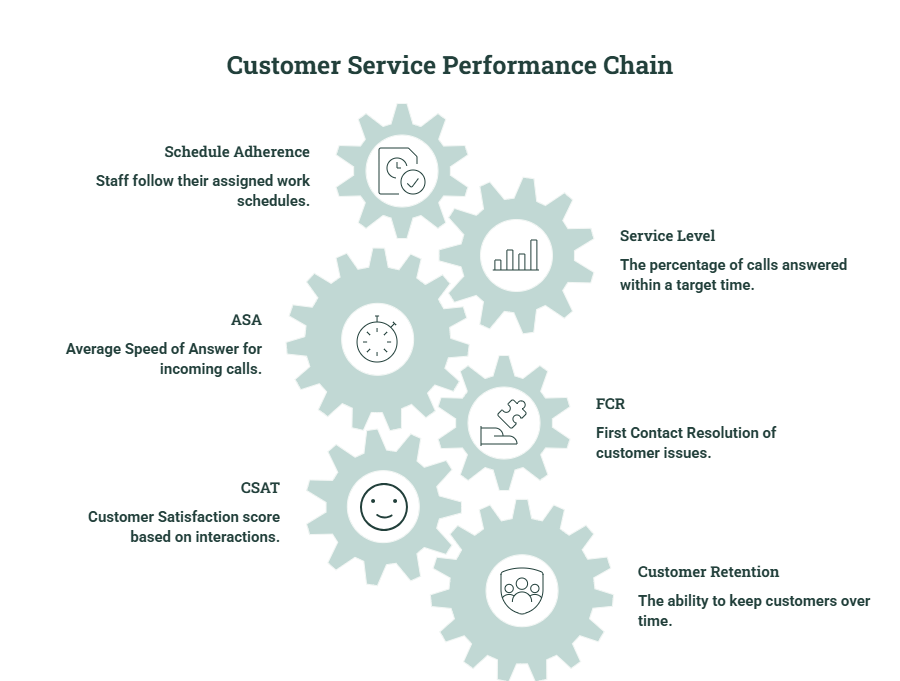
When agents maintain high schedule adherence, queue capacity remains stable throughout the day. This consistent coverage helps teams meet their service level targets, keeping wait times low. When customers connect with unhurried agents quickly, first-contact resolution rates naturally rise, boosting long-term loyalty and customer satisfaction.

Best Practices for Sustaining High FCR

Maintaining excellent resolution rates over time requires establishing disciplined, structured habits across your management team. Consistently tracking your performance keeps your customer service operations aligned with active market demands.

  • Continuous monitoring: Review your support metrics weekly to catch sudden performance drops before they impact customer satisfaction.
  • Coaching: Provide your agents with personalized, data-supported feedback based on live call recordings.
  • Cross-functional collaboration: Build clear communication channels between support, billing, and product development teams to resolve complex issues quickly.
  • Customer feedback loops: Use post-call surveys to verify that the customer feels their problem was fully resolved before closing the ticket.
  • Performance reviews: Evaluate your internal processes quarterly to ensure your benchmarks match changing consumer habits.

By choosing to partner with a specialized provider for call centre outsourcing services, businesses can easily maintain these management practices. Outsourced teams utilize advanced, real-time quality monitoring tools to keep your resolution rates high year-round.

Frequently Asked Questions

What is a good FCR rate?

A first call resolution rate between 70 percent and 79 percent is considered the standard industry benchmark for high-performing contact centers. Achieving a rate of 80 percent or higher is considered world-class, though it requires highly optimized systems and extensive agent training.

How is FCR measured?

FCR is measured by taking the total number of issues resolved during the first interaction and dividing it by the total number of inbound cases during that same timeframe. This raw percentage is often verified using post-call customer satisfaction surveys and tracking software to confirm no repeat contacts occurred.

What is the difference between FCR and First Contact Resolution?

First Call Resolution traditionally refers only to voice channels, measuring success during the initial phone call. First Contact Resolution is a broader term that evaluates first-interaction success across all digital channels, including email, chat, and social media.

Why is FCR important?

FCR is a critical metric because it directly impacts customer satisfaction, operating costs, and overall agent productivity. Resolving issues on the first try eliminates repeat calls, lowering your overhead while building customer loyalty.

Can AI improve FCR?

Yes, AI improves FCR by powering intelligent routing systems that match customers with the most qualified agent. It also acts as a real-time assistant, suggesting accurate answers to help agents resolve issues faster.

Which metrics should be tracked alongside FCR?

Managers should track average handle time, customer satisfaction scores, and repeat contact rates alongside FCR. Monitoring these related metrics ensures your team is not sacrificing service quality for speed.

Conclusion

Maximizing your First Call Resolution rate is one of the most effective ways to lower contact center operating costs and boost customer loyalty. By investing in agent training, optimizing routing, and consolidating your backend software, you can build a highly efficient support system.

To sustain these high standards long-term, brands should establish a structured action plan focused on identifying the root causes of repeat calls. Partnering with experienced professionals who provide call centre outsourcing services can give your business the scale, tools, and expertise needed to achieve world-class results.

AI in Gaming Customer Support: Benefits, Use Cases, Best Practices & Future Trends

AI in Gaming Customer Support Benefits, Use Cases & Trends

The global gaming community demands instant, context-aware assistance while immersed in live service environments. When digital helpdesks fall behind, players quickly abandon active lobbies, which directly damages developer revenue streams. Integrating modern analytical workflows allows studios to resolve high-volume tickets without pulling resources away from game development.

Leveraging specialized AI in Gaming Customer Support ensures that your community retains quick access to troubleshooting guides at any hour. Forward-thinking developers frequently combine these automated platforms with scaled gaming customer service outsourcing networks to achieve cost-efficient global coverage. This definitive guide analyzes real-world automation deployments, hybrid labor frameworks, and emerging industry trends that are reshaping player care.

What Is AI in Gaming Customer Support?

Automated player care refers to the deployment of machine learning models, natural language processing, and automated backend scripts built to handle player inquiries. Unlike standard website widgets, these dedicated gaming systems connect directly with player database environments to view live telemetry and inventory tracking histories. This tight structural connection allows the platform to diagnose account glitches instantly without manual human review.

When paired with a modern strategy for gaming customer service outsourcing, artificial intelligence serves as a smart frontline validation filter. The primary software engine handles routine structural updates, freeing your external agents to manage complex community disputes patiently. Implementing this dynamic technical architecture ensures your global platform scales smoothly, whether you are hosting five thousand players or five million.

Build a Smarter Gaming Support Team

Talk to Our Team

Why Gaming Companies Are Investing in AI Support

Operating live service platforms requires maintaining continuous helpdesk availability across diverse international markets. Traditional email queues fail to satisfy the immediacy expected by modern online communities, driving massive commercial investments into real-time automation.

  • Rising player expectations: Modern communities demand immediate, frictionless troubleshooting directly inside their active game clients rather than navigating external web pages.
  • Global audiences: Managing international user communities requires maintaining stable communication pipelines across dozens of distinct geographical language groups simultaneously.
  • 24/7 availability: Server failures and payment issues can occur at any hour, making around-the-clock helpdesk accessibility vital for minimizing player churn.
  • High ticket volumes: Major DLC launches and seasonal updates generate immense spikes in ticket queues that easily overwhelm traditional internal support divisions.
  • Cost and scalability pressures: Hiring enough internal full-time employees to cover random operational traffic surges creates immense financial overhead for independent studios.

Common Customer Support Challenges in Gaming

Managing a gaming community involves navigating a highly specialized collection of technical, financial, and behavioral issues. Support centers must resolve these complex inquiries rapidly to prevent disruptions to active gameplay sessions.

  • Payment issues: Resolving failed microtransactions, missing battle pass activations, and unauthorized digital store purchases before users request bank chargebacks.
  • Account recovery: Restoring compromised credentials, resolving two-factor authentication locks, and merging split profile histories securely.
  • Matchmaking and server problems: Triaging regional connectivity complaints, identifying latency spikes, and communicating live maintenance schedules clearly.
  • Toxic behavior reports: Processing high volumes of player reports regarding harassment, cheat modification programs, and unfair community behavior.
  • Refunds and subscriptions: Managing recurring billing cancellations, partial platform wallet credits, and downloadable content return parameters.
  • Virtual item disputes: Investigating missing inventory assets, broken achievement rewards, and trade market bugs using historical database logs.
  • Multilingual support: Providing highly localized technical assistance that respects regional dialects, cultural context, and specific gaming slang.

Key AI Use Cases in Gaming Customer Support

Modern machine learning integrations handle far more than basic script reading on standard help web pages. Modern studios deploy specialized software configurations to manage distinct layers of the player communication lifecycle.

AI Chatbots

Advanced conversational models use natural language processing to understand complex gaming slang and resolve account inquiries directly in the chat interface. These tools reference active database rules to issue missing rewards or fix login profiles automatically without human touch.

AI Voice Agents

Automated phone systems converse naturally with users to troubleshoot network connectivity problems and verify identity profiles over voice channels. These platforms transcribe speech instantly to process urgent inquiries during massive server outages.

AI Agent Assist for Human Teams

Internal copilot software scans enterprise knowledge documents and past ticket resolutions to suggest accurate response drafts for human representatives. This guidance helps agents answer complex game mechanic questions without spending minutes searching internal files.

Automated Ticket Routing

Intelligent engines scan incoming ticket text to categorize the exact nature of the player's underlying technical issue. The system immediately assigns the ticket to the most qualified internal engineering or billing team, eliminating manual sorting delays.

Knowledge Base Search

Smart search bars interpret a user's natural phrasing to surface exact patch notes or gameplay walkthroughs instantly. This conversational retrieval prevents players from having to sift through long, outdated FAQ text lists manually.

Multilingual Translation

Real-time translation software instantly converts a player's native language into the preferred dialect of your support staff. This translation layer allows a single support hub to service global player bases with minimal localization friction.

Sentiment Analysis

Algorithmic filters evaluate the emotional tone of incoming messages to flag highly frustrated players or VIP spenders instantly. This immediate prioritization helps managers step in before an unhappy consumer vents their issues on public social channels.

Predictive Support

System monitoring tools notice when a user repeatedly encounters the same graphical error code or crashes out of a match lobby. The system can proactively message the player with optimized driver update guides before they even open a ticket.

AI Across the Player Journey

Automated assistance enhances the user experience well before a customer runs into an active technical error. Mapping your artificial intelligence tools to the complete lifecycle ensures players feel supported from their initial login through their late-game progression.

Gaming Customer Support

During onboarding, automated systems guide new accounts through account initialization steps and device linking configurations smoothly. As users move into core gameplay, responsive overlay tools deliver instant tips regarding complex leveling quests and inventory combinations. When players make purchases, background automation verifies digital asset distribution instantly, building long-term brand loyalty.

Benefits of AI in Gaming Customer Support

Deploying a modern framework for AI in Gaming Customer Support yields measurable operational enhancements for your development studio. These visual and text optimizations eliminate traditional helpdesk blockages, ensuring your community spends less time in support queues.

  • Faster response times: Automated nodes resolve common issues instantly, slashing standard player wait times from days to seconds.
  • Lower support costs: Shifting routine ticket resolution to automated scripts reduces the need to purchase excess internal agent seats.
  • Higher CSAT: Instant, highly accurate support resolutions naturally drive up player satisfaction scores and trust metrics.
  • Increased player retention: Fixing transaction glitches and account recovery errors instantly stops players from abandoning the ecosystem.
  • Improved agent productivity: Automated triage clears low-value inquiries, allowing human teams to focus on nuanced community initiatives.
  • Personalized experiences: Deep backend integrations analyze player history to serve customized tips tailored to their current character progression.

Integrating these tools alongside a calculated strategy for gaming customer service outsourcing delivers the ultimate balance of speed and scalability. Outsourced teams utilize these software solutions to maintain strict performance metrics during major product updates.

AI + Human Agents: Building a Hybrid Support Model

The most successful gaming support centers use a unified approach where automation and human professionals work in tandem. Automation excels at processing objective, rule-based database transactions like password updates and inventory tracking lookups. However, complex problems like cheating appeals, structural toxicity reviews, and VIP community management require human empathy.

To ensure a seamless experience, developers must establish strict backend data protocols for agent handoffs. When an automated bot passes a conversation to a human team member, it must transmit the complete interaction log and player history. This complete data transfer ensures the player never has to repeat their technical issue, preserving customer satisfaction.

Measuring Success: KPIs for AI-Powered Gaming Support

Transitioning to automated systems requires continuous tracking of targeted key performance indicators to confirm operational health. Support managers must evaluate these core numbers to ensure their software investments yield genuine value.

  • First Response Time (FRT): The total seconds a player spends waiting in the queue before receiving an automated greeting or answer.
  • Average Handle Time (AHT): The complete time required for an automated loop or a human agent to resolve a case fully.
  • Resolution Time: The total duration from the moment a ticket is opened until the underlying glitch is fully resolved.
  • CSAT (Customer Satisfaction): Post-interaction review scores that validate whether your automated answers feel genuinely helpful.
  • Containment Rate: The exact percentage of inbound inquiries resolved entirely by automation without human intervention.
  • Deflection Rate: The volume of players who find answers within self-service knowledge articles before opening a support ticket.
  • Player Retention: Long-term analytics showing whether fast support interactions keep users active in the game over time.
  • Cost per Resolution: The comprehensive financial expenditure required to close a ticket using automated tools versus live agents.

How to Implement AI in Gaming Customer Support

Building a responsive, automated player service framework requires a careful, phased roll-out strategy. Rushing the technical implementation process without sufficient data preparation can result in inaccurate answers and frustrated users.

  • Assess support demand: Analyze your historical communication channels to determine your most common ticket categories and peak submission hours.
  • Identify automation opportunities: Select highly repetitive, rule-based tasks like password resets to automate during your initial phase.
  • Build a knowledge base: Author detailed technical troubleshooting articles and patch note repositories for your models to use as a data source.
  • Train AI models: Feed historical ticket logs and game design documents into the engine to familiarize it with specialized terminology.
  • Define escalation paths: Program exact rules that specify when a conversation must be transferred to a live human expert.
  • Launch with a pilot: Test the automation platform on a small subset of active players to gather performance data safely.
  • Monitor performance: Review conversation transcripts weekly to catch hallucinations or confusing conversational loops early.
  • Optimize continuously: Regularly update your database inputs to reflect recent game balances, patch notes, and event changes.

Challenges

While the operational advantages of automated customer service are immense, studios must manage several technical and ethical risks. Ignoring these underlying infrastructure demands can lead to severe compliance violations and damaged brand reputation.

  • AI accuracy: Preventing text engines from inventing incorrect cheat codes or delivering confusing answers requires strict data guardrails.
  • Privacy and compliance: Ensuring your automated loops scrub player financial data and comply with global frameworks like GDPR and COPPA.
  • Responsible AI: Auditing automated moderation filters to ensure they do not introduce bias when processing community behavior reports.
  • Brand consistency: Setting the conversational tone of your bots to perfectly mirror the unique creative style of your game world.
  • Continuous training: Updating your underlying datasets constantly so the software stays aware of weekly patch updates and live-ops content drops.
  • Human oversight: Maintaining dedicated senior administrators to review automated account bans and handle high-priority escalations.

Future Trends in AI for Gaming Customer Support

The landscape of community management is evolving rapidly as new technological frameworks enter the market. The coming years will see customer service move away from separate help pages, becoming an integrated element of the gaming universe itself.

  • Generative AI copilots: Internal data tools that build real-time technical answers for agents, dropping ticket research times to zero.
  • Autonomous AI agents: Software networks that perform complex database corrections across external tools without human management.
  • Emotion-aware support: Smart voice and text filters that dynamically adjust their tone when interacting with stressed or angry customers.
  • AI-powered moderation: Real-time semantic scanners that detect toxic voice communications and cheating behaviors inside active game lobbies instantly.

Frequently Asked Questions

How is AI used in gaming customer support?

Studios deploy these systems to automate routine tasks like password resets, missing item claims, and basic server status inquiries. The software reads incoming player text, understands the underlying technical issue, and executes database corrections instantly. It also acts as an internal assistant, surfacing relevant patch notes to help live teams resolve cases faster.

Can AI replace human support agents?

No, the technology is designed to enhance human capabilities rather than completely replace live support teams. While bots process the high volume of simple, repetitive tasks, human agents remain vital for handling nuanced issues like toxic behavior reviews and VIP interactions. The hybrid approach delivers rapid response times while preserving personal care for complex cases.

What are the benefits of AI for online games and iGaming platforms?

Integrating automated support ensures that platforms maintain 24/7 technical availability without paying expensive night shift premiums. It allows companies to scale through huge traffic spikes during global game launches without experiencing long queues. Additionally, instant resolution of payment issues protects player trust and prevents costly chargeback fees.

How does AI improve player satisfaction?

Automation improves satisfaction by eliminating traditional queue wait times, resolving common account issues in seconds rather than days. It also allows users to access technical help directly inside the game client, avoiding disruptions to their active play sessions. Delivering fast, multilingual assistance makes the player feel valued, which increases customer loyalty.

Contact Center KPIs: 25 Essential Metrics to Measure, Benchmark, and Improve Performance

Contact Center KPIs 25 Essential Performance Metrics

Operating a modern customer service infrastructure requires continuous monitoring of operational metrics and customer satisfaction levels. When leadership lacks clear visibility into data, service quality suffers, and operating costs can spiral out of control. Implementing a structured framework to monitor Contact Center KPIs allows companies to spot communication bottlenecks before they damage brand reputation.

Many expanding brands choose to partner with specialized vendor networks to streamline their customer service workflows. Utilizing professional contact center outsourcing services provides immediate access to enterprise-grade analytics tools and experienced support staff. This exhaustive guide explores the critical categories of measurement, baseline performance formulas, and practical steps to optimize your customer experience.

What Are Contact Center KPIs?

Key Performance Indicators represent the core operational metrics that measure how effectively a support team achieves its primary corporate goals. While standard metrics track everyday data points like total call volume, True indicators measure long-term strategic success. Aligning these high-level calculations with your commercial objectives helps your brand maintain consistent, high-quality client care.

When businesses leverage contact center outsourcing services, these technical targets are explicitly outlined within master service agreements to ensure operational accountability. Evaluating performance data helps support leaders verify that every agent interaction protects the brand's long-term market value. Understanding these definitions helps your organization transition from reactive crisis management to proactive service optimization.

Expose communication bottlenecks and systematically improve your team's performance.

Book a Call With Us

Why Tracking the Right KPIs Is Critical

Monitoring target metrics provides operational clarity, helping support managers protect consumer retention and lower overhead expenses. Operating without reliable analytics data forces teams to rely on guesswork, which leads to scheduling errors and poor customer service.

  • Better customer experiences are achieved by identifying long queue delays and resolving communication friction points early.
  • Improved agent performance driven by objective scorecard metrics, data-supported coaching sessions, and regular transparency reviews.
  • Lower operating costs realized by optimizing handle times and eliminating redundant administrative workflows across shifts.
  • Smarter workforce planning based on historical peak traffic analytics and predictable seasonal volume fluctuations.
  • Data-driven decision-making that replaces management intuition with empirical financial and operational validation.

Contact Center KPI Categories

To manage a modern helpdesk efficiently, leadership must organize their data streams into distinct operational categories. Separating these metrics ensures that your management teams can assess customer satisfaction, agent efficiency, and budget stability independently.

Customer Experience KPIs

Customer experience measurements evaluate how well your staff meets consumer needs and preserves brand loyalty over time. Tracking these scores helps you determine whether your service strategies feel helpful or frustrating to your target market.

  • CSAT (Customer Satisfaction): Measures immediate client contentment following a specific service interaction through post-call feedback surveys.
  • NPS (Net Promoter Score): Assesses long-term brand loyalty by asking consumers how likely they are to recommend your business.
  • CES (Customer Effort Score): Evaluates how simple or complex it felt for a user to resolve their problem.
  • Customer Retention: Tracks the percentage of active consumers your business keeps over specific financial quarters.
  • Customer Effort: Monitors the operational friction points a buyer encounters when reaching out for technical assistance.

Operational KPIs

Operational analytics track the speed, accessibility, and structural health of your communication infrastructure. Monitoring these numbers ensures your support queues move rapidly and customer wait times remain within safe limits.

  • AHT (Average Handle Time): The complete duration of a customer interaction, including talk time and wrap-up administration.
  • ASA (Average Speed of Answer): The average time a consumer spends waiting in a queue before a live representative answers.
  • Service Level: The percentage of inbound calls answered within a specified target timeframe, such as eighty percent in twenty seconds.
  • Queue Time: The total duration a consumer spends waiting in line before connecting with a support professional.
  • Abandonment Rate: The percentage of inbound callers who hang up before reaching an active support agent.
  • Call Transfer Rate: The frequency with which agents must move a caller to a different department to finish a request.
  • Repeat Contact Rate: The percentage of buyers who must call back within a short timeframe to resolve the same issue.

Agent Performance KPIs

Agent performance tracking helps supervisors evaluate individual employee productivity, schedule adherence, and service quality. Maintaining visibility over these metrics ensures that team members utilize their shift hours effectively while following internal guidelines.

  • FCR (First Contact Resolution): The percentage of customer issues resolved completely during the initial interaction without requiring follow-ups.
  • Occupancy: The percentage of logged-in shift hours an agent spends handling active calls versus waiting for new ones.
  • Schedule Adherence: Measures how closely a support employee follows their assigned shift timings, lunch breaks, and training windows.
  • Utilization: Tracks the total time an agent spends performing direct production work compared to their total paid hours.
  • Quality Assurance Score: An objective evaluation of call transcripts conducted by supervisors to confirm compliance with brand scripts.
  • After-Call Work (ACW): The time a representative spends updating customer files and logging notes after a call ends.
  • Agent Productivity: The comprehensive volume of consumer tickets processed by an employee during a standard work shift.

Financial KPIs

Financial metrics reveal the true cost-efficiency and return on investment of your consumer support initiatives. Tracking these values protects your bottom line and helps justify future investments in customer service technology.

  • Cost per Contact: The total operational cost of running the center divided by the absolute number of inbound interactions.
  • Cost per Resolution: The comprehensive financial expenditure required to resolve a customer's issue from start to finish.
  • Revenue per Agent: The total sales volume generated by an individual sales support representative during their shift.
  • ROI (Return on Investment): The financial gains achieved through your support investments compared to the capital spent.
  • Cost to Serve: The total expenses required to deliver continuous helpdesk services to a specific client account.

Omnichannel & AI KPIs

Modern digital platforms require specialized tracking tools to measure the effectiveness of automated chatbots and multi-channel queues. Monitoring these elements ensures that your digital service pathways actually relieve pressure on human agents.

  • Chat Resolution Rate: The percentage of digital text conversations resolved completely within the chat application without escalating.
  • Email Response Time: The total duration from a customer submitting an email ticket to receiving a human reply.
  • Bot Containment Rate: The volume of customer interactions handled fully by automated AI tools without human intervention.
  • AI Deflection Rate: The percentage of inbound traffic resolved by automated self-service systems before a live ticket is generated.
  • Channel Switching Rate: How often a customer must move across text, email, and voice channels to resolve one problem.

KPI Formulas and Benchmark Table

To evaluate your operations accurately, you must understand the mathematical logic behind every key calculation. The following table highlights standard industry formulas, typical market benchmarks, and optimization strategies to guide your team.


KPI Formula Typical Benchmark Why It Matters How to Improve It
First Contact Resolution Total Contacts Resolved on 1st Contact​×100 70% to 75% Drives high CSAT and reduces total call volume. Improve agent training and routing accuracy.
Average Speed of Answer Total Answered Calls/Total Wait Time​ Under 20 seconds Directly impacts initial customer frustration levels. Optimize workforce scheduling and scheduling models.
Abandonment Rate Total Inbound CallsAbandoned Calls​×100 4% to 8% High rates indicate lost sales and frustrated buyers. Deploy callback options and optimize queue messages.
Average Handle Time Total Handled CallsTalk Time + Hold Time + ACW​ 4 to 6 minutes Dictates necessary staffing counts and labor budgets. Simplify desktop tools and knowledge bases.

Maintaining these high standards becomes much easier when partnering with premium contact center outsourcing services. External specialists leverage advanced software suites to maintain these benchmarks consistently, even during major traffic surges.

Leading vs. Lagging KPIs

Support managers must balance two primary forms of metrics to maintain complete control over their customer service ecosystem. Lagging indicators reveal historical outcomes, showing you exactly how your team performed over the previous month. Conversely, leading indicators serve as early warning signs, reflecting real-time behavioral patterns that influence future results.

Balancing both data types allows operations leaders to make proactive scheduling and coaching adjustments before performance drops. For example, tracking low schedule adherence today allows you to address staffing gaps before it ruins your monthly service level metrics. Reviewing these data sets in tandem ensures that your customer support team remains highly resilient against sudden volume changes.

How Contact Center KPIs Work Together

Operational metrics do not exist in isolated bubbles; they operate as a highly connected chain of cause and effect. A small change in one backend variable triggers a predictable domino effect that impacts your final customer satisfaction scores.

When agents maintain high schedule adherence, your live queue capacity remains stable and secure throughout the day. This stable capacity allows the team to hit its service level goals, which slashes your average speed of answer. When customers connect with relaxed, unhurried agents quickly, first-contact resolution rises, driving up long-term customer retention.

Building an Effective Contact Center KPI Dashboard

To maximize the value of your data, you must present customized metrics to the right stakeholders across your organization. Designing specialized visual layouts ensures that everyone can extract actionable insights instantly without getting lost in raw data.

Executive Dashboard

Executive views focus entirely on high-level financial health, long-term brand health trends, and overall return on investment. This layout removes granular hourly details, highlighting broad monthly performance indicators and comprehensive operational costs instead.

Operations Dashboard

Operations views provide call center managers with real-time visibility into active queue queues, service level percentages, and staffing counts. This interactive layout allows directors to shift resources between voice and digital channels the moment traffic spikes.

Team Leader Dashboard

Supervisors require a dedicated view focused on group schedule adherence, quality assurance scores, and average handle times. This tracking tool helps managers identify which teams are meeting standards and which individuals require immediate coaching.

Agent Scorecard

Individual scorecards give representatives direct clarity regarding their personal daily volume, first contact resolution rates, and compliance trends. Providing this personal data dashboard encourages employee accountability and supports self-guided career improvement.

Common KPI Tracking Mistakes

Focusing blindly on raw data without evaluating the underlying human experience can lead to severe operational failures. Support directors must look past simple numbers to confirm their metrics encourage the right workplace behaviors.

  • Overemphasizing AHT forces agents to rush off calls with buyers, which ruins first contact resolution and frustrates consumers.
  • Tracking too many KPIs dilutes your operational focus, leaving your staff confused about which goals matter most.
  • Ignoring quality metrics in favor of pure call volume results in compliance errors and inconsistent customer care.
  • Using outdated benchmarks that fail to reflect modern omnichannel consumer behaviors can lead to inaccurate staffing models.
  • Measuring without action plans creates a culture of passive monitoring rather than active, continuous operational improvement.

Best Practices for Improving Contact Center KPIs

Optimizing your helpdesk performance requires establishing disciplined routines and leveraging modern analytical technology. Follow these core operational strategies to ensure your support infrastructure scales efficiently over time.

  • Set SMART targets that provide your team with clear, realistic performance goals based on historical data.
  • Review KPIs regularly to ensure your active operational strategies adapt smoothly to changing customer volumes.
  • Coach agents with data gathered from live recordings to improve conversational quality and compliance scores.
  • Use workforce management tools to align your scheduled employee counts directly with projected call patterns.
  • Leverage AI and automation to resolve simple questions early, keeping your live agent queues clear for complex cases.
  • Benchmark against industry standards to ensure your support campaigns deliver a highly competitive user experience.

Frequently Asked Questions

What is the most important contact center KPI?

First contact resolution is widely considered the most valuable metric because it directly influences both operational expenses and customer happiness. Resolving an issue during the first call eliminates expensive repeat inquiries, which lowers your total contact volumes. It also creates a seamless experience for the consumer, which naturally improves long-term brand loyalty scores.

How many KPIs should a contact center track?

While a modern helpdesk gathers hundreds of data points, leadership should focus on five to seven core metrics on their main dashboards. Tracking too many indicators simultaneously creates data fatigue and leaves employees confused about their primary targets. Limiting your focus ensures your support team can execute targeted, measurable improvements across shifts.

What is the difference between KPIs and metrics?

Metrics are general data points that track everyday business activities, such as total inbound calls or average talk time minutes. Key Performance Indicators are a select group of critical calculations that directly measure success against high-level corporate goals. All indicators are metrics, but only the most strategically vital metrics serve as true performance indicators.

What are good benchmark values for CSAT, FCR, and AHT?

A strong customer satisfaction score generally sits above eighty percent, while a healthy first contact resolution rate ranges between seventy and seventy-five percent. Standard industry benchmarks for average handle time typically hover between four and six minutes depending on industry complexity. Comparing your team against these targets helps identify hidden operational inefficiencies early.

Which KPIs are most important for omnichannel contact centers?

Multi-channel environments must closely track channel switching rates, email response times, and consistent chat resolution scores. It is also vital to monitor cross-channel customer effort scores to ensure users experience zero friction when moving from chat to phone. Keeping these integrated channels fully optimized protects your brand consistency across all digital touchpoints.

How can AI improve contact center KPIs?

Artificial intelligence improves your core metrics by deflecting simple, repetitive questions through smart self-service chatbots. This technical automation slashes inbound wait times, reduces abandonment rates, and lowers the average speed of answer. By removing routine tickets, AI allows human agents to handle complex issues patiently, which boosts first contact resolution scores.

The Complete Live Chat Staffing Guide: How to Calculate the Right Number of Agents

The Complete Live Chat Staffing Guide

Providing instant consumer support has become a baseline operational expectation for modern digital brands. When visitors encounter long queues or delayed responses on your storefront, they frequently abandon their carts and move to competitors. Utilizing a structured data model to forecast your personnel requirements prevents these service lapses and protects your brand reputation.

This comprehensive live chat staffing guide delivers the mathematical formulas and operational frameworks needed to build an optimized support team. Balancing human agent availability with incoming message volumes allows customer service managers to hit their response time targets consistently. We will explore how to calculate your baseline staffing requirements, evaluate conversation complexities, and choose the most cost-effective management strategies.

Why Live Chat Staffing Matters More Than Ever

Maintaining the correct balance of customer service personnel directly influences both consumer satisfaction scores and internal operating budgets. Understaffed digital support lines quickly lead to long wait times, burnt-out workers, and high customer abandonment rates. Conversely, overstaffing your digital support desks leads to idle team hours and unnecessary corporate overhead.

Finding the exact operational sweet spot requires continuous data analysis and structured workload forecasting. Implementing the principles outlined in this Live Chat Staffing Guide ensures your organization maintains optimal service levels around the clock. By right-sizing your customer service department, you can maximize your daily conversion rates while keeping labor costs fully optimized.

Optimize your live chat team without increasing costs

Talk to an Expert

What Determines How Many Live Chat Agents You Need?

Several operational factors influence the total number of customer service representatives needed to manage your communication queues. Support leaders cannot rely on guesswork because slight shifts in customer traffic can quickly overwhelm an unprepared team.

  • Website traffic: The absolute volume of unique visitors browsing your website establishes the baseline pool of potential incoming chat conversations.
  • Peak chats per hour: Sourcing agent counts from your busiest hours instead of daily averages protects your queues from sudden traffic spikes.
  • Average handle time (AHT): The total duration from the opening greeting to the final window closure dictates how long an agent remains occupied.
  • Chat concurrency: The number of active, simultaneous conversations an individual customer support employee can manage safely impacts your total headcount.
  • Service level goals: Your internal targets, such as answering ninety percent of incoming messages within thirty seconds, establish your capacity requirements.
  • Business hours vs. 24/7 support: Providing around-the-clock global coverage requires implementing complex rotational shift patterns to cover overnight hours.

How to Calculate Live Chat Staffing (Step-by-Step)

Calculating your necessary headcount requires breaking down your historical communication data into structured, sequential metrics. Following a disciplined, step-by-step approach ensures your support department remains resilient during sudden market shifts.

Step 1: Measure peak demand

Analyze your historical analytics software to determine the maximum number of inbound messages received during your busiest hours. Tracking these peak periods prevents long customer queues during intense marketing campaigns or seasonal sales events.

Step 2: Calculate workload

Multiply your peak hourly chat volume by your average handle time expressed in minutes to find the total minutes of support work required. This calculation provides the raw operational volume that your human support network must absorb each hour.

Step 3: Factor in concurrency

Divide your total workload minutes by the maximum number of simultaneous conversations an agent can handle effectively without compromising quality. This adjustment lowers the total physical agent count required since staff members can manage multiple text windows at once.

Step 4: Add shrinkage

Account for inevitable labor hours lost to employee breaks, team training sessions, sudden sick leaves, and administrative meetings. Sourcing leaders typically add a buffer of twenty to thirty percent to their baseline calculations to cover this operational shrinkage.

Translate your final adjusted headcount into structured team shifts that place the maximum number of workers online during peak hours. Review these schedules regularly to ensure your active coverage matches shifting consumer browsing habits.

Recommended Chat Concurrency by Conversation Type

The number of simultaneous digital conversations a support professional can manage effectively depends heavily on the complexity of the topic. Forcing agents to handle too many windows at once quickly degrades service quality and increases human input errors.

  • Sales: Agents should manage only one or two chats at once to ensure they can provide personalized, high-touch product recommendations.
  • Customer service: Representatives can typically balance two or three simultaneous windows when handling simple order tracking requests and return status updates.
  • Technical support: Staff members should be limited to one or two concurrent chats due to the intense focus required to troubleshoot software glitches.
  • Billing: Operators can easily manage two or three standard conversations at once when processing basic payment updates or processing simple client refunds.
  • Complex troubleshooting: Engineers must focus on a single active window at a time to resolve deep system failures and infrastructure issues safely.

How to Build an Efficient Live Chat Schedule

Creating a resilient support schedule requires aligning employee availability directly with your historical consumer traffic patterns. Managers must look past standard office hours to build flexible coverage options that protect their key performance metrics.

  • Shift planning: Design overlapping team rotations that ensure fresh agents are logged in and ready before your busiest hours begin.
  • Peak-hour coverage: Allocate part-time support assets or specialized scheduling blocks to reinforce your team during known high-traffic intervals.
  • Weekend staffing: Maintain adequate weekend coverage numbers since digital consumers frequently browse and shop outside of standard corporate work weeks.
  • Time-zone planning: Distribute your support infrastructure across diverse geographical regions to manage international customer inquiries without paying expensive overnight shift premiums.
  • On-call coverage: Maintain a reliable backup roster of support professionals to fill unexpected gaps when primary agents experience illnesses.

How AI Changes Live Chat Staffing

The rapid development of artificial intelligence is transforming how digital enterprises manage their consumer communication pipelines. Modern automated systems allow smaller support teams to handle massive conversation volumes without experiencing operational delays.

  • AI chatbots: Automated agents resolve high volumes of routine customer inquiries instantly, keeping basic questions away from human support queues.
  • Intent routing: Smart algorithms read incoming text inputs to guide users to the most qualified department instantly.
  • Automated FAQs: Interactive systems serve relevant knowledge base articles to website visitors before a live ticket is even generated.
  • Smart escalation: Machine learning tools transfer complex conversations to human specialists seamlessly, along with a complete history of the interaction.
  • Hybrid AI + human models: Blending automated tools with human empathy allows companies to optimize their headcount while maintaining a premium brand experience.

Key Metrics Every Support Manager Should Track

To confirm that your consumer support investments are yielding maximum value, you must monitor performance data consistently. Reviewing these data points regularly helps validate that your personnel allocations match active marketplace demands.

  • First response time: The total seconds a customer spends waiting in the queue before an agent types their initial personalized greeting.
  • Average handle time: The complete duration of a chat session, which helps managers update their future workload projections.
  • Concurrent chats: The real-time number of active digital conversations a support professional balances during their standard shift.
  • Occupancy: The percentage of logged-in shift hours an agent spends resolving active chats versus waiting for new entries.
  • Shrinkage: The total internal time lost to non-productive activities like team meetings, vacation days, and unexpected system downtimes.
  • CSAT: Customer satisfaction scores gathered via post-chat surveys to measure the helpfulness of the support interaction.
  • Resolution time: The comprehensive duration required to resolve a customer's underlying issue completely, whether on the first contact or through follow-ups.
  • Chat abandonment rate: The percentage of website visitors who close their communication windows before connecting with an agent.

Common Live Chat Staffing Mistakes

Failing to analyze your comprehensive communication channels carefully can lead to major scheduling mismatches and budget waste. Avoid these standard operational pitfalls to keep your customer support pipeline running smoothly.

  • Staffing from daily averages instead of peak demand leaves your support lines completely overwhelmed during high-traffic afternoon hours.
  • Excessive chat concurrency expectations place too much stress on your agents, leading to slow responses and copy-paste answers.
  • Ignoring shrinkage variables in your hiring spreadsheets results in constant, severe understaffing whenever employees take routine leaves.
  • Underestimating training needs causes new support hires to spend excessive time researching basic company policies while customers wait.
  • Failing to adjust for seasonality leaves your helpdesk shorthanded during intense holiday shopping spikes and major marketing events.

Should You Build an In-House Team or Outsource Live Chat?

Building an internal customer support department gives your enterprise direct oversight regarding employee training, cultural alignment, and daily performance tracking. However, managing an internal team requires significant corporate investments in office infrastructure, specialized ticketing software, and continuous recruiting efforts. For expanding brands, maintaining an in-house team around the clock can become an expensive administrative burden.

Choosing a specialized model for live chat support outsourcing allows companies to bypass these overhead expenses entirely. External service providers deliver immediate access to trained, multilingual professionals and scalable infrastructure that adjusts to your seasonal traffic changes. Partnering with a reliable vendor ensures your brand maintains professional coverage around the clock while freeing your internal teams to focus on core product development.

Live Chat Staffing Best Practices

Successfully operating a high-performance support desk requires establishing disciplined management routines across your entire corporate structure. Follow these proven operational strategies to ensure your support campaigns deliver a strong return on investment.

  • Cross-functional collaboration between your marketing and support leaders ensures your helpdesk is warned about upcoming promotional campaigns early.
  • Data-driven decision-making ensures your monthly team schedules are built from empirical traffic metrics rather than manager intuition.
  • Continuous supplier evaluation keeps your active outsourcing vendors fully aligned with your modern brand voice and response time targets.
  • Risk management planning provides clear backup communication channels and alternative connectivity options for agents during regional internet outages.
  • Technology adoption streamlines mundane administrative tracking, allowing your core team to focus entirely on building high-value customer relationships.

Applying these best practices across your organization is much simpler when you utilize a structured Live Chat Staffing Guide to train your management team.

Frequently Asked Questions

How many chats should one agent handle at once?

A support professional can typically manage two to three routine service conversations simultaneously without experiencing a drop in quality. For complex technical support or high-value sales lines, the recommended concurrency drop is one or two active windows. Setting appropriate concurrency levels prevents employee burnout and keeps customer satisfaction scores high.

How many agents do I need for 100 chats per day?

Your necessary agent count depends entirely on how those one hundred conversations are distributed throughout the standard working day. If the traffic is spread evenly across an eight-hour shift, one or two agents can manage the load comfortably. However, if those hundred inquiries arrive during a single peak hour, you will need a larger scheduled team.

How do I staff live chat for 24/7 support?

Providing around-the-clock global coverage requires building a rotational schedule involving a minimum of four to five full-time employees per active shift position. This structure accounts for weekend rotations, standard night shifts, and routine employee leaves. Many growing enterprises leverage live chat support outsourcing models to secure global coverage without managing complex overnight employee rosters.

Does AI reduce staffing requirements?

Yes, integrating modern artificial intelligence tools can reduce your total human staffing requirements by automating the resolution of simple, repetitive customer inquiries. By deflecting up to fifty percent of routine tickets, AI allows your human agents to focus entirely on complex issues. This technical optimization lowers your overall operating costs while maintaining rapid response times.

How often should staffing forecasts be updated?

Support managers should review and update their personnel resource projections at least monthly to account for recent traffic trends. Comprehensive structural evaluations should happen quarterly to prepare your helpdesk for upcoming product rollouts or holiday sales. Keeping your data models fresh ensures your support schedules adapt smoothly to changing customer volumes.

Outsource Live Chat Support: Benefits, Costs, and AI-Powered Customer Service

Outsource Live Chat Support

If your internal team is struggling to clear an email backlog while website visitors exit your store due to slow response times, your operational model is facing a bottleneck.

Modern digital consumers expect instant responses. Forcing potential buyers to wait hours for an email reply introduces friction that drives shoppers straight to your competitors. Deploying internal staff to cover overnight shifts or handle sudden holiday traffic spikes is incredibly expensive, leading to high management overhead, rapid agent burnout, and inconsistent service quality.

Transitioning to a structured partner model solves these resource challenges. When you partner with a specialized provider to outsource live chat support, you secure reliable coverage across all time zones, lower your cost-per-ticket metrics, and maintain high customer satisfaction scores during peak seasons.

This guide covers common outsourcing pricing models, hidden service expenses, and the structural impact of deploying hybrid AI-and-human support networks. You will gain a practical framework to select the exact live chat model your organization requires.

What Is Live Chat Support Outsourcing?

Live chat outsourcing transfers your real-time website customer service workflows to an external provider. The partner takes over your front-line digital messaging operations, handling everything from agent recruitment and onboarding to active performance management and quality control monitoring.

Outsource live chat support for cost-effective and seamless 24/7 coverage.

GET A FREE OPERATIONAL ASSESSMENT

Common Live Chat Support Functions Businesses Outsource

  • Resolving standard tier 1 product questions, delivery lookups, and account resets.
  • Managing real-time sales lead generation, visitor qualification, and meeting bookings.
  • Processing initial technical troubleshooting steps and software bug cataloging.
  • Routing complex escalations cleanly to your internal product specialists.

Why Businesses Outsource Live Chat Support

  • Improve Customer Response Times: External support centers operate with optimized agent scheduling to bring first response times under 60 seconds, eliminating long wait times.
  • Extend Support Availability: Deploying a reliable 24/7 live chat outsourcing framework secures full weekend and holiday coverage without requiring expensive local night-shift differentials.
  • Scale During Growth and Seasonal Demand: Outsourced structures allow companies to add or reduce agent seats dynamically to navigate seasonal e-commerce rushes or product launches smoothly.
  • Reduce Operational Overhead: Handing off workforce logistics to an external partner allows your management team to shift its focus back to core product development and primary marketing strategies.

Outsourced vs In-House Live Chat Support

Building an internal, round-the-clock support operation requires major capital investments in recruitment pipelines, HR management, software licensing, and physical facility space.

Conversely, an outsourced support model converts these high, fixed administrative overhead costs into a predictable, scalable monthly operating expense. This operational flexibility allows your company to adjust support capacity based on live message volumes without the burden of local staffing liabilities.

Operational Element

In-House Support Operations

Outsourced Support Operations

Hiring & Training Time Slow (typically 6 to 8 weeks per agent) Fast (managed entirely by the vendor)
24/7 Coverage Costs High (requires night shifts & holiday pay) Inclusive (built directly into global rates)
Scalability Flexibility Rigid (requires formal hiring or layoffs) Adaptive (adjusts smoothly to ticket volumes)
Management Focus Heavy internal HR & operational oversight Streamlined performance review tracking

Understanding Live Chat Outsourcing Costs

Outsourcing vendors generally structure contracts under four primary pricing models:

  • Per-Hour Rates: You pay a fixed rate per agent hour worked.
  • Per-Chat Fees: A pay-as-you-go model where you are billed a flat fee for each completed customer conversation.
  • Monthly Seat Retainers: A predictable flat monthly fee per dedicated agent assigned exclusively to your business.
  • Per-Resolution Pricing: A modern, outcome-based model where you only pay for interactions that are successfully resolved.

Dedicated vs Shared Agent Pricing

A shared agent pool involves a group of operators managing incoming messages for multiple non-competing brands simultaneously. This model is highly cost-effective for businesses with lower chat volumes. For brands with high ticket volumes and complex workflows, a dedicated agent framework assigns exclusive operators to your business.

Hidden Costs Businesses Often Overlook

When reviewing initial vendor quotes, remember to look past the baseline hourly rate. Ensure you account for potential auxiliary line items like initial database setup fees, specialized agent training hours, technology platform access licenses, and holiday premium surcharges.

The Rise of AI-Powered Live Chat Outsourcing

Modern customer service operations leverage a hybrid support model that combines smart automation with human expertise. Automated AI engines filter incoming traffic, instantly resolving repetitive questions like delivery tracking requests and basic password resets.

When a user submits a complex inquiry or expresses clear frustration, the system transfers the conversation seamlessly to an experienced human agent. This intelligent routing ensures fast resolutions while preserving human empathy for high-priority client interactions.

Technology Integrations That Strengthen Support

  • CRM Integration: Syncing your chat tools with platforms like Salesforce or HubSpot ensures all conversation transcripts and lead details map to your central contact timelines automatically.
  • Help Desk Syncing: Linking chat channels with ticketing tools like Zendesk or Freshdesk allows agents to convert complex chat conversations into trackable support tickets instantly.
  • Ecommerce Integration: Connecting your store systems with Shopify or WooCommerce lets operators view customer carts and order details right from the chat dashboard.
  • Knowledge Base Synchronization: Maintaining a central, updated internal database helps both automated bots and human agents pull accurate product answers quickly.

Selecting the ideal service partner requires a systematic review of four core operational pillars:

  • Industry Expertise: Verify that the vendor has a proven track record of handling customer service within your specific market vertical.
  • Service Level Agreements (SLAs): Ensure the contract clearly outlines key performance benchmarks, including maximum first-response times and minimum customer satisfaction scores.
  • Security and Compliance: Confirm that the partner's data infrastructure meets strict regulatory standards, such as GDPR, HIPAA, or PCI-DSS compliance.
  • Reporting Dashboards: Choose a provider that offers transparent, real-time access to operational metrics, ticket volumes, and agent performance tracking.

Signs Your Business Is Ready to Outsource

Your organization is ready to partner with an external provider if your current support team is regularly missing live chat alerts, abandonment rates are climbing on your checkout pages, or internal managers are spending too much time answering repetitive customer questions instead of focusing on growth strategies.

live chat support outsourcing

Frequently Asked Questions About Live Chat Outsourcing

1. How much does live chat support outsourcing typically cost?

Costs vary depending on your chosen service model. Shared agent packages generally cost between $300 and $900 per month, making them ideal for lower traffic volumes. Dedicated offshore agent retainers usually range from $924 to $2,000 per month, while onshore US-based dedicated coverage can run between $4,500 and $6,500 monthly.

2. Can outsourced agents handle complex customer inquiries?

Yes, absolutely. Dedicated outsourced agents go through structured onboarding programs tailored to your exact workflows, guidelines, and systems. For highly complex or specialized technical issues, teams use clear escalation playbooks to route the ticket smoothly to your internal engineers.

3. Is AI completely replacing live chat agents?

No, AI is not replacing human teams; instead, it optimizes how they work. Modern customer service relies on a hybrid model where smart automation handles high-volume, routine tier 1 questions, allowing human operators to focus their time and energy on resolving nuanced customer issues.

4. What industries benefit most from live chat outsourcing?

High-growth industries like e-commerce retail, SaaS software companies, travel and hospitality agencies, fintech firms, and digital healthcare platforms see the highest returns. Any business where slow response times directly cause cart abandonment or user churn benefits from a highly responsive chat presence.

Conclusion

Deciding to outsource live chat support is a strategic operational shift that directly protects your customer acquisition investments, optimizes resource allocation, and improves customer retention. While building an internal team creates high overhead costs and staffing hurdles, partnering with a professional service provider delivers a flexible, responsive support model that scales alongside your business growth.

By combining an experienced global workforce with modern automation tools, your brand can provide reliable, 24/7 customer care that resolves issues quickly and protects your long-term profitability.

Selecting a partner with deep platform expertise is the most critical step to ensure a successful launch. If you want to eliminate your support backlogs, streamline your digital customer touchpoints, and configure high-converting storefront messaging channels, connect with the integration experts at Wow Customer Support to customize your live chat strategy today.