Outsource Live Chat Support: Benefits, Costs, and AI-Powered Customer Service

Outsource Live Chat Support

If your internal team is struggling to clear an email backlog while website visitors exit your store due to slow response times, your operational model is facing a bottleneck.

Modern digital consumers expect instant responses. Forcing potential buyers to wait hours for an email reply introduces friction that drives shoppers straight to your competitors. Deploying internal staff to cover overnight shifts or handle sudden holiday traffic spikes is incredibly expensive, leading to high management overhead, rapid agent burnout, and inconsistent service quality.

Transitioning to a structured partner model solves these resource challenges. When you partner with a specialized provider to outsource live chat support, you secure reliable coverage across all time zones, lower your cost-per-ticket metrics, and maintain high customer satisfaction scores during peak seasons.

This guide covers common outsourcing pricing models, hidden service expenses, and the structural impact of deploying hybrid AI-and-human support networks. You will gain a practical framework to select the exact live chat model your organization requires.

What Is Live Chat Support Outsourcing?

Live chat outsourcing transfers your real-time website customer service workflows to an external provider. The partner takes over your front-line digital messaging operations, handling everything from agent recruitment and onboarding to active performance management and quality control monitoring.

Outsource live chat support for cost-effective and seamless 24/7 coverage.

GET A FREE OPERATIONAL ASSESSMENT

Common Live Chat Support Functions Businesses Outsource

  • Resolving standard tier 1 product questions, delivery lookups, and account resets.
  • Managing real-time sales lead generation, visitor qualification, and meeting bookings.
  • Processing initial technical troubleshooting steps and software bug cataloging.
  • Routing complex escalations cleanly to your internal product specialists.

Why Businesses Outsource Live Chat Support

  • Improve Customer Response Times: External support centers operate with optimized agent scheduling to bring first response times under 60 seconds, eliminating long wait times.
  • Extend Support Availability: Deploying a reliable 24/7 live chat outsourcing framework secures full weekend and holiday coverage without requiring expensive local night-shift differentials.
  • Scale During Growth and Seasonal Demand: Outsourced structures allow companies to add or reduce agent seats dynamically to navigate seasonal e-commerce rushes or product launches smoothly.
  • Reduce Operational Overhead: Handing off workforce logistics to an external partner allows your management team to shift its focus back to core product development and primary marketing strategies.

Outsourced vs In-House Live Chat Support

Building an internal, round-the-clock support operation requires major capital investments in recruitment pipelines, HR management, software licensing, and physical facility space.

Conversely, an outsourced support model converts these high, fixed administrative overhead costs into a predictable, scalable monthly operating expense. This operational flexibility allows your company to adjust support capacity based on live message volumes without the burden of local staffing liabilities.

Operational Element

In-House Support Operations

Outsourced Support Operations

Hiring & Training Time Slow (typically 6 to 8 weeks per agent) Fast (managed entirely by the vendor)
24/7 Coverage Costs High (requires night shifts & holiday pay) Inclusive (built directly into global rates)
Scalability Flexibility Rigid (requires formal hiring or layoffs) Adaptive (adjusts smoothly to ticket volumes)
Management Focus Heavy internal HR & operational oversight Streamlined performance review tracking

Understanding Live Chat Outsourcing Costs

Outsourcing vendors generally structure contracts under four primary pricing models:

  • Per-Hour Rates: You pay a fixed rate per agent hour worked.
  • Per-Chat Fees: A pay-as-you-go model where you are billed a flat fee for each completed customer conversation.
  • Monthly Seat Retainers: A predictable flat monthly fee per dedicated agent assigned exclusively to your business.
  • Per-Resolution Pricing: A modern, outcome-based model where you only pay for interactions that are successfully resolved.

Dedicated vs Shared Agent Pricing

A shared agent pool involves a group of operators managing incoming messages for multiple non-competing brands simultaneously. This model is highly cost-effective for businesses with lower chat volumes. For brands with high ticket volumes and complex workflows, a dedicated agent framework assigns exclusive operators to your business.

Hidden Costs Businesses Often Overlook

When reviewing initial vendor quotes, remember to look past the baseline hourly rate. Ensure you account for potential auxiliary line items like initial database setup fees, specialized agent training hours, technology platform access licenses, and holiday premium surcharges.

The Rise of AI-Powered Live Chat Outsourcing

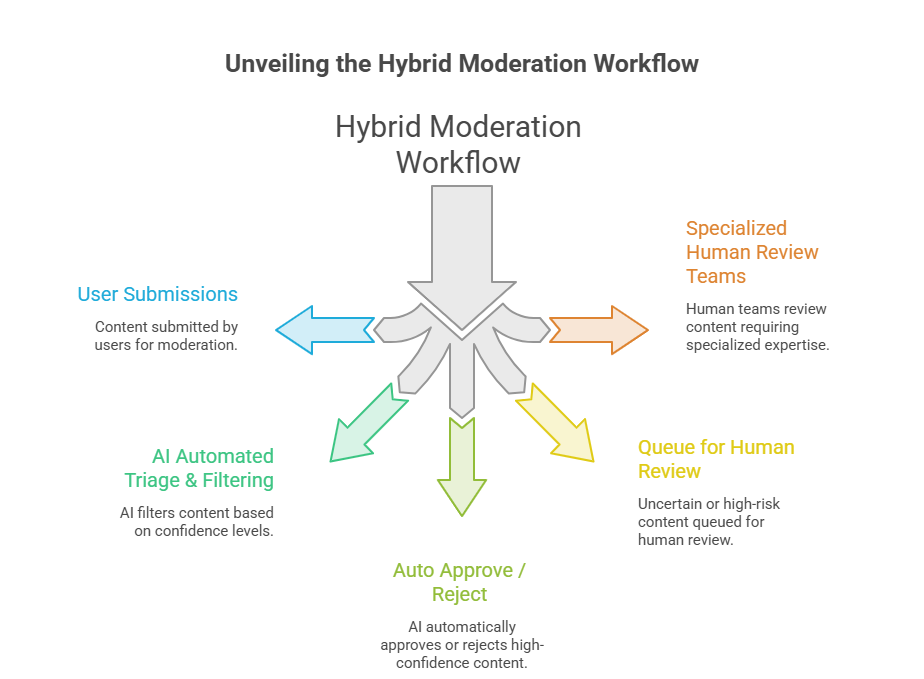
Modern customer service operations leverage a hybrid support model that combines smart automation with human expertise. Automated AI engines filter incoming traffic, instantly resolving repetitive questions like delivery tracking requests and basic password resets.

When a user submits a complex inquiry or expresses clear frustration, the system transfers the conversation seamlessly to an experienced human agent. This intelligent routing ensures fast resolutions while preserving human empathy for high-priority client interactions.

Technology Integrations That Strengthen Support

  • CRM Integration: Syncing your chat tools with platforms like Salesforce or HubSpot ensures all conversation transcripts and lead details map to your central contact timelines automatically.
  • Help Desk Syncing: Linking chat channels with ticketing tools like Zendesk or Freshdesk allows agents to convert complex chat conversations into trackable support tickets instantly.
  • Ecommerce Integration: Connecting your store systems with Shopify or WooCommerce lets operators view customer carts and order details right from the chat dashboard.
  • Knowledge Base Synchronization: Maintaining a central, updated internal database helps both automated bots and human agents pull accurate product answers quickly.

Selecting the ideal service partner requires a systematic review of four core operational pillars:

  • Industry Expertise: Verify that the vendor has a proven track record of handling customer service within your specific market vertical.
  • Service Level Agreements (SLAs): Ensure the contract clearly outlines key performance benchmarks, including maximum first-response times and minimum customer satisfaction scores.
  • Security and Compliance: Confirm that the partner's data infrastructure meets strict regulatory standards, such as GDPR, HIPAA, or PCI-DSS compliance.
  • Reporting Dashboards: Choose a provider that offers transparent, real-time access to operational metrics, ticket volumes, and agent performance tracking.

Signs Your Business Is Ready to Outsource

Your organization is ready to partner with an external provider if your current support team is regularly missing live chat alerts, abandonment rates are climbing on your checkout pages, or internal managers are spending too much time answering repetitive customer questions instead of focusing on growth strategies.

live chat support outsourcing

Frequently Asked Questions About Live Chat Outsourcing

1. How much does live chat support outsourcing typically cost?

Costs vary depending on your chosen service model. Shared agent packages generally cost between $300 and $900 per month, making them ideal for lower traffic volumes. Dedicated offshore agent retainers usually range from $924 to $2,000 per month, while onshore US-based dedicated coverage can run between $4,500 and $6,500 monthly.

2. Can outsourced agents handle complex customer inquiries?

Yes, absolutely. Dedicated outsourced agents go through structured onboarding programs tailored to your exact workflows, guidelines, and systems. For highly complex or specialized technical issues, teams use clear escalation playbooks to route the ticket smoothly to your internal engineers.

3. Is AI completely replacing live chat agents?

No, AI is not replacing human teams; instead, it optimizes how they work. Modern customer service relies on a hybrid model where smart automation handles high-volume, routine tier 1 questions, allowing human operators to focus their time and energy on resolving nuanced customer issues.

4. What industries benefit most from live chat outsourcing?

High-growth industries like e-commerce retail, SaaS software companies, travel and hospitality agencies, fintech firms, and digital healthcare platforms see the highest returns. Any business where slow response times directly cause cart abandonment or user churn benefits from a highly responsive chat presence.

Conclusion

Deciding to outsource live chat support is a strategic operational shift that directly protects your customer acquisition investments, optimizes resource allocation, and improves customer retention. While building an internal team creates high overhead costs and staffing hurdles, partnering with a professional service provider delivers a flexible, responsive support model that scales alongside your business growth.

By combining an experienced global workforce with modern automation tools, your brand can provide reliable, 24/7 customer care that resolves issues quickly and protects your long-term profitability.

Selecting a partner with deep platform expertise is the most critical step to ensure a successful launch. If you want to eliminate your support backlogs, streamline your digital customer touchpoints, and configure high-converting storefront messaging channels, connect with the integration experts at Wow Customer Support to customize your live chat strategy today.

The ROI of Outsourced Customer Support Services: How to Measure Business Impact Beyond Cost Savings

ROI of Outsourced Customer Support Services

If your leadership team still views customer care as a necessary financial liability rather than an active pipeline for customer retention, your operational metrics are incomplete.

Most corporate executives evaluate outsourcing partnerships through a very narrow lens: line-item cost reduction. They focus heavily on hourly agent rates and infrastructure savings while ignoring the financial consequences of slow first-response times, unresolved user queries, and customer churn. Relying on an understaffed or poorly trained support desk quietly erodes consumer trust, lowering your market share over time.

Transitioning to a modern support structure changes this dynamic completely. Integrating professional outsourced customer support services preserves your hard-earned customer acquisition investments, boosts brand loyalty, and uncovers consistent opportunities for upselling and cross-selling during routine interactions.

This strategic guide covers advanced financial return metrics, revenue expansion timelines, and the measurable business impact of deploying automated hybrid support networks. You will gain a practical framework to calculate the total financial impact of your customer experience operations.

What Does ROI Mean in Outsourced Customer Support?

Historically, calculating the financial return of support outsourcing focused almost entirely on immediate budget relief. Businesses looked for simple ways to cut overhead, such as:

  • Direct labor cost savings by utilizing global talent pools.
  • Elimination of local recruitment, background checks, and onboarding expenses.
  • Elimination of workspace overhead, hardware provisioning, and enterprise licensing fees.

Why Cost Savings Alone Don't Tell the Whole Story

Evaluating your return solely through expense reduction misses the larger financial picture. Customer care interactions are a primary driver of consumer retention and long-term brand loyalty. When an organization shifts its mindset from viewing care as an operational cost center to treating it as a growth engine, support teams are built to protect and expand existing revenue streams.

Revenue-Driven ROI: How Outsourced Customer Support Increases Business Growth

More than money, outsourced customer support saves in many ways. Let’s see some of them.

Higher Customer Retention Through Faster Support

Long wait times are a primary driver of customer churn. When specialized support networks handle multi-channel customer requests quickly, consumer frustration drops significantly. Resolving issues during the initial interaction builds immediate buyer confidence and keeps customers from migrating to competitors.

Increased Customer Lifetime Value (CLV)

A satisfied customer base naturally spends more over a longer period. Well-trained support agents handle issues with a high level of care, turning transactional buyers into long-term brand advocates. This sustained engagement directly inflates individual lifetime value metrics across your entire database.

Better Customer Satisfaction Leads to More Repeat Purchases

Clear communication and positive resolutions are directly tied to repeat buying behavior. When consumers experience fast, accurate assistance, they develop a strong affinity for the brand, which increases their likelihood of choosing your products for future purchases.

More Upselling and Cross-Selling Opportunities

Support interactions occur when a consumer is actively engaged with your ecosystem. Gifted support agents leverage these moments by recommending relevant product upgrades, complementary accessories, or extended service plans that naturally align with the user's immediate needs.

Slash internal administrative overhead and secure 24/7 coverage by shifting to high-performing customer support outsourcing.

Get expert customer support.


Cost Savings ROI vs Revenue-Driven ROI

Evaluation Pillar

Cost Savings ROI Model

Revenue-Driven ROI Model

Primary Metric Hourly agent cost reductions Growth in Customer Lifetime Value (CLV)
Operational Goal Minimize cost per support ticket Maximize resolution quality and retention
Business Impact Short-term operational budget relief Long-term growth in repeat purchase rates
Financial Outcome Reduced internal administrative overhead Lower churn and increased customer advocacy

How to Calculate the ROI of Outsourced Customer Support

To build an accurate comparison baseline, compile all internal operational costs over the past twelve months. Ensure your calculation includes:

  • Base salaries, performance bonuses, and payroll taxes.
  • HR recruitment fees and internal training hours.
  • Dedicated customer service software licenses and communication platforms.
  • Physical workspace costs and computer hardware depreciation.
  • Management oversight and quality assurance layers.

Calculate Outsourcing Costs and Revenue Gains

Next, calculate the total annual service fees paid to your outsourced service provider. To measure the full return, contrast this expenditure against the total revenue preserved through lower customer churn, gains from agent up-sells, and the reclaimed capital value of internal management hours.

Sample ROI Formula and Example

To calculate the comprehensive financial return of your support investments, use the standard performance evaluation formula:
ROI Formula
For example, if an enterprise invests $100,000 annually in specialized support services, saves $80,000 in internal overhead, and recaptures $70,000 in preserved customer renewals, the total financial gain equals $150,000. Applying the formula yields a clear 50% net return on the investment.

When Does Outsourcing Start Delivering ROI?

First 30 Days: Setup and Knowledge Transfer

The initial month focuses on structural onboarding, documentation transfers, and setting up core workflows. During this phase, the primary financial value comes from freeing up your internal managers, allowing your core team to pivot back to primary product development.

After 60-90 Days: Process Optimization

By the end of the first quarter, workflows stabilize. Average handling times drop, backlog queues clear out, and team performance consistently hits contractual Service Level Agreements (SLAs), creating a faster, more dependable support environment.

After 6 Months: Measurable Financial Performance

At the half-year mark, clear financial returns emerge. Internal operating expenses decrease, customer satisfaction scores improve, and agent productivity trends upward, signaling a highly efficient support engine.

Long-Term ROI: 12 Months and Beyond

Past the one-year mark, the partnership delivers deep strategic value. The business benefits from sustained customer retention, a highly scalable support model that adjusts smoothly to seasonal traffic spikes, and predictable revenue growth built on a loyal customer base.

How AI and Human Agents Together Improve ROI

Modern automation tools streamline high-volume support queues by handling repetitive tier 1 inquiries instantly. Automated workflows excel at resolving basic tracking requests, routing complex tickets to the right specialized departments, and generating instant knowledge recommendations to help agents work faster.

Why Human Agents Remain Essential

While automated tools handle routine questions efficiently, skilled human support remains critical for managing complex technical challenges and high-stakes escalations. Human agents provide the nuanced problem-solving and emotional intelligence required to turn frustrated buyers into loyal customers.

The ROI of a Hybrid AI + Human Support Model

Integrating automated systems alongside a skilled team maximizes the efficiency of your support operations. This hybrid approach allows brands to scale their support capabilities smoothly during peak traffic periods without needing to add seasonal headcount, significantly lowering the average cost per ticket.
AI + Human Support Model

KPIs That Demonstrate ROI

Operational Performance Metrics

  • First Response Time (FRT): The average time a customer waits before receiving an initial agent response.
  • Average Resolution Time: The total duration required to completely resolve a customer's issue.
  • Cost Per Ticket: Total support operational expenditure divided by the total number of processed tickets.
  • SLA Compliance: The percentage of support tickets resolved within agreed-upon contractual timelines.

Customer Experience & Business Growth Metrics

  • Customer Satisfaction (CSAT): Transactional feedback measuring the helpfulness of the support experience.
  • Customer Retention Rate: The percentage of active buyers preserved over a specific evaluation window.
  • Customer Lifetime Value (CLV): The cumulative revenue contribution generated by an individual customer account over time.
  • Churn Rate: The percentage of subscribers or buyers who stop interacting with your business.

Best Practices for Maximizing ROI from Outsourced Customer Support

  • Select an outsourcing partner with deep, verified experience in your specific industry vertical.
  • Establish clear, measurable performance metrics and SLA benchmarks from day one.
  • Build and continuously update a comprehensive, central knowledge repository for your support agents.
  • Implement a balanced hybrid support model that combines smart automation tools with experienced human agents.
  • Run monthly operational performance reviews to uncover and eliminate system bottlenecks.

Frequently Asked Questions

1. Is reducing operating costs the only way to measure the financial impact of support outsourcing?

No, expense reduction is simply the baseline metric. The true value of an optimization strategy shows up in customer retention gains, higher repeat purchase rates, and improvements in overall lifetime value. Protecting your existing customer base is far more cost-effective than constantly funding new user acquisition campaigns.

2. How does a fast customer care response time improve long-term business profitability?

Fast, reliable support directly removes buyer hesitation and lowers cart abandonment. When customers know a brand resolves issues quickly, they buy with confidence and are highly likely to recommend the product to others, driving organic, word-of-mouth growth.

3. Can a small business achieve a strong financial return from support outsourcing early on?

Yes, outsourcing allows smaller brands to deploy a professional, 24/7 support presence without the high costs of local hiring. This scalable approach lets emerging businesses deliver enterprise-grade customer experiences while keeping internal capital focused on product growth.

4. What role does automation play in lowering the total cost of support operations?

Automated tools filter out high-volume, routine inquiries like tracking requests and basic password resets. Handing these repetitive tasks to automated systems reduces the overall workload on your team, allowing your human agents to focus entirely on high-value client resolutions.

Conclusion

Measuring the total return on your support investments requires looking past simple cost-cutting to track long-term business growth. While lower administrative overhead provides immediate budget relief, the true strategic value of modern outsourced customer support services lies in their ability to protect and expand your core revenue streams.

By combining skilled global support teams with smart automation tools, businesses can accelerate resolution times, lower cost-per-ticket metrics, and build a highly loyal customer base that drives consistent repeat purchases.

Selecting an experienced execution partner is the definitive factor in building an efficient system. If you are ready to future-proof your support architecture, optimize customer response metrics, and future-proof your bottom line, partner with the certified specialists at Vserve Solutions to design your support strategy today.

AI in Order Management Systems: A Complete Guide for Modern Businesses

Order Management Systems

If your logistics staff spends hours manually checking shipping lines and resolving warehouse stock errors rather than growing your business, your fulfillment workflow is slowing down your enterprise growth.

Modern commerce moves too fast for traditional tracking methods. Managing orders across multiple digital storefronts, wholesale portals, and distribution networks introduces data bottlenecks that manual review teams cannot keep pace with. Relying on outdated systems leads to processing delays, inventory stockouts, and expensive split-shipment fees that hurt your margins.

Transitioning to an AI-driven fulfillment ecosystem solves these operational challenges. Moving past simple data logging to integrate advanced predictive automation allows your business to optimize stock levels across locations, assign delivery tasks dynamically, and resolve processing errors before packages leave the warehouse.

This complete technical guide covers foundational machine learning applications, step-by-step lifecycle automation models, and practical data readiness requirements. You will gain a clear integration roadmap to transform your fulfillment center into a scalable competitive asset.

What Is AI in Order Management?

AI-powered order management describes the strategic integration of machine learning, context engineering, and real-time decision intelligence into your fulfillment workflows. This modern infrastructure connects with your sales channels to automate the entire life cycle of an order, from the initial cart checkout down to final delivery.

This advanced methodology relies on four core underlying software technologies:

  • Machine Learning: Software algorithms that study historical processing logs to identify billing anomalies and flag fraud variants automatically.
  • Predictive Analytics: Data engines that analyze market buying patterns and seasonal trends to forecast exact warehouse stock requirements.
  • Intelligent Automation: Autonomous software modules that choose the best shipping methods and print warehouse packing slips without human intervention.
  • Generative AI: Conversational tools that instantly create localized international customs declarations and update logistics tracking data.

Leverage AI to eliminate bottlenecks and automate your workflow.

Get AI-powered order management

AI-Powered vs Traditional Order Management Systems

Traditional systems rely completely on static, preset rules and manual data entry. When an order encounters an exception, such as a typo in a street address or a temporary warehouse shortage, the entire line pauses until a human operator opens the log, fixes the error manually, and pushes the status forward. This creates systematic processing backlogs during high-volume sales windows.

AI-driven platforms analyze data continuously to resolve fulfillment exceptions automatically. The system reviews warehouse stock levels across locations, fixes minor address typos using geographical databases, and routes shipments dynamically to ensure on-time delivery at the lowest possible cost.

AI vs Traditional Order Management: Key Differences Table

Operational Pillar

Traditional Management Systems

AI-Powered Management Systems

Workflow Engine Rigid, rule-based configurations Adaptive, continuous-learning models
Fulfillment Processing Manual data entry and keying 94% straight-through touchless processing
Decision Infrastructure Reactive handling after issues occur Predictive routing based on real-time data
Inventory Control Scheduled daily batch-file synchronization Instant, live multi-location tracking
Average Cost per Order High ($30.00 to $60.00 per manual order) Low ($5.00 to $10.00 per automated order)

Why Businesses Are Adopting AI for Order Management

Migrating to modern order management solutions delivers immediate, measurable structural advantages across your entire distribution operation:

  • Improving Order Accuracy: Automating validation checks eliminates common human typing errors and incorrect item descriptions, achieving a 99.5% processing accuracy rating.
    CLEARomni
  • Reducing Manual Processing: Moving to automated validation routines speeds up processing workflows by up to 96%, cutting a standard 12-hour fulfillment cycle down to 15 minutes.
    Stealth Agents
  • Enhancing Customer Experience: Eliminating stockouts, delivery delays, and shipping errors builds immediate buyer confidence and reduces incoming customer support requests.
    Artsyl
  • Optimizing Inventory and Fulfillment: Predictive tracking models lower overall warehouse storage expenses by up to 30% while keeping available stock levels safely aligned with market demand.

How AI Fits into Each Stage of the Order Lifecycle

Let’s see how AI fits into the workflow.

Order Capture and Validation

The moment a buyer checks out, AI natural language processors read the purchase data across formats like EDI, email forms, or web portals. The software instantly verifies product codes, flags invalid shipping addresses, and screens for potential fraud before releasing the order to the warehouse floor.

Inventory Visibility and Allocation

Instead of relying on slow overnight batch updates, the platform maintains a live view of available stock across all retail outlets, distribution hubs, and in-transit shipments. The allocation engine secures inventory from the most efficient location to prevent accidental overselling.

Demand Forecasting

By cross-referencing sales data, seasonal buying trends, and external market shifts, predictive algorithms forecast localized product demand. This optimization enables procurement teams to restock high-performing items proactively, minimizing excess storage costs.

Order Processing and Routing

The system routes incoming orders dynamically by evaluating customer location, carrier pricing, warehouse capacities, and delivery commitments. This intelligent orchestration reduces overall logistics costs while consistently meeting shipping deadlines.

Shipping and Fulfillment

The software compares regional carrier performance metrics and real-time shipping rates to select the most cost-effective transportation option. This automated selection helps reduce average transit costs while maintaining fast delivery times.

Returns and Reverse Logistics

Predictive algorithms evaluate historical purchase data to identify items with a high likelihood of being returned. When a return occurs, the platform automates return label generation and routes the product to the optimal location for restocking, refurbishment, or recycling.

Common AI Use Cases in Order Management

  • Automated Order Processing: Converting unstructured PDF invoices into formatted warehouse picking queues instantly.
  • Inventory Optimization: Balancing stock levels across secondary distribution spaces to support same-day delivery options.
  • Demand Forecasting: Generating highly accurate product manufacturing schedules to prevent stockouts before peak seasonal promotions.
  • Exception Management: Auto-correcting minor typos in customer addresses by cross-referencing global postal databases.
  • Customer Communication: Sending automated, real-time tracking updates and delivery alerts directly to buyers.

Data Requirements and AI Readiness

AI systems rely entirely on clean, well-structured data. Feeding unverified inventory records or incomplete customer logs into a machine learning model leads to processing errors and inefficient routing decisions.

Key Data Sources for AI Order Management

  • Order History: Multi-year transaction records to train predictive demand models.
    Artsyl
  • Inventory Data: Real-time stock counts across warehouses, retail locations, and transit paths.
    KIBO
  • Customer Data: Validated account profiles, contract terms, and historical shipping preferences.
  • Supplier Data: Vendor delivery lead times, product availability metrics, and baseline raw material costs.

Signs Your Business Is Ready for AI

Your organization is ready to integrate AI automation if you manage a high volume of orders across multiple digital channels and store your primary business records in a unified, accessible database repository.

How to Implement AI in Order Management Successfully

Transforming your logistics operations requires a structured, step-by-step implementation strategy:

  • Assess Current Order Management Processes: Map out your current order lifecycle to identify the specific steps causing manual backlogs and processing bottlenecks.
  • Identify High-Impact AI Opportunities: Prioritize automating high-volume, repetitive tasks that yield immediate cost savings, such as automated data capture or address validation.
  • Prepare and Clean Your Data: Standardize your product codes, resolve duplicate customer accounts, and verify your inventory counts across all systems.
  • Choose the Right AI Solution: Select an integration partner that features a scalable, API-driven architecture designed to connect easily with your existing software stack.
    Zuora, Inc.
  • Start with a Pilot Project: Deploy the automation platform on a single product line or sales channel first to validate your workflows before scaling across the entire enterprise.

Best Practices for AI Order Management Implementation

  • Establish clear, measurable performance goals and return-on-investment targets before beginning development.
  • Enforce strict data governance policies to keep your master inventory and product catalogs clean and accurate.
  • Connect your automation software directly to existing core systems like your ERP, WMS, and CRM via open APIs.
    Zuora, Inc.
  • Maintain clear human-in-the-loop oversight workflows for high-value wholesale transactions and exceptional routing edge cases.
  • Track your processing speeds and accuracy metrics continuously to optimize system performance over time.

Challenges of Implementing AI in Order Management

The primary hurdle when deploying smart tools centers on system integration complexity. Connecting modern, API-first software with older, unpatched enterprise resource planning databases often requires technical fine-tuning.

Furthermore, your operational teams may show initial resistance to new automated processes. Overcoming this requires structured training sessions that clearly demonstrate how automated validation tools save time by eliminating repetitive manual data entry.
Order Management Systems

Measuring the Success of AI in Order Management

Organizations must track these core operational metrics to verify the performance and financial return of their systems:

  • Order Accuracy Rate: Monitor the reduction in processing errors after automating your validation workflows (Target: over 99.5%).
  • Fulfillment Cycle Time: Track the average speed from initial checkout confirmation down to carrier package scan.
  • Inventory Turnover Ratio: Measure the improvement in stock velocity resulting from automated demand forecasting.
  • Operational Cost Savings: Compare your total manual order processing service expenses against automated transaction costs.
    Stealth Agents

The Future of AI in Order Management

The future of logistics points toward fully autonomous, predictive supply chain networks. Enterprise configurations are shifting away from simple reactive routing toward self-optimizing distribution systems.

Modern automation tools evaluate weather updates, global shipping lane data, and factory raw material constraints to adjust your inventory levels proactively. This automated intelligence allows companies to navigate supply chain disruptions smoothly, maintaining high fulfillment speeds without operational downtime.

Frequently Asked Questions (FAQs)

1. Can AI order management systems help eliminate split-shipment costs?

Yes, absolutely. The routing engine analyzes item weights, delivery destinations, and stock locations simultaneously to bundle multi-item orders into a single shipment from the most efficient warehouse, saving significant packing and shipping fees.

2. Do we need to replace our existing ERP database to use AI tools?

No, modern automation systems connect directly with legacy platforms like NetSuite or SAP via open APIs. The software acts as an intelligent processing layer that optimizes data validation and routing workflows without requiring a costly ERP replacement.

3. How do automated validation systems help lower product return rates?

Automated validation tools check orders for accuracy before fulfillment begins, identifying incompatible product combinations or incorrect item options early. Resolving these issues prior to shipping significantly reduces returns caused by incorrect product fulfillment.

4. What is a typical timeline for deploying an AI-powered order solution?

A standard implementation using pre-built API connectors takes between 12 and 16 weeks. Large enterprise rollouts featuring complex multi-warehouse setups or highly customized routing rules generally require 20 to 26 weeks of development and validation testing.

Conclusion

Implementing AI across your fulfillment operations is a strategic advantage that directly shapes your business agility, accuracy, and long-term profitability. While legacy platforms struggle with manual exceptions and slow data syncing, modern order management solutions turn complex logistics data into an automated, highly efficient fulfillment engine.

Combining experienced operations teams with smart automated routing tools allows your business to optimize stock levels, lower cost-per-order metrics, and deliver fast shopping experiences that build customer loyalty.

Choosing an integration partner with deep platform expertise is the definitive factor in ensuring an efficient launch. If you are ready to modernize your e-commerce ecosystem, optimize your B2B purchasing funnels, and deploy fast storefronts, connect with the certified engineers at Vserve Solutions to execute your BigCommerce strategy today.

IT Support vs Technical Support: What’s the Difference and Which Do You Need?

If your internal systems administration team is spending half their workday answering basic user setup questions for external clients, your operational structure is misaligned.

Many businesses use the terms IT support and technical support interchangeably. While both involve troubleshooting and problem-solving, they serve entirely different audiences and distinct business functions. Misunderstanding these specialized roles can easily lead to hiring the wrong engineering team, inefficient resource allocation, and severe service gaps that hurt your customer satisfaction scores.

Implementing a clearly defined support structure eliminates this operational confusion. Delineating internal infrastructure maintenance from client-facing application troubleshooting optimizes workflow speed, keeps employee productivity high, and resolves consumer software errors faster.

This guide details the core scope differences, unique service types, and cost factors associated with both support channels. You will gain a practical decision framework to select the precise service model your organization requires.

What Is IT Support?

Information Technology (IT) support focuses completely on maintaining, securing, and optimizing an organization’s internal technological infrastructure. It is the operational backbone that keeps an enterprise's employees connected, productive, and secure.

The core goal of an IT support unit is internal uptime and data compliance. They manage the internal deployment of corporate assets, monitor local network stability, enforce cybersecurity protocols, and provide a direct helpline for employees facing software configuration or hardware performance hurdles.

Common IT Support Services

  • Managing centralized business cloud directories and active user permissions.
  • Conducting routine data backup procedures and disaster recovery testing.
  • Deploying internal cybersecurity monitoring tools and device patch updates.
  • Setting up employee workstations, local printing access, and secure VPN channels.


Get target-driven technical support outsourcing to cut overhead by up to 60%.

OUTSOURCE YOUR HELP DESK NOW

What Is Technical Support?

Technical support addresses the product-specific issues faced by end-users or consumers interacting with a company’s commercial outputs. It acts as the direct link between a complex technology product and the client base utilizing it.

A specialized technical support provider focuses on post-sale user assistance. These teams specialize in resolving functional application errors, debugging user installation scripts, explaining advanced product capabilities, and ensuring that buyers extract the full operational value from their software purchase.

Common Technical Support Services

  • Providing multi-channel Tier 1 through Tier 3 software debugging solutions.
  • Troubleshooting API integration errors and database connection failures for clients.
  • Assisting users with mobile app installation, account provisioning, and feature activation.
  • Escalating verified codebase bugs directly to internal software engineering sprints.

IT Support vs Technical Support: Key Differences

Let’s see some of the key differences between them.

Scope and Users Served

IT support operates with a broad organizational scope, focusing on the entire internal tech ecosystem. The users served are exclusively internal employees, stakeholders, and contractors. Technical support maintains a hyper-focused scope limited directly to the proprietary products sold by the business, serving external customers, product subscribers, and integration partners.

Skills Required and Tools Used

Internal IT teams must master broad infrastructure management tools, including mobile device management (MDM) platforms, centralized active directories, and local area network (LAN) routing architectures.

Conversely, technical support agents require deep, product-specific code literacy. They utilize advanced bug tracking tools, live remote-screen access utilities, and customer relationship management systems to interact with clients natively.

Factors Affecting Costs

Internal IT operational costs fluctuate based on total corporate seat counts, physical office network complexities, and enterprise security compliance requirements. Technical support budgets scale alongside user acquisition metrics, ticket arrival frequencies, and the depth of multi-language coverage required by global customer bases.

Side-by-Side Comparison Table

Evaluation Benchmark

IT Support Services Technical Support Services
Primary Target User Internal Employees & Staff External Customers & Clients
Operational Focus Corporate Infrastructure & Networks Proprietary Products & Software
Core Software Tooling MDM, Active Directory, Firewalls CRM, Jira, Remote Screen Diagnostic
Required Skill Set Broad Systems & Network Admin Deep Product Code & API Diagnostics
Success Metric Internal System Uptime & Security Ticket Resolution Time & CSAT Scores
Core Delivery Model Internal IT Department or MSP Specialized Technical Support Provider

Types of IT Support Services

  • Help Desk Support: Resolving internal user login resets, basic software access permissions, and daily workplace computing complaints.
  • Network Support: Configuring secure corporate Wi-Fi connections, monitoring bandwidth, and maintaining local switch frameworks.
  • Infrastructure Management: Overseeing data center storage structures, cloud servers, and foundational enterprise directory hubs.
  • Security Support: Enforcing multi-factor authentication (MFA) protocols, executing virus scans, and auditing device endpoint data risks.
  • Hardware Support: Repairing enterprise laptops, replacing local storage drives, and provisioning physical office hardware components.

Types of Technical Support Services

  • Product Support: Guiding external end-users through specialized hardware configurations or physical equipment adjustments.
  • Software Troubleshooting: Resolving unexpected system execution crashes, runtime exceptions, and operating system version incompatibilities.
  • SaaS Support: Assisting corporate subscribers with user onboarding, license configuration, and data dashboard creation.
  • Application Support: Diagnosing mobile or web application bugs that prevent users from saving settings or processing data.
  • Customer Technical Assistance: Deploying high-performing top chat support services to resolve product setup queries in real time.

When Does a Business Need IT Support?

Your organization requires dedicated IT support the moment your workforce expands past a size where basic peer-to-peer tech help is viable. As internal operations become dependent on centralized cloud sharing, data privacy compliance laws, and stable network access, a dedicated IT team is required.

This unit guarantees your staff experiences zero productivity loss due to system crashes, while shielding your internal corporate intelligence from cyber vulnerabilities.

IT Support vs Technical Support

When Does a Business Need Technical Support?

A business requires a dedicated technical support solution the moment it launches a proprietary software application, consumer technology asset, or B2B SaaS tool.

If you manage high-volume transactional platforms, partnering with an expert team ensures customer software errors are resolved before they cause churn. This rapid intervention keeps your customer satisfaction scores high and prevents basic questions from distracting your core development team.

Do Businesses Need Both IT Support and Technical Support?

Mid-market and enterprise technology organizations almost always run both frameworks simultaneously. For example, a fast-growing B2B software vendor relies on IT support to keep their developers' laptops secure and their internal Slack channels connected.

Simultaneously, they deploy a technical support structure to handle incoming software inquiries from global customers using their live production apps.

Outsourcing IT Support and Technical Support

Choosing technical support outsourcing models allows enterprises to lower operational overhead by up to 60% compared to local recruitment pipelines.

By passing these functions to a specialized global partner, you escape high social charges, avoid facility expenses, and secure reliable 24/7 coverage. This setup ensures your customer requests are answered quickly across every global time zone.

When Outsourcing Makes Sense

Outsourcing is highly effective when your internal engineering teams are overwhelmed by basic tier 1 tickets, distracting them from core product development. Partnering with an outsourced provider allows your brand to scale its support operations dynamically during peak seasonal cycles without requiring long-term local hiring commitments.

How to Choose the Right Support Model for Your Business

To select the appropriate support framework, systematically evaluate your current operational friction point. If your primary goal is shielding corporate hardware, upgrading internal databases, and managing employee onboarding, prioritize IT support options.

If your core goal is helping external users navigate your digital storefront, use professional technical support provider networks to safeguard your user retention metrics.

Conclusion

Maintaining a successful business requires a clear understanding of your support needs. IT support serves as the vital foundation that keeps your internal staff connected, secure, and operationally efficient. Meanwhile, technical support functions as the external driver of client satisfaction, helping users overcome product hurdles and lower subscription churn.

Delineating these roles prevents resource misallocation and ensures your technical workflows receive the specialized attention they require to perform.

Selecting an experienced execution partner is the definitive factor in building an efficient system.

Frequently Asked Questions

1. Is IT support the same as technical support?

No, they serve completely different audiences. IT support focuses internally, managing your company's network infrastructure, data security protocols, and employee hardware assets. Technical support focuses externally, helping your customers troubleshoot functional issues with your proprietary products, software applications, or SaaS solutions.

2. Which support model is more customer-facing?

Technical support is entirely customer-facing. These agents act as the direct, client-facing touchpoint for your buyers when they encounter software bugs or setup challenges. To maintain high responsiveness, teams often integrate chat support services to resolve consumer questions across live web channels instantly.

3. Which support service is better for small businesses?

Small businesses typically require a balanced mix of both services based on their business model. A service-oriented firm needs basic IT support to protect its local network, while a product-focused startup should prioritize a dedicated technical support model to help users navigate its software features smoothly.

4. Can one single team handle both support functions?

While small startups often combine these roles out of necessity, doing so as you scale creates major operational bottlenecks. The skill sets required for broad network administration differ significantly from product-specific debugging, meaning a combined team can easily lead to delayed resolution times and internal burnout.

Top 10 Live Chat Software for Small Businesses in 2026

Best Live Chat Software for Small Businesses (

If your small business website lacks a real-time messaging channel, you are ignoring a major source of customer churn and lost sales.

Modern online consumers expect immediate answers when evaluating a service or completing an online purchase. Forcing potential buyers to dial a phone number or submit an email form creates unnecessary friction. Deploying dedicated live chat software for small businesses bridges this communication gap, allowing your team to answer questions instantly, resolve product issues, and secure sales before customers abandon their carts.

Evaluating the extensive software market requires looking past basic messaging widgets. A high-performing chat application must balance simple agent dashboards, robust mobile options, clear app integrations, and affordable entry prices.

This guide outlines our rigorous evaluation criteria, provides a comprehensive software comparison matrix, and delivers an objective breakdown of the top ten chat platforms available today. You will learn how to integrate these digital tools into your existing systems to drive long-term business growth.

How We Selected the Best Live Chat Software

To identify the leading chat options for small teams, we analyzed dozens of market platforms against six strict operational benchmarks:

  • Core Features: We prioritized software that includes essential utilities like canned responses, desktop notifications, visitor tracking, and offline lead capture forms.
  • Ease of Use: The administration dashboard and chat widget must be simple to configure, requiring no advanced programming knowledge to install.
  • Integrations: We checked how easily each tool connects with popular business software, including Shopify, WordPress, Salesforce, and top marketing systems.
  • Scalability: The software must allow your company to add agent seats, unlock advanced features, and expand channels smoothly as your business grows.
  • Pricing Transparency: We selected platforms that offer affordable entry plans, free trial windows, or permanent free tiers tailored for growing budgets.
  • AI Capabilities: We favored platforms that integrate smart automation assistants capable of resolving repetitive questions without manual intervention.

Quick Comparison Table

Software Platform Best For Standout Key Feature Core App Integration Starting Monthly Price Implementation Difficulty
Tidio E-commerce Growth Lyro AI autonomous support Shopify, WordPress, Wix $24.17 Very Low
HubSpot Chat B2B Lead Management Direct native CRM logging HubSpot CRM, Gmail Free / $15.00 Low
tawk.to Budget Bootstrapping 100% free core functionality Global CMS tools Free Low
LiveChat Scaling Retailers Separate product add-ons WooCommerce, Zendesk $25.00 Medium
Crisp Chat Multi-Channel Teams Real-time browser co-browsing Slack, WhatsApp, Meta $25.00 Low
Chatty Shopify Stores Direct cart interaction Shopify ecosystem $19.99 Very Low
Freshchat Omnichannel Support Smart multi-channel routing Freshdesk, Shopify $15.00 Medium
Zoho SalesIQ Zoho Ecosystem Users Lead scoring tracking Zoho CRM, Mailchimp $7.00 Medium
Help Scout Relationship Building Integrated shared email inbox Jira, HubSpot, Slack $25.00 Low
LiveAgent Support Gamification Agent performance rewards Slack, Squarespace $9.00 Medium

Reduce your customer care overhead by up to 60%.

Get Custom Outsourcing Support

Top 10 Live Chat Software Solutions

1. Tidio

Tidio provides an intuitive, highly visual customer communication dashboard tailored directly for online stores and growing startups. The platform stands out for its native automation options, allowing small business owners to deploy smart responses without complex setup steps.

Key features include the Lyro AI engine, a drag-and-drop conversational builder, automated shopping cart recovery triggers, and real-time visitor monitoring.

Pros

  • The Lyro AI agent successfully resolves up to 67% of routine customer questions automatically.
  • Quick one-click installation extensions for Shopify and WordPress sites.

Cons

  • Free tier usage limits data volumes and chatbot conversations tightly.
  • Custom brand formatting requires upgrading to higher-priced monthly plans.

Tidio connects natively with Shopify, WordPress, Wix, HubSpot, Zapier, and major social messaging channels. Paid plans start at $24.17 per month when billed annually, and a basic free version is available for early-stage sites. It is best for small e-commerce brands wanting an automated chat presence, and the implementation difficulty is very low.

2. HubSpot Live Chat

HubSpot Live Chat is a relationship-focused lead generation tool built inside the free HubSpot ecosystem. The software records every customer conversation directly onto your central contact timelines automatically.

Key features include native CRM data syncing, targeted welcome triggers, automated meeting booking links, and a unified team inbox.

Pros

  • The foundational live chat widget and underlying CRM database are completely free.
  • Provides agents with a comprehensive view of a customer's history during live conversations.

Cons

  • Advanced automation features require moving to expensive HubSpot Marketing tiers.
  • The standard design interface feels rigid compared to dedicated chat applications.

The platform integrates perfectly with the HubSpot CRM suite, Gmail, Google Workspace, and Outlook. Paid starter options begin at $15.00 per user seat monthly, with a reliable free option available. It is best for B2B service firms seeking to track sales leads cleanly, and the implementation difficulty is low.

3. tawk.to

tawk.to is a popular messaging application that provides full feature access completely free of charge. The platform generates revenue through optional add-on services like hiring remote chat agents or removing the software's branding.

Key features include unlimited agent seats, customizable chat widgets, automated trigger parameters, localized translation options, and detailed visitor tracking.

Pros

  • Provides access to a comprehensive, enterprise-grade feature set for an unlimited number of agents at zero cost.
  • Highly responsive mobile apps allow teams to answer customer queries on the move.

Cons

  • Removing the small tawk.to branding logo requires a monthly subscription fee.
  • The backend user interface feels dated and takes time to navigate efficiently.

The software offers universal HTML snippet installation alongside native plugins for WordPress, Joomla, and Magento. The core application is completely free, with paid visual add-ons available. It is best for bootstrapped businesses needing multi-agent seats on a budget, and the implementation difficulty is low.

4. LiveChat

LiveChat is a high-speed, dependable messaging framework engineered for businesses experiencing steady transaction growth. The software focuses on accelerating agent workflow speeds during high-volume support windows.

Key features include real-time preview text showing what users are typing, tag classifications, file sharing options, and target goal tracking modules.

Pros

  • The agent interface is exceptionally clean, responsive, and easy to navigate.
  • Includes rich reporting analytics covering team response speeds and customer satisfaction metrics.

Cons

  • Does not provide a permanent free service tier for small or pre-revenue sites.
  • Advanced security reporting access requires moving to higher-priced enterprise tiers.

The platform provides over 200 integrations, including WooCommerce, Shopify, Salesforce, and Zendesk. Paid tiers start at $25.00 per user seat monthly, backed by an open multi-day trial window. It is best for scaling teams that manage steady daily message volumes, and the implementation difficulty is medium.

5. Crisp Chat

Crisp Chat provides a clean, unified messaging inbox that combines website chat, team emails, and social media direct messages into a single feed. It is designed to simplify multi-channel communication for lean agencies.

Key features include co-browsing tools for shared screen viewing, custom data routing, game add-ons for offline users, and an internal knowledge base engine.

Pros

  • Co-browsing features allow agents to view a customer's screen in real time to resolve technical issues.
  • Flat-rate workspace pricing plans remove per-user licensing cost penalties.

Cons

  • The core chat layout can require technical fine-tuning on highly customized websites.
  • Chatbot automation logic is locked behind higher paid workspace tiers.

Crisp connects directly with Slack, WhatsApp, Messenger, Instagram, HubSpot, and Zapier. Paid workspace options start at $25.00 monthly per site dashboard, supported by a basic free tier. It is best for technical agencies requiring screen-sharing capabilities, and the implementation difficulty is low.

6. Chatty

Chatty is an AI-first live chat application built for modern e-commerce storefronts. The software connects directly with retail systems to help convert basic chat conversations into completed sales.

Key features include direct Shopify shopping cart viewing, automated product recommendation pop-ups, multi-channel inbox syncing, and AI order status lookups.

Pros

  • Allows support agents to view a buyer's cart items and order history directly inside the chat screen.
  • AI assistants learn your inventory policies automatically to handle product questions.

Cons

  • Optimized explicitly for Shopify, reducing its utility on alternative website builders.
  • Analytical dashboards focus heavily on sales, providing fewer deep technical support metrics.

The platform is built for the Shopify app ecosystem and links with WhatsApp, Instagram, and Facebook Messenger. Paid plans range from $19.99 to $199.00 monthly based on your usage scale, and a free trial is available. It is best for independent retail stores focused on driving sales, and the implementation difficulty is very low.

7. Freshchat

Freshchat provides an enterprise-grade conversational messaging structure designed for growing customer service teams. The application focuses on organizing high-volume client inquiries across multiple communication channels.

Key features include intelligent user routing, conversational context preservation, automated message translation, and event-triggered updates.

Pros

  • Maintains a continuous conversation history even when a visitor leaves and returns days later.
  • Distributes incoming messages intelligently based on specific agent skill sets.

Cons

  • The advanced backend configuration options can feel overwhelming for solo operators.
  • Transitioning between live chat screens and deep ticketing systems can require extra clicks.

The application integrates with the Freshworks ecosystem, Shopify, WhatsApp Business, and major CRM tools. Paid seating options start at $15.00 per agent monthly, with a restricted free version available. It is best for growing service teams prioritizing organized workflows, and the implementation difficulty is medium.

8. Zoho SalesIQ

Zoho SalesIQ balances website visitor tracking with live customer messaging, functioning as a digital sales acceleration tool. The system evaluates user behavior to help agents identify high-value buyers.

Key features include digital visitor scoring mechanics, real-time website heat mapping, custom database routing, and basic auto-responders.

Pros

  • Visitor scoring tools alert your sales team the moment an high-value corporate lead visits a product page.
  • Provides an exceptionally affordable per-operator pricing model for small teams.

Cons

  • The administrative control dashboard requires a learning curve for non-technical users.
  • Visual presentation options feel plain unless you apply custom CSS styling.

The platform works best inside the Zoho CRM ecosystem but also connects with Mailchimp, WordPress, and Shopify. Paid operator plans start at $7.00 per user monthly, with an open free plan available for small sites. It is best for business teams already utilizing Zoho software, and the implementation difficulty is medium.

9. Help Scout

Help Scout combines an online chat widget with a shared team email inbox to deliver a personal, relationship-focused support experience. The platform avoids rigid, cold ticketing layouts to keep conversations natural.

Key features include an integrated shared inbox, proactive messaging beacons, an internal documentation directory, and AI-assisted reply drafting.

Pros

  • The user interface balances email management and live website chat seamlessly.
  • AI writing assistants help agents proofread and refine customer responses quickly.

Cons

  • Lacks deep conversational marketing utilities like behavioral pop-ups and lead scoring.
  • Paid plans require a minimum seat commitment that can strain very small budgets.

The platform connects natively with Jira, HubSpot, Slack, WooCommerce, and Salesforce. Paid options start at $25.00 per user seat monthly, backed by an open multi-week evaluation trial. It is best for service teams prioritizing high-quality, personal customer interactions, and the implementation difficulty is low.

10. LiveAgent

LiveAgent brings built-in gamification mechanics to the customer support dashboard, transforming routine ticket resolution into a motivating experience for your staff. The platform functions as a full-service help desk.

Key features include agent leaderboard rewards, real-time typing previews, universal communication sorting, and automated chat invitations.

Pros

  • Gamification badges and performance tracking keep internal support teams motivated.
  • Offers an affordable entry price for businesses needing full help desk functionality.

Cons

  • The mobile application options offer a limited feature set compared to the desktop app.
  • The core chat widget design looks traditional out of the box and requires customization.

The software integrates with Slack, Squarespace, WordPress, and major shipping tracking systems. Paid tiers start at $9.00 per agent monthly, with an introductory free trial window available. It is best for teams looking to boost agent engagement scores, and the implementation difficulty is medium.

Live Chat Software Integration Considerations

Deploying a standalone live chat for a small business can create data silos if the platform is disconnected from the rest of your technology stack. To maximize your efficiency, verify that your new messaging platform connects directly with your existing infrastructure:

  • CRM Integrations: Connecting your chat tools to platforms like HubSpot or Zoho ensures transcripts, lead data, and user details are saved to your central contact timelines automatically.
  • Ecommerce Integrations: Linking with systems like Shopify or WooCommerce allows your agents to view active shopping carts and track deliveries without leaving the chat window.
  • Help Desk Integrations: Ensure your chat platform connects with back-end ticketing tools so your team can easily turn complex chat conversations into trackable support tickets.
  • Marketing Automation: Syncing chat data with email systems like Klaviyo or Mailchimp lets you add new chat leads to automated email follow-up sequences instantly.

How to Choose the Right Live Chat Software

To select the appropriate application, match the software configuration to your primary business model:

  • Service Businesses: Prioritize platforms like HubSpot Chat or Help Scout that log leads directly into a central CRM and support personal, relationship-building conversations.
  • Ecommerce Brands: Select retail-focused solutions like Tidio or Chatty that display live cart contents and use smart bots to answer product availability questions.
  • Growing Teams: Look for systems like LiveChat or Freshchat that offer flat-rate workspace pricing and clear message routing to keep your workflows efficient as you scale.

The Future of Live Chat Software

The digital customer support landscape is shifting rapidly from manual message handling to intelligent, automated communication models. Modern platform configurations use advanced conversational AI engines to manage high-volume chat queues effectively.

Instead of relying on rigid, pre-scripted reply trees, modern AI assistants read your internal documentation and FAQs to deliver personalized answers in real time. These hybrid systems filter out routine inquiries like shipping lookups automatically, allowing your human agents to focus entirely on high-priority customer resolutions.

Frequently Asked Questions

1. Is IT support live chat the same as product technical support chat?

No, they serve completely different audiences. Internal IT chat systems help employees resolve internal software access or workplace network issues. Product technical support chat focuses externally, helping your customers troubleshoot functional issues with your software, products, or subscription services.

2. Can a single agent manage multiple live chat conversations effectively?

Yes, a well-trained support agent can typically handle three to four text conversations concurrently without sacrificing response quality. Utilizing canned responses for common questions and deploying automated routing tools helps agents multitask efficiently.

3. Do live chat applications slow down website loading speeds?

They can if they use unoptimized JavaScript code. To protect your site speed, choose platforms that use modern asynchronous loading scripts. This ensures your main website content loads completely before the chat widget appears, passing Core Web Vitals checks.

4. Is a completely free live chat tool safe for business operations?

Yes, trusted platforms like tawk. to offer secure, full-featured messaging applications at no cost. They keep their services free by charging for optional premium add-ons, such as custom branding removal or hiring professional virtual assistants, rather than compromising user data security.

Conclusion

Deploying modern chat solutions for small businesses is a strategic investment that directly improves your website's user experience, cuts down email response backlogs, and helps capture sales leads. Choosing a platform that aligns with your specific operational model ensures your team resolves customer questions efficiently without hitting code limitations.

By combining skilled support staff with smart automation tools, your business can deliver responsive, 24/7 assistance that keeps customers loyal and supports long-term profitability.

Selecting the right implementation partner is the definitive factor in building an efficient system. If you want to optimize your digital customer service, connect your messaging channels, and build high-converting storefronts, partner with the certified integration engineers at Wow Customer Support to design your chat strategy today.

Outsource Live Chat Support: Benefits, Costs, and AI-Powered Customer Service

Customer Service

Customers expect immediate answers. Whether they are asking about product availability, shipping updates, billing concerns, or technical issues, delays can quickly lead to abandoned purchases and lost revenue. This is why many businesses choose to outsource live chat support rather than build and manage large in-house teams.

The outsourcing model has evolved significantly in recent years. Today, leading providers combine skilled support agents with artificial intelligence, automation, CRM integrations, and performance analytics to create a more efficient customer experience.

In this guide, we'll explore the benefits, costs, technology requirements, and AI-driven trends shaping modern live chat operations

What Is Live Chat Support Outsourcing?

Live chat support outsourcing is the practice of partnering with a specialized service provider to manage customer conversations across websites, mobile applications, and digital messaging channels. Instead of building and maintaining an in-house chat team, businesses rely on external experts to deliver timely, professional, and consistent customer support.

Companies that outsource live chat support gain access to trained agents who represent their brand, follow established service guidelines, and handle customer interactions with the same level of professionalism expected from an internal team. This approach allows businesses to improve response times, enhance customer satisfaction, and provide support coverage without the challenges of recruiting, training, and managing additional staff.

How Outsourced Live Chat Support Works

Outsourced live chat providers typically integrate with a company's existing technology ecosystem, including websites, CRM platforms, help desk software, ecommerce systems, and knowledge bases. Once integrated, incoming chats are routed to dedicated or shared agents who respond in real time, answer questions, resolve issues, and guide customers through their buying journey.

Many providers also use AI-powered tools to assist agents, automate routine inquiries, and ensure customers receive faster support while maintaining a seamless experience.

Convert visitors instantly with 24/7 live chat outsourcing.

Get Expert Live Chat Support

Common Live Chat Support Functions Businesses Outsource

Businesses commonly outsource a wide range of customer-facing chat activities, including:

  • Answering sales and pre-purchase inquiries
  • Providing product recommendations and buying guidance
  • Tracking orders and shipping updates
  • Delivering technical support and troubleshooting assistance
  • Managing billing and account-related questions
  • Qualifying leads and capturing prospect information
  • Handling returns, exchanges, and refund requests
  • Supporting customer retention and loyalty initiatives

By outsourcing these functions, organizations can maintain high service standards while allowing internal teams to focus on growth, strategy, and core business operations.

Why Businesses Outsource Live Chat Support

Customer expectations have changed dramatically in recent years. Today's consumers expect fast, accurate, and personalized support regardless of the time of day. For many businesses, meeting these expectations with an in-house team can be both challenging and expensive. As a result, more organizations choose to outsource live chat support to improve service quality while maintaining operational efficiency.

Improve Customer Response Times

Speed plays a critical role in customer satisfaction. Research consistently shows that customers are more likely to make a purchase or remain loyal to a brand when their questions are answered quickly. Outsourced live chat teams are specifically structured to manage large volumes of conversations simultaneously, ensuring customers receive timely assistance instead of waiting in lengthy queues. Faster response times not only improve the customer experience but can also increase conversions and reduce cart abandonment.

Extend Support Availability

Modern customers do not operate on a standard 9-to-5 schedule. They browse, shop, and seek assistance during evenings, weekends, and holidays. This is one of the primary reasons businesses invest in 24/7 live chat outsourcing. Around-the-clock support ensures customers can receive help whenever they need it, regardless of location or time zone. For companies serving national or international markets, continuous availability can become a significant competitive advantage.

Scale During Growth and Seasonal Demand

Support requirements rarely remain constant. Product launches, holiday shopping seasons, promotional campaigns, and periods of rapid business growth can cause chat volumes to surge unexpectedly. Hiring and training additional in-house staff for temporary demand spikes is often costly and time-consuming. Outsourcing provides the flexibility to quickly scale support operations up or down, allowing businesses to maintain consistent service levels without overextending internal resources.

Reduce Operational Overhead

Building an internal live chat department involves much more than hiring agents. Businesses must invest in recruitment, onboarding, training, workforce management, quality assurance, software licenses, and ongoing performance monitoring. By choosing to outsource live chat support, organizations can shift many of these responsibilities to a specialized provider. This allows leadership teams to focus on strategic priorities while benefiting from experienced support professionals, established processes, and advanced customer service technologies.
 Live Chat Support

Outsourced vs In-House Live Chat Support

Choosing between an in-house support team and an outsourced provider is one of the most important decisions businesses make when developing their customer service strategy. While both models can deliver quality support, they differ significantly in terms of cost, scalability, staffing flexibility, and operational complexity. Understanding these differences can help organizations determine which approach best aligns with their growth objectives and customer service requirements.

Cost Comparison

Building an in-house live chat team involves a wide range of direct and indirect expenses. Beyond employee salaries, businesses must account for benefits, recruitment costs, onboarding programs, management oversight, software subscriptions, equipment, workspace requirements, and ongoing training initiatives. These costs can quickly add up, especially as support operations expand.

In contrast, outsourcing typically consolidates many of these expenses into a predictable monthly or usage-based service fee. This cost structure allows businesses to forecast customer service expenditures more accurately while gaining access to experienced agents and established support infrastructure without significant upfront investment.

Scalability and Flexibility

Customer support demand is rarely consistent throughout the year. Seasonal sales events, marketing campaigns, product launches, and business growth can all generate sudden increases in customer inquiries. Expanding an internal team to accommodate these fluctuations often requires lengthy hiring and training cycles.

Outsourced providers offer a much higher degree of flexibility. Because they maintain larger talent pools and workforce management systems, they can quickly increase or decrease staffing levels based on demand. This agility helps businesses maintain service quality during peak periods without carrying excess staffing costs during slower months.

Talent and Coverage Considerations

Recruiting and retaining skilled support professionals can be challenging, particularly for businesses that require specialized knowledge, multilingual capabilities, or extended operating hours. Creating a fully staffed support operation that provides continuous coverage often requires substantial investment and ongoing management.

Outsourcing providers typically employ agents with experience across multiple industries and customer service environments. Many also offer multilingual support and established processes for delivering seamless customer experiences across different regions and time zones. For organizations seeking 24/7 live chat outsourcing, partnering with a specialized provider is often a more practical and cost-effective solution than building a global support team from the ground up.

Understanding Live Chat Outsourcing Costs

Cost is often one of the first considerations for businesses evaluating whether to outsource live chat support. However, pricing is rarely one-size-fits-all. It is influenced by multiple operational factors, service models, and business requirements that determine the overall investment and long-term value.

Common Outsourcing Pricing Models

Live chat outsourcing providers typically structure their pricing in several ways, depending on the level of support and customization required. The most common models include:

  • Per-agent pricing, where businesses pay for each dedicated or shared support representative
  • Per-hour pricing, based on the total time agents spend handling customer interactions
  • Per-chat pricing, where costs are tied directly to the number of conversations managed
  • Monthly service packages that bundle staffing, tools, and support features into a fixed fee

Each model offers different levels of predictability and scalability, depending on business needs.

Factors That Influence Live Chat Support Costs

Several key variables affect the overall cost of outsourced live chat services. These include:

  • Support volume and expected chat traffic
  • Required hours of coverage, including after-hours or 24/7 live chat outsourcing
  • Industry complexity and the level of product or technical knowledge required
  • Language requirements for serving global or multilingual customers
  • Technical expertise needed for troubleshooting or specialized support
  • Reporting depth and analytics requirements for performance tracking

The more complex and demanding the support environment, the higher the overall cost tends to be.

Dedicated vs Shared Agent Pricing

One of the most important pricing distinctions is between dedicated and shared agents. Dedicated agents work exclusively with a single brand, allowing them to develop deeper product knowledge and deliver more personalized customer experiences. This model typically comes at a higher cost due to exclusivity.

Shared agents, on the other hand, handle support for multiple clients. This structure allows providers to distribute costs more efficiently, making it a more budget-friendly option for businesses with moderate or fluctuating chat volumes.

Hidden Costs Businesses Often Overlook

While base pricing is often clearly defined, businesses should also account for potential additional costs that may arise during implementation or ongoing operations, such as:

  • Initial training and onboarding of agents
  • Integration with CRM, ecommerce, or help desk systems
  • Quality assurance and monitoring programs
  • Custom reporting or advanced analytics requests
  • Seasonal staffing adjustments during peak demand periods

Understanding these potential costs upfront helps businesses make more accurate comparisons between providers and avoid unexpected expenses later in the partnership.

The Rise of AI-Powered Live Chat Outsourcing

Modern customer support is undergoing a major shift. The most effective live chat operations no longer rely solely on human agents or fully automated systems. Instead, they combine artificial intelligence with human expertise to create a hybrid support model that is faster, more scalable, and more consistent.

This evolution is especially important for businesses that outsource live chat support, as providers increasingly integrate AI tools into their workflows to improve efficiency and customer satisfaction.

How AI and Human Agents Work Together

In an AI-assisted support model, artificial intelligence handles the initial layer of customer interaction. It responds to routine questions, collects relevant customer details, and routes inquiries to the appropriate department or agent.

Human agents focus on higher-value interactions that require critical thinking, empathy, or negotiation skills. This division of labor allows support teams to resolve issues more efficiently while ensuring customers receive the right level of attention based on the complexity of their concern.

When Conversations Should Be Escalated to Human Agents

While AI can manage a large portion of customer inquiries, certain situations require human intervention. Escalation is typically necessary in cases such as:

  • Billing disputes that require review of account history
  • Technical troubleshooting involving complex or multi-step issues
  • Account security concerns such as login issues or unauthorized access
  • High-value sales opportunities where personalized guidance is critical

Clear escalation pathways ensure that customers are not stuck in automated loops and receive timely, accurate resolutions.

Benefits of an AI-Assisted Support Model

Integrating AI into live chat outsourcing delivers several measurable advantages for businesses:

  • Faster response times through instant automated replies
  • Lower operational costs by reducing repetitive workload for agents
  • More consistent service delivery across large volumes of inquiries
  • Improved agent productivity by eliminating routine tasks
  • Enhanced customer experiences through quicker and more accurate support

These benefits make AI-powered systems a key driver behind the growth of 24/7 live chat outsourcing strategies across industries.

Common Use Cases for AI in Live Chat Operations

AI is particularly effective in handling high-frequency, structured interactions. Common applications include:

  • Providing order status updates and shipment tracking
  • Answering frequently asked questions
  • Assisting with appointment scheduling and confirmations
  • Processing return or refund requests
  • Recommending relevant help articles from knowledge bases

By automating these repetitive tasks, businesses allow human agents to focus on more complex and revenue-impacting conversations, improving overall service quality and efficiency.

Technology Integrations That Strengthen Outsourced Live Chat Support

Modern live chat outsourcing is no longer just about staffing support agents. The real performance advantage comes from deep technology integration that connects chat systems with business tools, customer data, and automation platforms. These integrations enable faster resolutions, more personalized conversations, and smoother workflows across the entire support ecosystem.

CRM Integration

Customer Relationship Management (CRM) integration is one of the most critical components of effective live chat operations. By connecting chat systems to a CRM, agents gain immediate access to valuable customer context, including purchase history, previous interactions, preferences, and account details.

This level of visibility allows agents to deliver more personalized and efficient support. Instead of asking customers to repeat information, agents can quickly understand the situation and provide relevant solutions, improving both speed and satisfaction.

Help Desk and Ticketing System Integration

Not all customer inquiries can be resolved in a single chat session. More complex or technical issues often require structured follow-up and internal coordination. Help desk and ticketing system integration ensures that these cases are seamlessly escalated without losing context.

When a chat is converted into a ticket, all conversation history, customer details, and relevant notes are preserved. This allows support teams to continue resolving issues efficiently, even if multiple agents or departments are involved. It also helps maintain accountability and ensures consistent follow-through.

Ecommerce Platform Integration

For online retailers, integration with ecommerce platforms such as Shopify, WooCommerce, Magento, and similar systems is essential. These connections allow support agents to access real-time order data, inventory information, shipping updates, and payment status directly within the chat interface.

This enables faster resolution of common customer requests such as order tracking, cancellations, refunds, and product availability checks. It also reduces the need to switch between systems, improving overall efficiency and response time.

Knowledge Base and Customer Data Synchronization

A well-structured knowledge base plays a key role in both human and AI-assisted support environments. When live chat systems are synchronized with up-to-date documentation and customer data, agents and AI tools can quickly retrieve accurate information to answer customer questions.

This synchronization improves consistency across responses, reduces resolution time, and enhances the effectiveness of automated suggestions. It also ensures that both AI systems and human agents are working with the same verified information, which is critical for maintaining service quality in 24/7 live chat outsourcing operations.

How to Choose the Right Live Chat Outsourcing Partner

Selecting the right live chat outsourcing partner is a strategic decision that directly impacts customer experience, brand reputation, and operational efficiency. Beyond cost considerations, businesses should evaluate providers based on expertise, reliability, security, and their ability to deliver measurable performance outcomes.

Industry Expertise

Not all live chat providers are equally equipped to handle every industry. A strong outsourcing partner should have proven experience within your specific sector, whether it is ecommerce, SaaS, healthcare, finance, or another customer-driven industry.

Industry expertise matters because it ensures agents understand common customer concerns, terminology, and expectations. This reduces training time and improves the quality and accuracy of support interactions from the start.

Service Level Agreements (SLAs)

Service Level Agreements define the performance standards a provider is expected to meet. A well-structured SLA should clearly outline response time targets, resolution benchmarks, availability commitments, and quality assurance metrics.

Strong SLAs are essential for maintaining accountability. They ensure that both parties have a shared understanding of expectations and provide a framework for evaluating performance over time. Without clear SLAs, it becomes difficult to measure whether a provider is delivering consistent value.

Security and Compliance Standards

Because live chat support often involves sensitive customer data, security is a critical consideration. Reputable providers should follow strict data protection protocols and comply with relevant industry standards and regulations.

This may include secure data handling practices, encrypted communication channels, access control policies, and compliance with frameworks such as GDPR or other regional data privacy laws. Ensuring strong security measures helps protect both the business and its customers from potential risks.

Reporting and Performance Monitoring

Transparent reporting is essential for evaluating the effectiveness of an outsourced support operation. A reliable provider should offer detailed performance dashboards and regular reports that track key metrics such as response time, resolution rate, customer satisfaction, and chat volume.

These insights allow businesses to identify trends, measure success, and uncover areas for improvement. Over time, strong reporting practices help optimize support strategies and ensure continuous improvement in 24/7 live chat outsourcing performance.

Signs Your Business Is Ready to Outsource Live Chat Support

Recognizing the right time to outsource live chat support can make a significant difference in customer satisfaction, operational efficiency, and overall business growth. Many organizations do not actively plan for outsourcing in advance. Instead, they reach a point where internal teams can no longer keep up with increasing demand or rising customer expectations.

If your business is experiencing any of the following challenges, it may be a strong indicator that outsourcing is the next logical step.

  • Consistently increasing chat volumes that strain your internal support team
  • Long response times that negatively impact customer satisfaction and conversion rates
  • Limited or inconsistent after-hours coverage that leaves customers waiting outside business hours
  • Rising support costs that are difficult to scale alongside business growth
  • Seasonal or unpredictable demand spikes that overwhelm existing staff
  • Difficulty maintaining consistent service quality across all customer interactions

When several of these issues occur at the same time, internal support structures often become inefficient or unsustainable. At this stage, many companies begin exploring 24/7 live chat outsourcing as a scalable solution that can stabilize performance, improve response times, and support continued business growth without overburdening internal teams.

Conclusion

The decision to outsource live chat support is no longer driven solely by cost savings. Modern outsourcing solutions provide access to skilled agents, advanced technology, scalable staffing models, and AI-powered tools that improve both efficiency and customer satisfaction.

As customer expectations continue to rise, businesses that embrace 24/7 live chat outsourcing gain a significant competitive advantage through faster responses, broader coverage, and a more seamless customer experience. The strongest results come from combining human expertise with intelligent automation, creating a support model that is both efficient and customer-focused.

Frequently Asked Questions

1. How long does it take to onboard an outsourced live chat team?

Implementation timelines vary based on complexity. Most providers require two to six weeks for training, system integration, workflow development, and quality testing. Businesses with extensive product catalogs or highly regulated industries may require additional preparation time before launch.

2. What performance metrics should businesses monitor?

Key metrics include first response time, resolution rate, customer satisfaction score, average handling time, conversion rate, and escalation frequency. Monitoring these indicators helps organizations evaluate service quality and identify opportunities for continuous improvement.

3. Can outsourced chat agents support multiple languages?

Yes. Many outsourcing providers offer multilingual support capabilities. This is particularly beneficial for ecommerce businesses serving international customers. Language coverage often includes major global markets and can significantly improve customer experience across regions.

4. What happens if chat volumes suddenly increase?

Established providers typically maintain workforce management systems that allow rapid staffing adjustments. This flexibility helps businesses maintain service levels during product launches, marketing campaigns, holiday seasons, and unexpected demand surges without disrupting customer support operations.

Top 7 Outsourcing Support Services in the US

Top 7 Outsourcing Support

Customer support bottlenecks are quietly killing growth for many US businesses. Whether it's delayed responses, overwhelmed teams, or rising operational costs, poor support directly impacts customer retention and revenue. This is especially true for startups, SaaS companies, and even virtual assistant real estate businesses trying to scale without expanding internal teams.

That’s why outsourcing support services has become a strategic solution, not just for cost savings, but for delivering consistent, high-quality customer experiences. Instead of building large in-house teams, companies are leveraging specialized providers for outsourced technical support, customer service, and back-office operations.

In this guide, you’ll discover the top providers, key benefits, and how to choose the right outsourcing partner to scale efficiently.

What are outsourcing support services?

Outsourcing support services refers to hiring external providers to handle customer service, IT support, or back-office operations. These services include outsourced technical support, customer inquiries, and help desk management, enabling businesses to reduce costs, improve efficiency, and scale support operations without expanding internal teams.

What is Outsourcing Support Services

Outsourcing support services involves delegating business support functions to third-party providers. These functions may include:

  • Customer service (calls, chat, email)
  • Technical support outsourcing for IT issues
  • Helpdesk and troubleshooting
  • Back-office operations
  • Specialized services like virtual assistant real estate support

Instead of managing everything in-house, businesses partner with experts who already have trained teams, tools, and processes in place.

Key Benefits of Outsourcing Support Services

1. Cost Efficiency

Hiring, training, and maintaining an in-house team is expensive. However, outsourcing reduces overhead costs significantly.

2. Access to Expertise

Providers specializing in outsourced tech support bring industry experience, tools, and best practices.

3. 24/7 Availability

Many outsourcing providers offer round-the-clock support, ensuring customers are always assisted.

4. Scalability

As your business grows, outsourcing allows you to scale support operations without hiring internally.

5. Improved Customer Experience

Professional outsourced customer support services ensure faster response times and better issue resolution.

Top 7 Outsourcing Support Service Providers in the US

1. WOW Customer Support

Established: 2014
Specialization: End-to-end outsourcing support services including customer service, technical support, chat support, and back-office operations.

WOW Customer Support tops the list due to its scalable and flexible service model that caters to businesses of all sizes. Their platform integrates multi-channel support with advanced reporting tools, allowing clients to optimize workflows and maintain high customer satisfaction. By combining human expertise with tech-enabled systems, they consistently deliver fast, reliable, and high-quality support.

Key Strength: Comprehensive, end-to-end customer support solutions
Best For: Growing businesses needing flexible and scalable support

2. SupportNinja

Established: 2014
Specialization: Outsourced technical support, customer service, data entry, and back-office support.

SupportNinja is renowned for its tech-enabled operations, focusing on high-quality outsourced technical support. Their teams are trained to handle complex workflows efficiently, which is particularly valuable for SaaS companies and tech startups.

Unique Advantage: Strong focus on tech-driven support operations

3. TaskUs

Established: 2008
Specialization: Premium outsourced customer support services with AI integration for fast-growing companies.

TaskUs stands out for delivering AI-powered customer experience solutions, combining automation with human touch for high-volume support. Ideal for startups and scale-ups that need innovative support solutions.

Unique Advantage: Advanced AI-enabled workflows to improve customer satisfaction

4. Helpware

Established: 2014
Specialization: Custom support teams for businesses requiring personalized workflows and brand-aligned customer engagement.

Helpware is ideal for companies looking for customized support teams that reflect their brand voice. Their flexible team model allows clients to scale support quickly while maintaining a high degree of personalization.

Unique Advantage: Brand-aligned, fully customized support teams

5. Remote CoWorker

Established: 2012
Specialization: Virtual assistant services across multiple industries, including virtual assistant real estate services.

Remote CoWorker provides affordable, flexible virtual assistant staffing for repetitive tasks, phone answering, and customer support. Their expertise in specialized industries makes them a reliable choice for SMBs looking to optimize operations.

Unique Advantage: Cost-effective and flexible remote staffing solutions

6. Concentrix

Established: 1983
Specialization: Enterprise-level technical support outsourcing and omnichannel customer service.

Concentrix is a global leader in large-scale support operations, providing multilingual, 24/7 customer care and technical assistance for enterprise clients. Their extensive infrastructure allows them to handle high-volume operations efficiently.

Unique Advantage: Large-scale, omnichannel enterprise support capabilities

7. Foundever

Established: 2000
Specialization: Combining automation and human expertise for efficient outsourced customer support services.

Foundever balances AI-driven automation with human support, ensuring operational efficiency without sacrificing service quality. They focus on process optimization and scalable support solutions for mid-to-large businesses.

Unique Advantage: Balanced AI-human customer support model for maximum efficiency

Comparison Table

Company Key Strength Best For
WOW Customer Support End-to-end services SMBs & enterprises
SupportNinja Tech support expertise SaaS companies
TaskUs AI-driven CX High-growth brands
Helpware Custom workflows Personalized support
Remote CoWorker Virtual assistants Small businesses
Concentrix Enterprise solutions Large organizations
Foundever AI + human support Scalable operations


Selecting the right partner is critical. Here’s what to consider:

1. Industry Experience

Choose providers experienced in your niche, especially if you need outsourced tech support.

2. Service Scope

Look for companies offering end-to-end outsourcing support services.

3. Technology Stack

Ensure they use modern tools like CRM systems, AI chatbots, and analytics.

4. Scalability

Your provider should handle growth without service disruptions.

5. Cost vs Value

Don’t just look at price,focus on long-term ROI.

Common Mistakes to Avoid

Avoid these common pitfalls when outsourcing:

  • Choosing the cheapest provider without evaluating quality
  • Ignoring communication and reporting processes
  • Not defining clear KPIs and expectations
  • Overlooking data security and compliance

FAQs

1. What is technical support outsourcing?

Technical support outsourcing involves delegating IT support tasks to external providers. These experts handle troubleshooting, system maintenance, and customer issues, allowing businesses to reduce costs and improve efficiency.

2. Why do businesses use outsourced customer support services?

Businesses use outsourced customer support services to improve response times, reduce operational costs, and provide consistent customer experiences without expanding internal teams.

3. What industries benefit from outsourced tech support?

Industries like SaaS, ecommerce, healthcare, and virtual assistant real estate businesses benefit from outsourced tech support due to high customer interaction and technical requirements.

4. How do outsourcing support services improve efficiency?

Outsourcing support services streamline operations by leveraging trained professionals, advanced tools, and scalable systems, enabling businesses to focus on growth.

Conclusion

Managing customer and technical support internally can quickly become overwhelming, especially as your business scales. However, outsourcing support services provides a practical solution by reducing costs, improving efficiency, and enhancing customer experience.

This guide highlighted the top providers and key factors to consider when choosing a partner. Ultimately, the right provider will align with your business goals, support needs, and growth strategy.

If you’re looking for a reliable solution, exploring providers like WOW Customer Support can be a smart next step toward building a scalable and efficient support system.

Call Center Outsourcing Guide: Costs, Risks & Benefits

Call Center Outsourcing

eCommerce today is a world where phones do not sleep anymore. Customers send messages at midnight, and emails arrive before breakfast. Complaints walk in fast, and expectations walk even faster. Businesses today are not only selling products. They are answering questions every minute of the day.

That is why many companies now outsource customer service instead of building large internal teams. The modern customer cares a lot about speed. They want a solution without waiting forever on hold, listening to soft piano music.

For growing businesses, handling support internally can mean rising costs, hiring stress, training problems, and endless tickets. This is where call center outsourcing services fix the hassles without appearing in the spotlight.

Some businesses choose outsourced customer support to reduce costs. Others want 24/7 availability. Some simply want their internal teams to get a little break. Whatever the reason, customer service outsourcing service providers are becoming a major part of modern business growth.

The call center outsourcing market is projected to grow by USD 26.3 billion between 2024 and 2029, with a 4.3% CAGR, fueled by AI adoption and increased outsourcing demand across industries. Outsourcing comes with costs, risks, and rewards. Knowing the difference matters.

Call Center Outsourcing

What Is Call Center Outsourcing?

Call center outsourcing services allow businesses to hire external teams to handle customer communication. This may include calls, live chat, emails, technical support, social media responses, or complaint management.

Instead of managing everything in-house, companies outsource customer support to trained professionals. These are people who work remotely or from dedicated support centers.

This approach has become common across industries, including eCommerce, healthcare, finance, travel, SaaS, and retail.

Why Businesses Outsource Customer Service

Running support internally sounds simple at first, but hiring agents takes time. Training takes money, and managing shifts takes energy. Technology costs continue growing. Suddenly, the support department starts behaving like a second business inside the business.

This is why companies outsource customer service to experienced providers who already have trained teams, infrastructure, and systems in place.

Some common reasons include:

  • Reducing operational costs
  • Faster response times
  • 24/7 customer support
  • Flexible team scaling
  • Reduced hiring pressure
  • Better multilingual support

Many businesses also use outsourced customer support services during seasonal spikes when customer requests suddenly increase.

For eCommerce brands especially, customer support outsource processes help maintain customer satisfaction during busy periods.

Types of Customer Support Outsourcing Services

Different customer support company providers offer different levels of service depending on business needs.

Inbound Support

Handles incoming customer calls, complaints, and questions.

Outbound Support

Used for sales calls, surveys, lead generation, and follow-ups.

Technical Support

Focused on troubleshooting and product-related assistance.

Omnichannel Support

Supports customers through calls, email, live chat, and social media together.

Dedicated Support Teams

Some customer service outsourcing company providers assign fully dedicated agents for specific brands.

This creates a more personalized customer experience.

Call Center Outsourcing

The Real Cost of Outsourcing

Many businesses search for a cheap call center, hoping to save money quickly. Cost matters, but choosing only based on price can create bigger problems later.

Cheap support sometimes leads to:

  • Poor communication
  • Slow response times
  • High agent turnover
  • Weak training quality
  • Customer frustration

A cheap call centre may reduce short-term expenses but increase long-term customer loss.

Good customer care outsourcing solutions balance affordability with quality.

Costs usually depend on:

  • Number of agents
  • Support channels
  • Working hours
  • Technical complexity
  • Language requirements
  • Dedicated or shared teams

When you outsource customer service for small business models, you can begin with just one or two agents before expanding gradually.

That flexibility helps smaller companies grow without large investments.

Benefits of Outsourced Customer Support

Customers need to simply feel heard and helped. That is the real strength of outsourced customer support.

Lower Operational Costs

Businesses avoid office expenses, recruitment costs, and infrastructure investments.

Faster Scaling

Customer demand changes quickly. Outsourcing teams can expand support operations faster than internal hiring.

Better Availability

Many call center support services offer round-the-clock support. Customers appreciate quick replies.

Focus on Core Business

When businesses outsource customer support services, internal teams gain more time for product development, marketing, and growth planning.

Access to Experienced Teams

Established customer support agency providers already understand customer communication workflows. That experience reduces mistakes.

Call Center Outsourcing

Common Risks in Call Center Outsourcing

Outsourcing works well when managed properly. Without structure, problems appear quietly.

Communication Gaps

Different time zones or unclear instructions may create confusion.

Quality Control Issues

Not every customer service outsourcing solutions provider maintains consistent quality standards.

Data Security Concerns

Businesses handling sensitive customer information must choose secure partners carefully.

Brand Voice Problems

Some outsourced agents sound robotic or disconnected from the brand identity.

Proper training solves this issue.

Overdependence on Vendors

Relying entirely on one outsourcing customer care service provider without backup plans can create operational risk.

How to Choose the Right Outsourcing Partner

The best outsourcing partnerships usually begin with simple questions.

Ask:

  • Do they understand your industry?
  • Can they scale with growth?
  • How do they train agents?
  • What tools do they use?
  • How do they measure quality?

A good customer service outsource provider should feel like an extension of your business, not like a disconnected external team. Always request trial periods or pilot projects before long-term agreements.

When you outsource customer service solutions, partnerships are built on communication, transparency, and realistic expectations.

Why Small Businesses Are Outsourcing Faster

Large companies once dominated outsourcing. Today, even startups outsource customer service for small business operations because customer expectations are rising too quickly.

Small businesses benefit from:

  • Lower startup costs
  • Faster customer response
  • Flexible growth support
  • Reduced internal pressure

Instead of hiring large internal teams immediately, businesses use customer support services to stay lean while still delivering professional customer experiences. This creates room for smarter growth.

Future Trends in Customer Service Outsourcing

AI tools now assist agents with responses, summaries, and ticket routing. Automation handles repetitive questions. Human agents focus more on emotional conversations and complex issues.

Modern customer care outsourcing service providers are combining AI support with human communication instead of replacing people completely.

Call Center Outsourcing

The future will likely include:

  • AI-assisted support
  • Predictive customer service
  • Hyper-personalized responses
  • Omnichannel integration
  • Faster automation workflows

But one thing will remain constant. Customers will still want fast and human conversations.

FAQs

1. What is customer service outsourcing?

Customer service outsourcing means hiring an external company to manage customer support tasks like calls, emails, chats, and technical support.

2. Why do companies outsource customer support?

Businesses outsource customer support to reduce costs, improve response times, and scale operations more efficiently.

3. Are cheap call center services reliable?

Some are reliable, but businesses should evaluate quality, training, and communication standards before choosing low-cost providers.

4. Can small businesses use outsourcing services?

Yes. Many companies outsource customer service for small business operations to save money and improve customer handling.

5. What are the risks of outsourced customer support?

Common risks include communication issues, inconsistent service quality, data security concerns, and weak brand alignment.

Conclusion

Customer support is no longer an unimportant department quietly answering phones in the background. It shapes customer trust, brand reputation, and long-term growth. One poor support experience can quietly close doors that marketing worked hard to open.

That is why businesses are paying closer attention to customer service outsourcing solutions. The right outsourcing partner answers tickets. In the process, they create smoother conversations, faster resolutions, and calmer operations behind the scenes.

Can Better Customer Support Quietly Change Business Growth?

Sometimes growth is not about louder marketing or larger teams. Sometimes it begins with faster replies, better conversations, and support systems that actually work when customers need them most. WOW Customer Support has helped many businesses turn visitors into customers.

Contact WOW Customer Support Call Center Services

Suggested Reads

Technical Support Outsourcing Guide for Fast 24/7 Support

Technical Support Outsourcing Guide

Technology behaves like electricity. It is invisible when working but consequential when broken. A website crash at midnight, a payment gateway failure during a sale, or a login issue during peak traffic can quietly discourage the customer within minutes. Businesses no longer have the luxury of slow fixes or delayed replies. This restless digital world is why technical support outsourcing has become very important in 2026.

Modern customers expect systems to work constantly. Businesses across eCommerce, SaaS, gaming, finance, and hosting industries are now investing heavily in technical support outsourcing to maintain stability instead of relying on in-house teams. The idea is no longer simply about reducing costs. It is about speed, flexibility, and survival in a nonstop online world.

The support industry itself has changed. Older systems depended on slow email chains and limited office-hour assistance. Today’s technical support outsourcing service providers combine AI tools, live monitoring, multilingual agents, ticket automation, and cloud-based systems. Everything blends into one connected machine. Businesses that respond quickly often keep customer loyalty alive. Businesses that respond slowly usually watch frustration spread publicly across reviews and social platforms.

At the same time, companies must balance efficiency with quality. Choosing the wrong technical support outsourcing company can create bigger problems instead of solving them. The global technical support outsourcing market is projected to grow by USD 17.3 billion between 2024 and 2028, with a CAGR of 7.99%, driven by rising demand for cost-effective IT support and help desk services. This guide explores the costs, benefits, risks, and future of outsourced support in 2026.

Technical Support Outsourcing Guide

Why Technical Support Outsourcing Is Growing

Digital businesses now operate around the clock. Customers shop, stream, subscribe, and interact every hour. Even a short technical failure can create financial losses and public frustration.

This is why technical support outsourcing has become essential for many businesses. Maintaining large internal support departments is expensive and difficult. Hiring skilled technicians, managing schedules, training agents, and building support infrastructure requires major investment.

A professional technical support outsourcing service gives businesses access to experienced teams without building everything in-house.

Many companies also outsource technical support because customer expectations have become much sharper. Users expect quick troubleshooting, instant updates, and 24/7 availability.

Modern technical support outsourcing company providers help businesses maintain consistent service levels.

Technical Support Outsourcing Guide

What Technical Support Outsourcing Includes

Technical support outsourcing covers much more than answering complaints.

Modern outsourced technical support often includes:

  • Software troubleshooting
  • Website monitoring
  • Account recovery
  • Hosting support
  • Cloud system management
  • Device troubleshooting
  • Application support
  • Live chat assistance
  • Ticket management
  • Security monitoring

Many businesses also use outsourced technical support services for backend system monitoring and customer onboarding assistance.

A strong technical support outsourcing service combines technical knowledge with communication skills. Customers need solutions explained clearly.

This is why businesses increasingly outsource tech support instead of depending entirely on internal IT departments.

Benefits of Outsourced Technical Support

1. 24/7 Availability

Customers expect nonstop support. Businesses using technical support outsourcing can provide assistance across different time zones without exhausting internal teams.

2. Reduced Operational Costs

Building an internal technical department is expensive. Businesses that outsource technical support services reduce recruitment, training, and infrastructure costs.

3. Faster Scaling

A product launch or viral campaign can suddenly increase support demand. Outsourced tech support providers can scale operations quickly.

4. Access to Skilled Professionals

Leading technical support outsourcing companies train agents specifically for troubleshooting and customer communication.

5. Improved Customer Satisfaction

Fast problem resolution improves trust. Businesses using outsourced technical support services often maintain stronger customer retention.

6. Better Focus on Core Operations

When businesses outsource tech support services, internal teams can focus more on development and sales.

7. Advanced Technology Access

Many technical support outsourcing company providers already use AI tools, monitoring systems, and analytics platforms that businesses may not be able to afford independently.

Technical Support Outsourcing Guide

Industries Using Technical Support Outsourcing

Many industries now rely heavily on technical support outsourcing. This is because digital systems have become central to operations.

eCommerce

eCommerce technical support outsourcing helps online stores manage checkout problems, payment issues, and order tracking systems.

SaaS and Technology

Software companies use outsourced technical support for onboarding, troubleshooting, and subscription management.

Web Hosting

Outsourced web hosting support has become critical for server management and uptime monitoring.

Gaming

Gaming platforms require constant technical monitoring and account support.

Healthcare

Healthcare businesses rely on secure support systems for patient communication and scheduling platforms.

Finance

Financial companies use technical support outsource systems for transaction troubleshooting and secure customer assistance.

Education

Online learning platforms depend on outsourced website support for student access and platform management.

Risks Businesses Must Understand

Although technical support outsourcing offers major advantages, businesses must evaluate providers carefully.

Communication Gaps

Poor onboarding can create confusion between support teams and customers.

Data Security Concerns

Technical support teams often access sensitive customer information. Businesses must verify compliance and security standards carefully.

Brand Voice Problems

External teams may struggle to reflect the company culture naturally if training is weak.

Quality Inconsistency

Not all tech support outsourcing companies maintain high service standards.

Overdependence on Automation

Some providers rely too heavily on AI-generated replies. They make support interactions feel cold and repetitive.

Hidden Costs

Additional fees for escalations, integrations, or advanced monitoring tools may appear later.

Businesses using outsourcing technical support services should maintain regular quality reviews and performance audits.

AI and the Future of Support Services

AI is reshaping technical support outsourcing rapidly.

Modern providers now use AI for:

  • Ticket categorization
  • Automated troubleshooting
  • Predictive issue detection
  • Sentiment analysis
  • Chat automation
  • Knowledge base recommendations

Many companies now outsource technical support services that combine human technicians with AI systems.

AI improves speed, but human support remains important during complicated or emotional situations. Customers still want calm explanations when systems fail unexpectedly.

The future of tech support process outsourcing will likely depend on hybrid models where AI handles repetitive tasks while humans manage complex problem-solving.

Modern technical support outsourcing services are capable of achieving this balance.

Technical Support Outsourcing Guide

Choosing the Right Technical Support Partner

Selecting the wrong provider can damage the customer’s belief in the brand.

Businesses should evaluate:

  • Industry experience
  • Technical certifications
  • Security standards
  • Response times
  • AI capabilities
  • Language support
  • Reporting systems
  • Escalation management

The best technical support outsourcing company behaves like an extension of the business rather than a temporary vendor.

Strong communication also matters internally. Businesses should maintain regular meetings, quality checks, and support audits.

Reliable outsourced tech support sees to it that problems are solved before customers become frustrated.

Common Technical Support Channels

Modern support systems operate across multiple channels.

Live Chat

Fast and convenient for immediate troubleshooting.

Email Support

Useful for detailed technical issues and documentation sharing.

Phone Support

Important during urgent or emotional situations.

Social Media Assistance

Customers increasingly report technical issues publicly.

Knowledge Bases

Self-service systems reduce ticket volume.

Remote Technical Access

Technicians can directly troubleshoot devices or software systems remotely.

Businesses using technical support outsourcing often combine several channels into one connected workflow.

FAQs

1. How do businesses manage technical problems without building large in-house teams?

Many businesses rely on technical support outsourcing to handle troubleshooting, customer issues, software assistance, and system monitoring through experienced external professionals.

2. What makes a technical support outsourcing service valuable for growing companies?

A strong technical support outsourcing service helps businesses improve customer response times, maintain 24/7 assistance, and scale support operations during busy periods.

3. Why are technical support outsourcing companies becoming more popular?

Technical support outsourcing companies offer trained agents, advanced tools, multilingual assistance, and flexible support models that reduce operational pressure for businesses.

4. Can outsourced technical support work for online businesses and hosting platforms?

Yes. eCommerce technical support outsourcing and outsourced web hosting support are widely used to manage websites, payment systems, server issues, and customer troubleshooting.

5. What is the future of outsourcing technical support in 2026?

The future of outsourcing technical support will combine AI automation with human expertise, allowing businesses to deliver faster and more reliable outsourced tech support experiences.

Conclusion

When systems fail, customers notice immediately. Frustration spreads faster. Businesses unable to solve technical issues quickly often lose the customer permanently. This is why technical support outsourcing continues to grow rapidly in 2026.

Still, outsourcing is not simply about lowering expenses. It is about building stable systems, responsive communication, and reliable customer experiences. The strongest technical support outsourcing service providers now combine automation, skilled technicians, and human communication into one connected structure. Businesses that choose wisely are creating smoother operations and stronger long-term loyalty.

Can Fast Technical Support Protect Customer Trust?

Customers rarely remember systems working perfectly. They remember how businesses respond when things break. WOW Customer Support helps businesses deliver reliable outsourced technical support services designed for speed, stability, and 24/7 customer satisfaction.

Talk to our WOW Customer Support experts.

Suggested Reads

Best Video Game Support Services and Top Providers 2026

Best Video Game Support Services 2026

The gaming world is a world of excitement. Players log in at sunrise, highly competitive, and are not willing to settle for less. When there are glitches in the game, they expect answers within minutes. Online gamers expect fast responses, smooth gameplay, and instant problem resolution, especially during competitive or multiplayer experiences. A broken login, missing reward, or server glitch can turn excitement into fury very fast.

Besides, they are highly vocal on social media and community platforms, where positive support experiences can build loyalty while poor service can quickly damage a game’s reputation.  This is why video game player support services have become very important in the modern gaming industry. Behind every successful multiplayer title, mobile game, or live-service platform stands a sharp support system quietly fixing any issue that arises.

In 2026, the standards have grown. Players expect smooth chats, multilingual support, instant account recovery, fraud prevention, and human replies that do not sound robotic. Studios that ignore support often watch their game communities recede. Meanwhile, brands investing in video game customer service and advanced player care are building loyal fanbases that stay for years. The difference is in the support experience.

Best Video Game Support Services 2026

Why Gaming Support Matters in 2026

Gaming has evolved into a massive digital economy. Competitive esports, cloud gaming, cross-platform systems, and in-game purchases have changed how players interact with games. A single unresolved issue can now lead to refund requests, negative reviews, or public backlash across social media.

This is where video game player support services play their important role. Support teams handle technical issues, payment concerns, moderation disputes, hacking complaints, and account recovery. They keep things calm between developers and frustrated players.

Strong video game customer support also improves retention. Players are more likely to continue spending money in games when they trust the support team. A quick reply during a crisis often creates more loyalty than a successful game update.

The demand for video game support has also expanded beyond consoles and PCs. Mobile games now require mobile gaming customer service that works around the clock because global audiences never pause.

The Rise of Video Game Player Support Services

The support system looks very different today. Older systems relied heavily on email tickets. Modern video game player support services now use AI chat systems, multilingual live agents, Discord moderation, social media monitoring, and voice support.

Studios are investing more in gaming customer support because competition is brutal. Players have endless choices. If support feels slow or careless, users move to another title within hours.

Many companies now combine gaming customer service with community engagement. Support agents no longer just solve problems. They calm angry users and explain updates. They do not allow brand trust to be broken. This shift has changed customer service in the gaming industry operations completely.

Some studios even use specialized gaming call center solutions for peak launch periods. During updates or expansions, support tickets can rise by thousands overnight.

Features Every Gaming Support Provider Should Offer

Not every provider understands gaming culture. The best game customer support service providers know how gamers speak, react, and complain. That difference matters.

Here are the most important features modern providers should deliver:

1. 24/7 Global Coverage

Games operate all day. A provider offering online gaming customer service must support players across multiple time zones.

2. Multilingual Assistance

Global games require support in different languages. Strong gaming customer support services help studios reach wider audiences without confusion.

3. Live Chat and Ticketing

Fast replies are critical. Delayed responses damage player trust. Modern video game customer support systems combine live chat, email, and ticket tracking.

4. Fraud and Account Recovery

Hacked accounts are common. Reliable online game customer care teams must handle verification securely and quickly.

5. Community Moderation

Toxic behavior spreads fast. Great game customer support includes moderation for chats, forums, and social spaces.

6. Technical Assistance

Modern IT support for gaming includes troubleshooting crashes, patch failures, login bugs, and hardware compatibility issues.

7. Social Media Response Teams

Players often complain publicly before opening tickets. Smart gaming support services monitor platforms constantly.

Best Video Game Support Services 2026

Top Providers for Gaming Customer Support in 2026

Several companies are shaping the future of video game player support services. These providers combine technology with trained human support teams.

1. WOW Customer Support

WOW Customer Support has become a recognized name for gaming customer support services in 2026. Their services cover multilingual player support, live chat handling, moderation, technical assistance, and community management.

The company focuses heavily on personalized game customer support instead of generic replies. This creates smoother player experiences and stronger retention for gaming brands.

Their online gaming support solutions are especially useful for live-service games and mobile platforms that require nonstop engagement.

2. Keywords Studios

Keywords Studios remains one of the largest providers in the industry. Their services include localization, moderation, testing, and customer service game operations for major publishers.

They support AAA and indie titles across multiple regions.

3. TELUS Digital

TELUS Digital offers scalable gaming customer service solutions with AI integration and multilingual support systems. Their services work well for large gaming ecosystems.

4. 5CA

5CA specializes in remote support teams and flexible online gaming account call center operations. They are known for strong multilingual coverage and player-first communication.

5. SupportYourApp

SupportYourApp offers outsourced game customer support services for startups and mid-sized gaming brands. Their flexible pricing models attract growing studios.

Why Outsourcing is Growing Fast

More developers now outsource customer service for gaming because maintaining internal teams is expensive. Hiring multilingual agents, building infrastructure, and running 24/7 operations can drain budgets quickly.

Game customer services outsourcing helps studios focus on development while experts handle support operations.

There are several reasons outsourcing continues to rise:

  • Faster scaling during launches
  • Lower operational costs
  • Access to trained gaming agents
  • Improved multilingual coverage
  • Better ticket management systems
  • Easier seasonal expansion

Outsourcing also allows indie developers to compete with larger publishers by offering professional games customer service without building massive internal departments.

Challenges in Online Gaming Customer Service

Even the best providers face unique gaming problems.

Toxic Communities

Gaming communities can become hostile quickly. Support teams handling customer support gaming operations must remain calm under pressure.

Fraud and Scams

Account theft, fake purchases, and refund abuse continue growing. Secure video game support systems are now essential.

High Player Expectations

Modern gamers expect instant responses. Slow replies damage public reputation rapidly.

Cross-Platform Complexity

Games now operate across PC, console, cloud, and mobile. Support teams need broad technical knowledge.

Constant Updates

Live-service games change weekly. Support agents must stay updated with every patch and event.

Best Video Game Support Services 2026

The Future of Gaming Support Services

The future of video game player support services will combine human empathy with automation.

AI systems will handle repetitive tickets, while human agents solve emotional or complex issues. Voice AI may also reshape gaming call center operations in the coming years.

Predictive support is becoming important too. Instead of waiting for complaints, companies now monitor player behavior to detect frustration before tickets appear.

Virtual reality support lounges, smarter moderation tools, and integrated Discord assistance may soon become standard parts of game customer service.

The companies investing early in advanced gaming support services are likely to dominate player loyalty in the future.

FAQs

1. What are video game player support services?

Video game player support services help players solve issues related to accounts, payments, bugs, moderation, gameplay problems, and technical errors.

2. Why is video game customer service important?

Video game customer service improves player retention, protects brand reputation, and creates smoother gaming experiences.

3. What does gaming customer support include?

Gaming customer support includes live chat, email support, moderation, account recovery, fraud prevention, and technical troubleshooting.

4. Why do companies outsource game customer support services?

Companies outsource because it reduces costs, improves scalability, and provides access to trained support professionals.

5. What is the future of online gaming customer service?

The future includes AI-assisted support, predictive systems, multilingual automation, and stronger community management tools.

Conclusion

The gaming industry has become louder, faster, and more demanding than ever before. Players no longer judge games only by graphics or mechanics. They judge how quickly problems are solved, how respectfully they are treated, and how smoothly support systems operate during stressful moments. This is why video game player support services now influence player loyalty as much as gameplay itself.

As studios continue expanding globally, the need for professional video game customer support and advanced gaming customer service solutions will only increase. Brands that invest in efficient support systems today are building stronger communities for tomorrow. In a crowded market, support is no longer a side department. It is part of the game experience itself.

Can Great Support Turn Players Into Loyal Fans?

A reliable support system does more than solve tickets. It protects communities, strengthens trust, and keeps players engaged long after launch day. WOW Customer Support delivers customized gaming support services designed to help gaming brands provide smooth, responsive, and player-focused experiences across every platform.

Contact WOW Customer Support!

Suggested Reads