

Operational oversight of an externalized help desk requires clear quantitative parameters to ensure consistent service delivery. Executives cannot rely solely on qualitative feedback when managing external vendors.
According to customer experience research from Zendesk, more than half of shoppers select a brand specifically because they anticipate a superior customer service experience. When managing asynchronous communication channels, failing to meet these high expectations directly drives up ticket backlogs, escalates operating costs, and accelerates customer attrition. Deploying rigorous analytics for email support outsourcing provides business leaders with complete transparency into operational throughput and queue resolution efficiency, ensuring every customer interaction reinforces brand loyalty.
Table of Contents
Why KPIs Matter When You Outsource Email Support
The 10 Most Important KPIs for Outsourced Email Support
Additional KPIs Worth Tracking
Why KPIs Matter When You Outsource Email Support
Outsourcing email management shifts direct operational control from internal management to an external service partner. Without physical presence on the contact center floor, business leadership loses qualitative visibility into agent activity, real-time ticket handling, and daily workflow bottlenecks. Establishing independent key performance indicators restores operational governance and provides objective data to evaluate vendor efficiency.
Clear performance frameworks prevent misaligned expectations regarding agent productivity and ticket resolution standards. Relying on specialized top outsourced email support services allows executives to enforce strict service level agreements that link invoice payments directly to verified quality and speed targets. Quantitative reporting ensures that external partners maintain high operational accountability without requiring micromanagement from internal leadership.
Partner with top-tier outsourced email support services
The 10 Most Important KPIs for Outsourced Email Support
Evaluating an external help desk requires tracking a balanced mix of speed, accuracy, customer satisfaction, and fiscal efficiency metrics.
1. First Response Time (FRT)
- What it measures: The total elapsed duration between a customer submitting an email inquiry and receiving an initial substantive response from a support representative.
- Formula: $\text{Average FRT} = \frac{\text{Total First Response Time Across All Tickets}}{\text{Total Number of Tickets Handled}}$
- Why it matters: Rapid response times set customer expectations and prevent users from sending duplicate follow-up emails that inflate queue volume. Distinguishing between an automated auto-responder and a substantive human reply is critical, as automated acknowledgments do not fulfill first response requirements.
- Suggested target: Under 2 to 4 hours during standard business operational windows, or under 1 hour for 24/7 email support outsourcing environments.
- What poor performance indicates: Understaffed queues, inefficient ticket routing rules, or agents struggling with complex ticketing interfaces.
- How to improve it: Implement automated ticket classification, optimize routing matrices, and introduce macro templates for routine inquiries.
2. First Contact Resolution (FCR)
- What it measures: The percentage of incoming email tickets fully resolved within a single response from the support agent, requiring no subsequent follow-up from the customer.
- Formula: $\text{FCR Rate} = \left( \frac{\text{Tickets Resolved on First Reply}}{\text{Total Incoming Tickets Handled}} \right) \times 100$
- Why it matters: Asynchronous channels carry inherent delays for every email exchange. Resolving customer issues in a single touchpoint dramatically reduces total effort and operating costs while driving up customer retention.
- Suggested target: 65% to 75%+ across general inquiry queues.
- What poor performance indicates: Incomplete agent training, poor knowledge base documentation, or overly restrictive tier-one agent permission structures.
- How to improve it: Expand internal agent knowledge bases, authorize tier-one representatives to grant routine refunds, and mandate comprehensive ticket review before replying.
3. Average Resolution Time (ART)
- What it measures: The total elapsed time from ticket creation until the customer issue is fully marked as resolved in the help desk software.
- Why it matters: While First Response Time measures speed to initial engagement, ART evaluates overall operational velocity. A fast response time is meaningless if a ticket remains open for days due to slow internal handoffs or agent delays.
- Suggested target: Under 12 to 24 hours for standard tickets; under 4 hours for high-priority or urgent billing issues.
- What poor performance indicates: Unnecessary back-and-forth exchanges, slow tier-two internal escalations, or ineffective cross-departmental communication.
- How to improve it: Establish strict internal escalation SLAs, enforce structured agent response guidelines, and deploy modern ticketing tools that aggregate customer history.
4. Customer Satisfaction Score (CSAT)
- What it measures: The direct level of satisfaction reported by customers following the resolution of their email support interaction.
- Why it matters: CSAT acts as a direct qualitative check against pure speed metrics. High operational speed provides little value if agents deliver curt, unhelpful, or inaccurate answers that frustrate users.
- Suggested target: 85%+ positive feedback across post-resolution survey responses.
- What poor performance indicates: Inaccurate solutions, rigid brand communications, poor agent empathy, or repeated ticket reopens.
- How to improve it: Train agents in soft skills and brand voice alignment, optimize post-interaction survey placement, and perform root-cause analysis on low CSAT ratings.
5. Quality Assurance (QA) Score
- What it measures: An internal audit evaluation assessing an agent's email communication against established organizational quality benchmarks.
- Why it matters: External surveys measure customer perception, whereas internal QA measures compliance with operational standards, security protocols, and policy requirements. Evaluating dedicated email support outsourcing companies requires auditing raw agent responses against structured scorecards.
|
Audit Dimension |
Core Evaluation Criteria |
Weight in QA Score |
| Resolution Accuracy | Correct technical information and policy compliance | 30% |
| Security & Privacy | Proper user verification and sensitive data protection | 20% |
| Completeness | Addressing all questions asked in the user's initial email | 20% |
| Brand Voice & Tone | Professionalism, empathy, and grammar alignment | 15% |
| Workflow Adherence | Proper tagging, ticket logging, and escalation steps | 15% |
- What poor performance indicates: Inadequate onboarding programs, outdated knowledge bases, or lack of ongoing coaching.
- How to improve it: Establish weekly calibration sessions between vendor QA leads and internal managers, update training assets, and deliver targeted agent coaching.
6. Escalation Rate
- What it measures: The percentage of incoming tier-one email inquiries that require transfer to tier-two technical teams, management, or internal engineering resources.
- Why it matters: High escalation rates negate the financial benefits of email support outsourcing by burdening expensive internal engineering or management teams with basic troubleshooting.
- Suggested target: Under 10% to 15% of total ticket volume.
- What poor performance indicates: Weak tier-one agent capability, ambiguous escalation guidelines, or poorly documented technical processes.
- How to improve it: Refine tier-one troubleshooting decision trees, grant frontline staff wider resolution authority, and regularly update technical macros.
7. Ticket Backlog & Ticket Aging
- What it measures: The total volume of unresolved customer tickets active within the system, broken down by age brackets and SLA status.
- Formula: Segmented by aging tiers: 0 to 24 hours, 24 to 48 hours, 48 to 72 hours, 72+ hours, and active SLA breaches.
- Why it matters: Monitoring total backlog volume alone hides operational risk. Unresolved tickets aging past 48 hours signal systemic process failures or queue abandonment that damages customer trust.
- Suggested target: Zero tickets breaching SLA parameters; under 5% of open backlog exceeding 48 hours.
- What poor performance indicates: Mismatched staffing schedules, unpredicted volume spikes, or agents cherry-picking easy inquiries while ignoring complex tickets.
- How to improve it: Implement strict First-In, First-Out queue logic, automate ticket aging alerts, and reallocate staffing during peak volume periods.
8. SLA Compliance Rate
- What it measures: The overall percentage of handled tickets that successfully meet or exceed agreed-upon response and resolution time targets.
- Why it matters: SLA compliance provides executive leadership with a single composite health metric for vendor operations. Contractual agreements typically link financial incentives or penalties directly to verified compliance percentages.
- Suggested target: 95%+ compliance across response and resolution SLAs.
- What poor performance indicates: Chronic understaffing, inaccurate volume forecasting, or misaligned SLA target parameters.
- How to improve it: Review hourly staffing models, adjust queue prioritization rules, and establish automated breach warnings for aging tickets.
9. Cost Per Resolution (CPR)
- What it measures: The total fully loaded expenditure incurred to fully resolve a single customer email interaction.
- Why it matters: Calculating cost per resolution prevents vendors from inflating productivity by closing tickets without resolving underlying issues. True financial management requires evaluating CPR alongside CSAT and QA scores.
- Suggested target: Dependent on technical complexity; generally displays a baseline stability with a downward trend as self-service automation scales.
- What poor performance indicates: Inefficient agent workflows, high ticket reopen rates, or inflated vendor billing structures.
- How to improve it: Increase ticket deflection via knowledge bases, streamline agent macros, and eliminate duplicate ticket handling.
10. Agent Utilization & Productivity
- What it measures: The proportion of an agent's paid working time spent actively drafting responses, reviewing cases, or processing tickets versus non-productive idle time.
- Why it matters: Maximizing utilization to 100% causes rapid agent burnout, higher error rates, and plunging QA scores. Maintaining a sustainable capacity model ensures high resolution quality and lower agent turnover.
- Suggested target: 75% to 85% active utilization.
- What poor performance indicates: Rates below 70% indicate overstaffing or poor queue management; rates above 85% indicate severe agent fatigue and imminent quality collapse.
- How to improve it: Dynamically adjust shift schedules, reallocate agents across chat and email during quiet windows, and monitor handle-time metrics.
Additional KPIs Worth Tracking
In addition to core performance metrics, tracking specialized secondary indicators provides deeper operational insight into customer behavior and queue health:
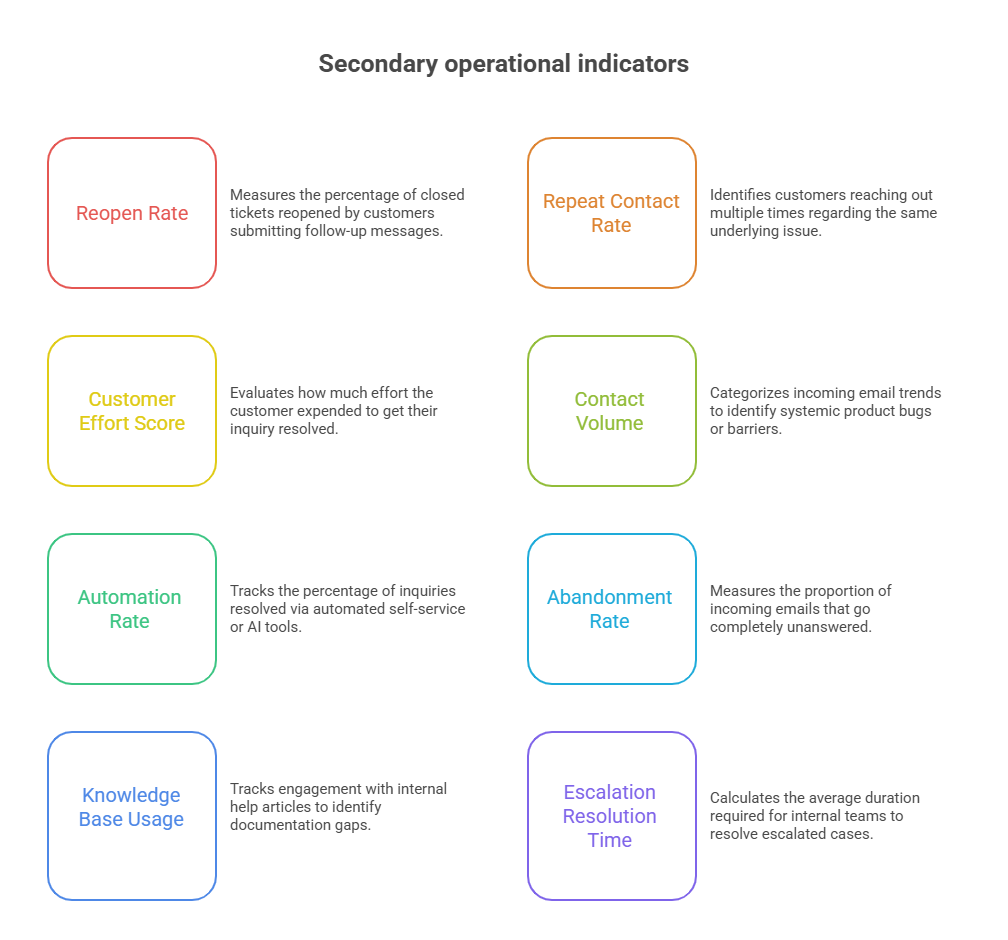
- Reopen Rate: Measures the percentage of closed tickets reopened by customers submitting follow-up messages, signaling incomplete initial resolutions.
- Repeat Contact Rate: Identifies customers reaching out multiple times regarding the same underlying issue within a specific timeframe.
- Customer Effort Score (CES): Evaluates how much effort the customer expended to get their inquiry resolved, assessed via post-support surveys.
- Contact Volume by Issue Type: Categorizes incoming email trends to identify systemic product bugs, software usability barriers, or fulfillment delays.
- Automation/Deflection Rate: Tracks the percentage of incoming inquiries successfully resolved via automated self-service or AI routing tools without human intervention.
- Abandonment or Unanswered Email Rate: Measures the proportion of incoming emails that go completely unanswered within maximum threshold limits.
- Knowledge Base Usage: Tracks agent and customer engagement with internal help articles to identify documentation gaps.
- Escalation Resolution Time: Calculates the average duration required for tier-two or internal technical teams to resolve escalated cases.
Email Support KPI Benchmarks: What Is a Good Target?
Comparing operational performance against industry benchmarks helps management identify operational vulnerabilities and refine vendor SLAs.
|
KPI |
Suggested Target |
Warning Signal |
What to Investigate |
| First Response Time (FRT) | < 2-4 Hours (Business Hours) / < 1 Hour (24/7) | Rising upward trend over consecutive weeks | Queue routing, staffing schedules, and ticket surges |
| First Contact Resolution (FCR) | 65% – 75%+ | Drops below 60% | Agent training quality, macro availability, and KB assets |
| Customer Satisfaction (CSAT) | 85%+ Positive | Drops below 80% | Communication tone, accuracy errors, and resolution delays |
| Quality Assurance (QA) | 90%+ Score | Falling trend in monthly audits | Coaching frequency and policy changes |
| Escalation Rate | < 10% – 15% | Exceeds 15% | Tier-one knowledge gaps and permission bottlenecks |
| Ticket Backlog | Stable / Declining | Sustained weekly backlog growth | Overall team capacity and ticket volume changes |
| SLA Compliance | 95%+ | Frequent target breaches | Shift coverage and SLA target realism |
| Cost Per Resolution (CPR) | Baseline with downward trend | Unexpected cost spikes | Ticket reopen rates and vendor invoicing parameters |
Frequently Asked Questions
What are the most important KPIs for outsourced email support?
The most critical metrics are First Response Time, First Contact Resolution, Customer Satisfaction Score, Quality Assurance Score, and SLA Compliance Rate. Balancing speed indicators with quality metrics ensures external teams operate efficiently without sacrificing service quality.
What is a good first response time for email support?
A standard benchmark for B2B and enterprise email support is under 2 to 4 hours during business hours. For consumer operations utilizing 24/7 email support outsourcing, initial human response times should ideally remain under 60 minutes.
What is a good FCR for email support?
A healthy First Contact Resolution rate for email support falls between 65% and 75%. Achieving higher rates in asynchronous email channels requires providing agents with comprehensive knowledge bases and wide authority to resolve issues.
How do you measure the performance of an outsourced customer support team?
Performance is measured by evaluating real-time help desk analytics against contractual SLAs, conducting independent QA ticket audits, and tracking post-resolution CSAT scores. Weekly operational reviews and monthly calibration calls keep vendor performance aligned with internal targets.
How often should email support KPIs be reviewed?
Operational management should monitor real-time queues and daily response times continuously. Formal KPI reviews with external vendor leadership should occur weekly for volume and speed metrics, and monthly for QA, CSAT, and financial cost-per-resolution audits.
Which KPIs should be included in an email support SLA?
An effective service level agreement must incorporate First Response Time thresholds, SLA Compliance Rates, Minimum CSAT Targets, QA Audit Standards, and Maximum Resolution Times. Tying vendor compensation structures to these targets enforces operational accountability.
How do you calculate the cost per email support resolution?
Calculate CPR by dividing total monthly vendor expenses—including software licensing, management fees, and invoice charges—by the total volume of verified resolved tickets in that same monthly billing period.
What is the difference between FRT and resolution time?
First Response Time measures the speed at which an agent sends an initial substantive response to a customer's inquiry. Resolution Time tracks the total duration from ticket creation until the issue is fully solved and closed within the system.
How can you tell if an outsourced support team is overworked?
Signs of an overworked team include declining QA scores, rising ticket backlogs, high agent utilization exceeding 85%, increasing average resolution times, and elevated ticket reopen rates caused by rushed agent responses.
Conclusion
Sustaining an effective outsourced help desk requires establishing clear quantitative performance parameters. Monitoring speed metrics alongside quality scores, customer satisfaction ratings, and cost indicators provides leadership with complete operational control over external vendor activities. Utilizing specialized email support outsourcing enables enterprise organizations to streamline operational expenditure, scale queue capacity dynamically, and deliver consistent support experiences across global markets. Evaluating vendor performance against structured SLA benchmarks ensures that externalized email operations continue to drive long-term business value.